



Disclosure: Bluehost paid TechLila for this Bluehost AI Builder review, and the Bluehost links on this page are affiliate links. The testing and the verdict are ours.
Bluehost AI Builder is $0 to start, no credit card, with 5 credits a day, up to 30 a month on its Free plan. For this Bluehost AI Builder review, we built a bakery website for Pune from one prompt on that Free plan on November 26, 2026. In a few minutes it produced a home page, a menu with prices, a gallery, opening hours, a cake pre-order form and an admin app to run the orders behind them.
Per Bluehost’s help center, the Free plan comes with a catch. Your free address can’t be changed, and it isn’t indexed by search engines. When we published a Free-plan test site on November 26, its free address sent a noindex rule in its HTTP headers, and according to Google Search Central, when a page carries a noindex rule, Google will drop that page entirely from Google Search results. So the Free plan is a real test drive and a shareable link, while a site customers find through search needs a paid plan and your own domain.
Key Takeaways
- The Free plan is $0 with no credit card and includes 5 credits a day, up to 30 a month.
- Our opening build from one prompt left the meter at 5 credits, so it did not use a daily credit.
- One two-part chat edit took the balance from 5 credits to 3.
- AI Builder Lite, Standard and Pro carry 100, 200 and 400 credits per month.
- Free-plan credits reset at 00:00 UTC, and plan credits expire 30 days after they’re added.
- Lite costs $16.00/mo billed yearly at $192.00, and the monthly plans in our upgrade dialog started at $20.00/mo.
Bluehost AI Builder Review: Our Verdict
Bluehost AI Builder earns a qualified recommendation for small businesses that want a working site with forms and a back office quickly. Per Bluehost’s pricing page, the Free plan costs $0, with no credit card required and 5 credits a day, up to 30 a month, which is enough to judge the output before paying anything.
The opening version was better than a template: It filled the pages with copy that matched the prompt, localized prices without being asked, and built order handling we did not request. The weak spots are the credit meter, which moves faster on multi-part requests than the one-message-one-credit rule suggests, and the Free address, which search engines skip. If those trade-offs work for you, try Bluehost AI Builder free and judge the output yourself.
Is Bluehost AI Builder free?
Yes, to start. Bluehost AI Builder Free costs $0, needs no credit card. It includes 5 credits a day, up to 30 a month, and publishes on a Bluehost subdomain. The AI Builder Free plan doesn’t require a credit card and has no end date, so the limit is credits and the address, not time.
What Bluehost AI Builder Is
Bluehost AI Builder lets you create a website, a working web app, or both by describing what you need in plain language, according to Bluehost’s help center. It sits apart from the WordPress side of Bluehost’s catalog: You never touch a theme, a plugin or a dashboard you installed yourself.
Bluehost AI Builder makes business sites, portfolios, landing pages and blogs, plus booking sites, customer portals, quote request forms, directories and internal tools. Your sites and apps run in a web browser, and it doesn’t build native apps for the Apple App Store or Google Play at this time.
Is Bluehost AI Builder the same as the WordPress AI website builder?
No. Bluehost WordPress AI Builder comes with WordPress hosting plans and creates a site you manage in WordPress. The chat-based product reviewed here is billed on credits and needs no WordPress knowledge, so reviews that quote WordPress hosting prices for it are describing the other tool.
How We Tested Bluehost AI Builder
We signed up for the Free plan on November 26, 2026 and typed one prompt for a small neighborhood bakery in Pune: a home page, a menu with prices, opening hours, a photo gallery and a form to pre-order cakes for pickup. We ran it the way we ran the video agent in our Flova AI review: one plain prompt, no hand edits, then a single follow-up.
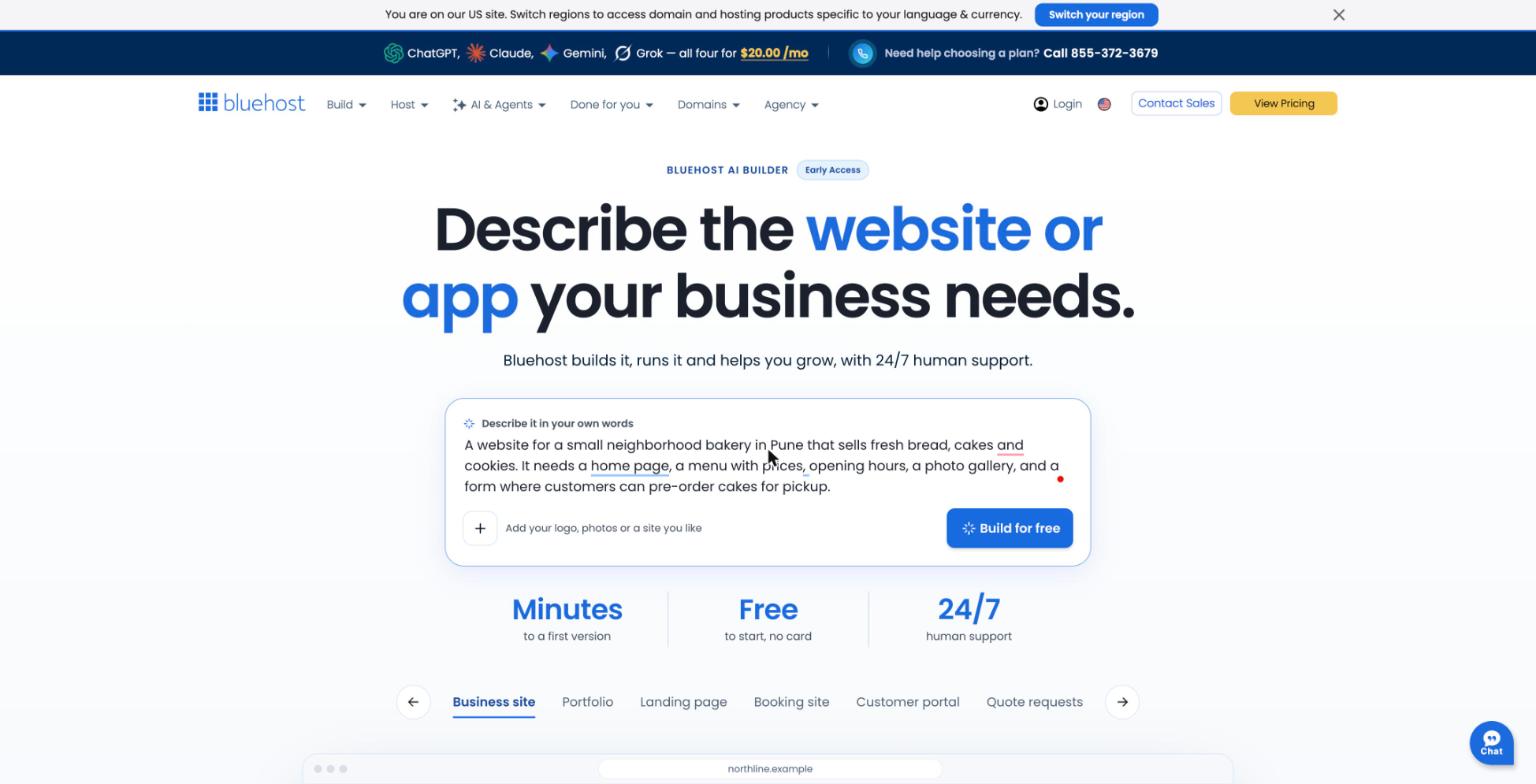
If anything about your business is unclear, AI Builder asks up to three short questions, each with a few options and one marked as recommended. Our build skipped straight to work and showed a separate set of quick onboarding questions while it ran (your role, industry, team size and main goal), every one of them skippable. A checklist ticks off as each part is built. You can close the tab or walk away, and ours listed the site’s look, the menu and hours, a dashboard and the pages before it finished in a few minutes.
What the First Build Produced
The first version arrived as Pune Bakery with prices in Indian rupees, such as a Chocolate Truffle Cake at Rs 1,200 and six soft pav at Rs 40, though our prompt never mentioned currency. The menu went further than we asked, with local items such as nankhatai and a whole wheat loaf made with jaggery.
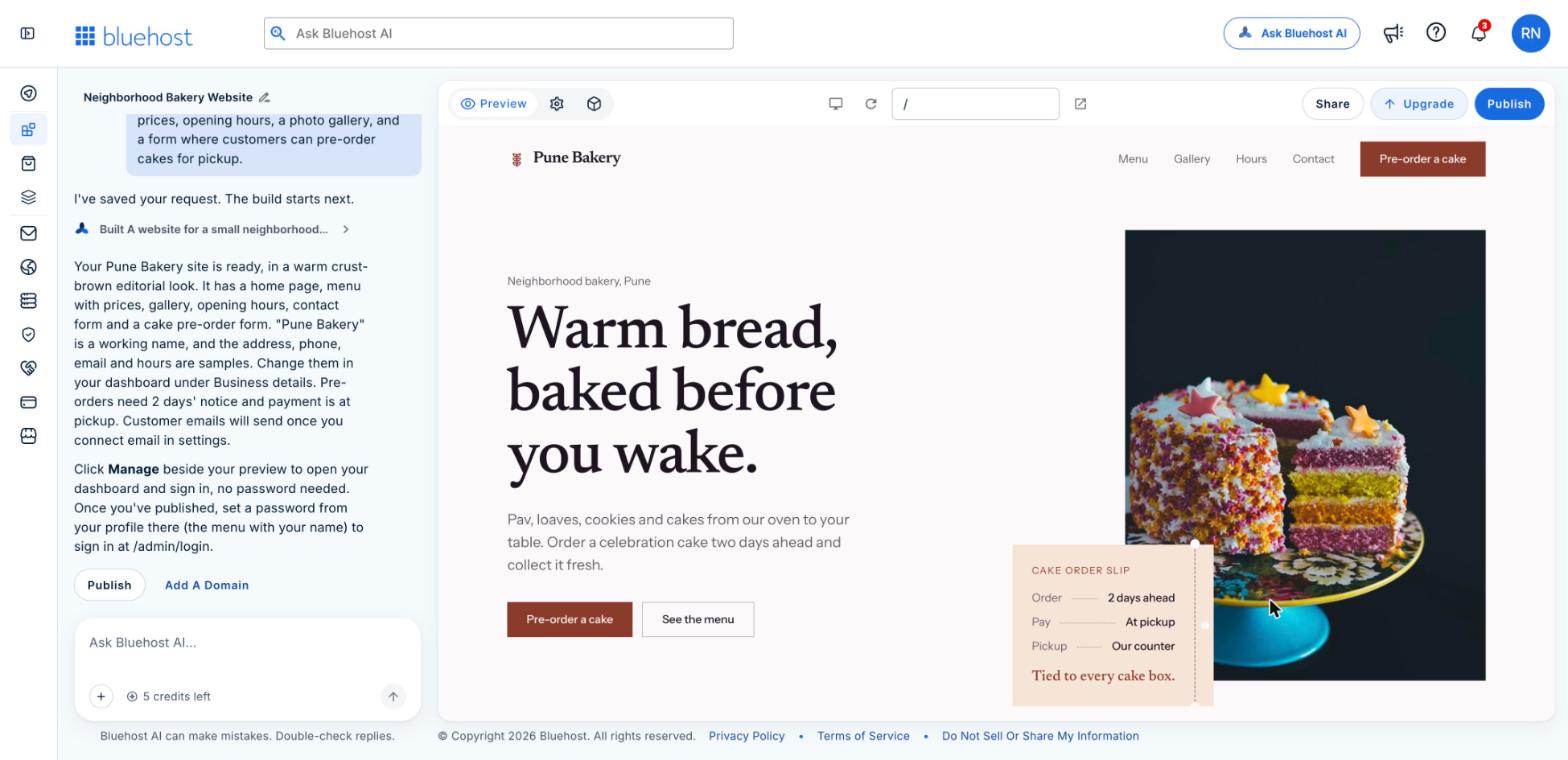
The home page opened on a warm hero line with two buttons, one to pre-order a cake and one to see the menu, followed by a “What we bake” grid, a favorites strip with photos and prices, a gallery teaser and a hours table. Everything visual came from stock photos. The assistant flagged the business name, address, phone, email and hours as samples to replace under Business details, which is honest, but the sample phone was a US-format number on a site it had just localized to India.
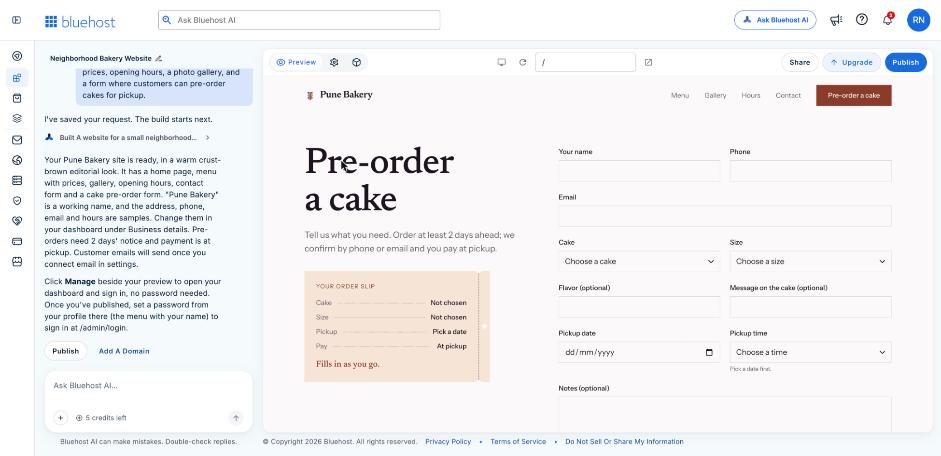
The pre-order page was the strongest part. It asks for name, phone, email, cake, size, an optional flavor and message, a pickup date and a pickup time that unlocks only after a date is picked, while a side card fills in the order slip live. Bluehost AI Builder writes content-filled pages for your business and generates page titles, descriptions, headings and alt text automatically.
Editing by Chat: What One Change Cost
In Bluehost AI Builder, one message uses one credit and the AI’s clarifying questions are free, according to Bluehost. Our test edit cost more: One message asking for an Indian phone format everywhere plus an Order on WhatsApp button took the balance from 5 credits to 3.
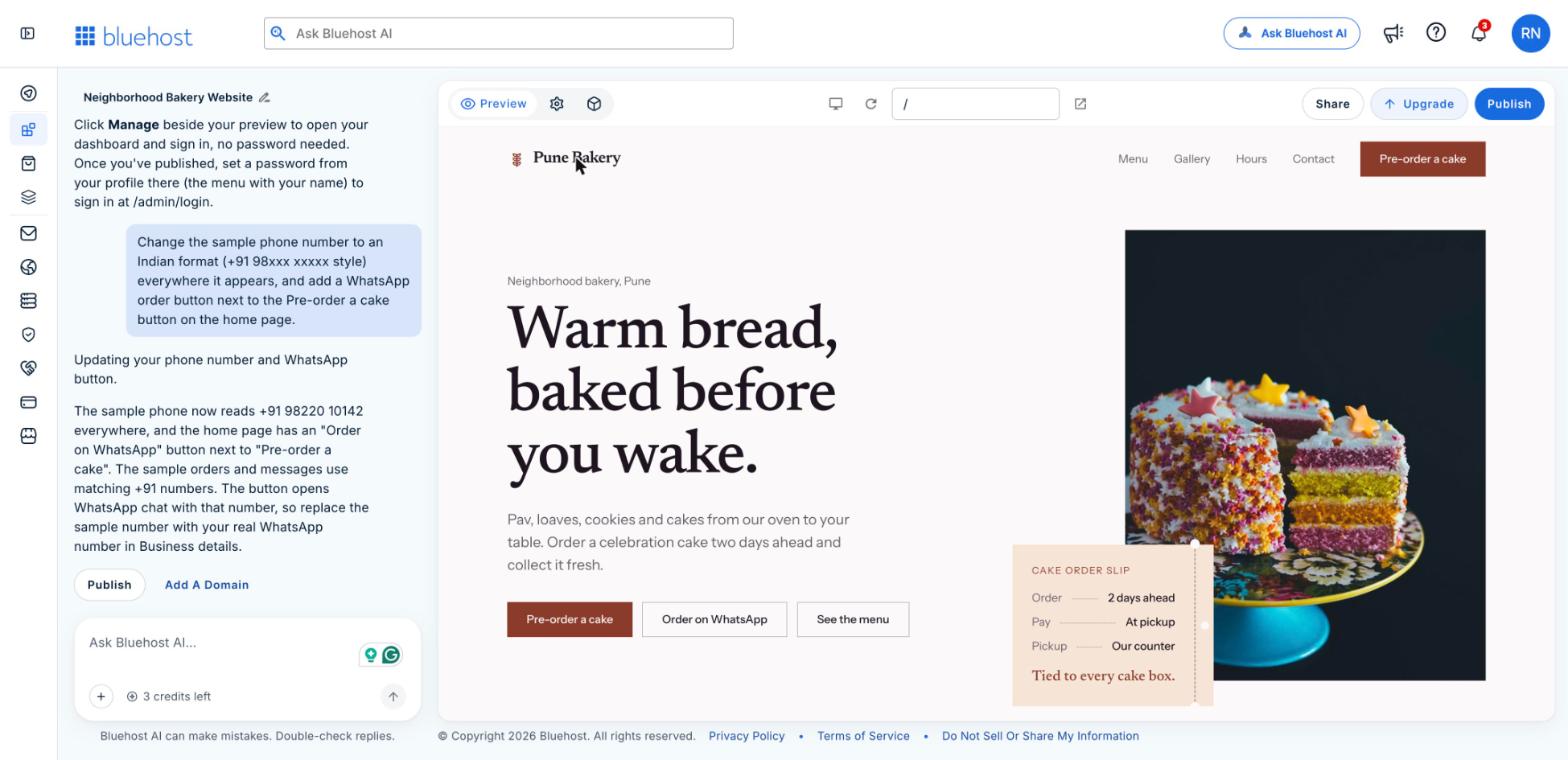
The edit itself was clean. It took about a minute, rewrote the sample phone in the Indian format across the site, and placed the WhatsApp button between the pre-order and menu buttons, with a note to swap in a real WhatsApp number later. The initial build did not draw down the allowance at all: the meter still read 5 credits left after it finished. Our reading is that the meter counted the request as two changes. Short, single-purpose messages make each change’s credit cost easier to predict on the Free plan (for comparison, see our Raycast AI statistics).
Key finding: Bluehost’s help center lists AI Builder Free at 5 per day, up to 30 per 30-day period, with the daily allowance reset at 00:00 UTC. Our two-part edit consumed two of those daily credits in a single message, so a Free user who bundles requests can stall for the day after three or four exchanges.
How do Bluehost AI Builder credits work?
Credits don’t roll over. Plan credits expire 30 days after they’re added, and top-up credits expire 30 days after purchase. Your published site or app stays online and keeps working exactly as it did. Only new building pauses when both plan credits and top-ups run out. Credit allowances work differently in Setapp’s AI credits, which come bundled with an app subscription rather than sold as the product itself.
The Admin Dashboard Behind the Site
Every web app made with Bluehost AI Builder has an admin panel where your team can view submissions, edit data and manage users, Bluehost says, and our bakery build came with one nobody asked for. Its sidebar covered the dashboard, users, cake orders, menu items, menu categories, the gallery, messages and business details.
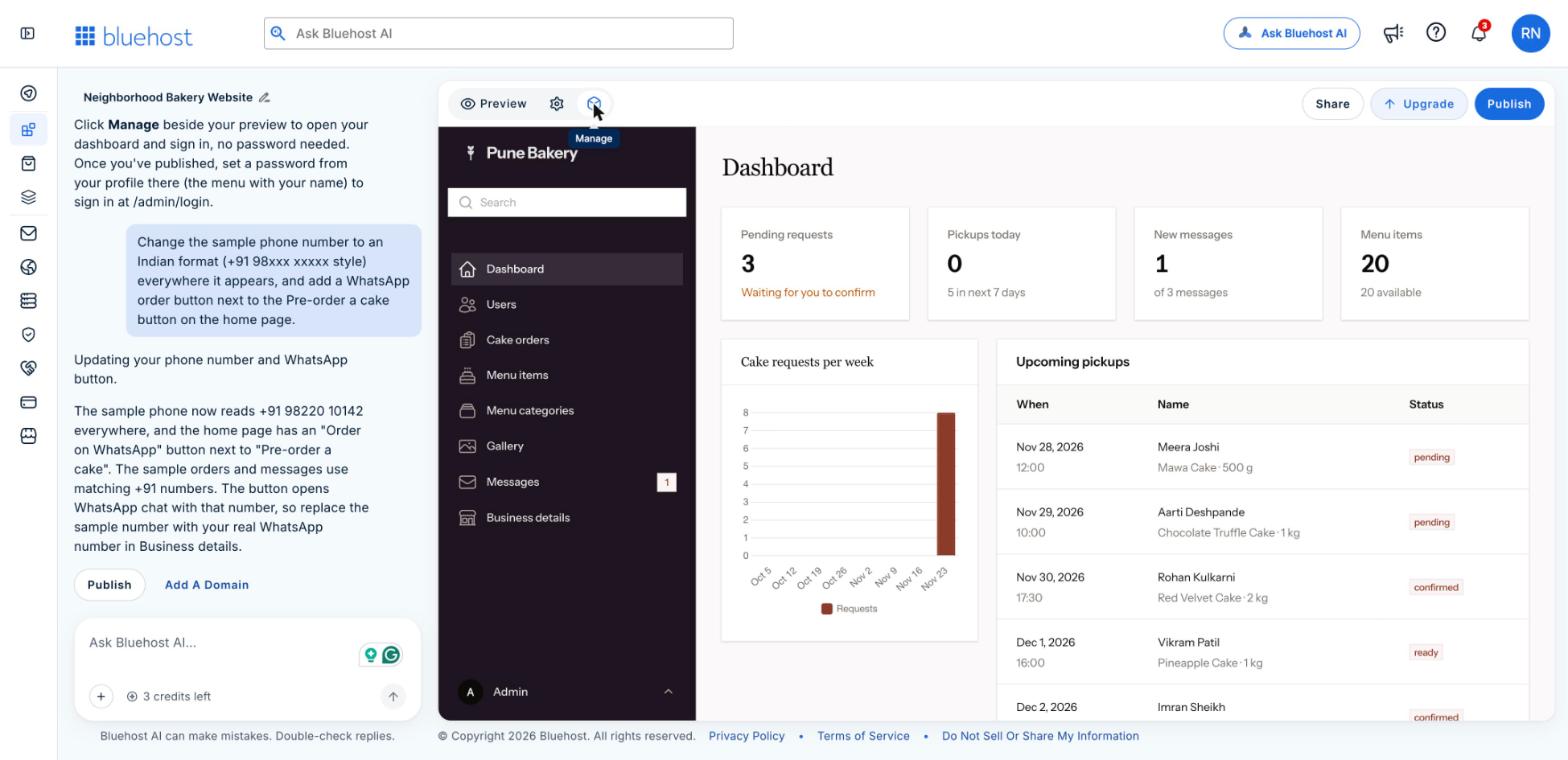
The dashboard opened with sample data: 3 pending cake requests, 20 menu items and a weekly chart of cake requests. An upcoming-pickups table listed sample customers and cakes with pending, confirmed and ready statuses, so the generated site has a working database behind it rather than static pages.
Business details held the phone, email, address, map link and opening hours, and editing them there used no AI credit. Changes to your business name, business details, or prices go live right away, after AI Builder asks you to confirm. You can set roles to control who sees what, and team members don’t need their own Bluehost account to work in the admin panel.
Bluehost AI Builder Pricing and Credits
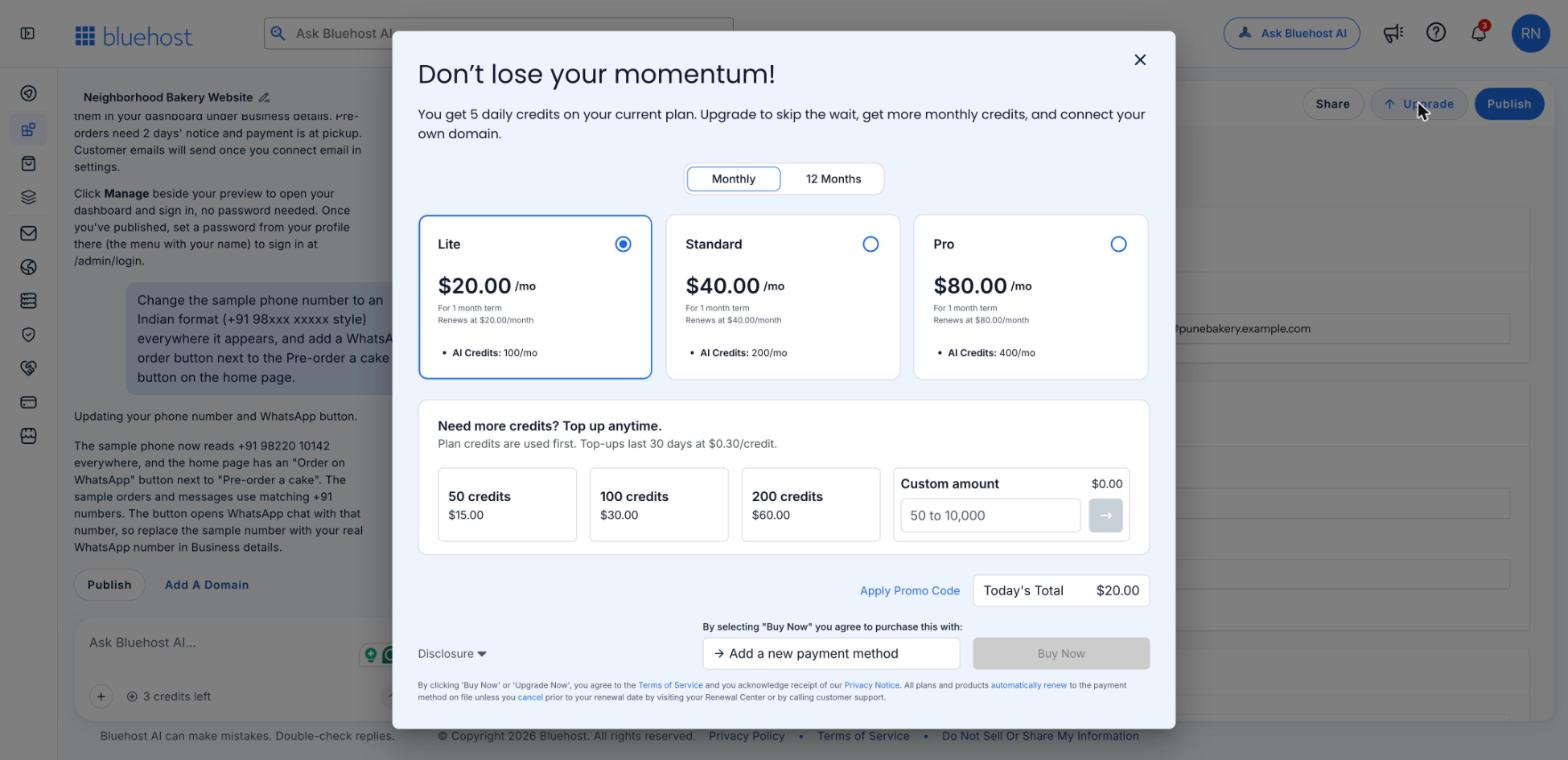
Bluehost lists AI Builder Lite at $16.00/mo billed yearly at $192.00, with up to 100 credits per month, and AI Builder Standard at $32.00/mo billed yearly at $384.00 with 200 credits a month. On monthly billing, our upgrade dialog showed paid plans from $20/mo: Lite at $20.00/mo, Standard at $40.00/mo and Pro at $80.00/mo.
View the data
Pro’s 400 credits are 4 times Lite’s 100, and AI Builder Lite, Standard, and Pro are otherwise the same. The only difference is how many credits you get each month. The yearly prices and publishing rules sit in the next table.
Plan | Price billed yearly | AI credits | Where you can publish |
|---|---|---|---|
AI Builder Free | $0 | 5 per day, up to 30 per 30-day period | Your free Bluehost AI Builder address |
AI Builder Lite | $192.00 | 100 per month | Your own domain |
AI Builder Standard | $384.00 | 200 per month | Your own domain |
Source: Bluehost AI Builder page and plans and credits help article, November 2026
Choose a pack of 50, 100, or 200 credits, or enter a custom amount from 50 to 10,000 credits, and Bluehost’s help center says top-ups are available on every plan, including Free. Our dialog priced them at $0.30 per credit, so a pack of 100 cost $30.00.
Free Plan Limits Worth Knowing
You can publish on a free, automatically generated Bluehost AI Builder address (ending in .app.bluehost.ai). Your free address can’t be changed, and it isn’t indexed by search engines, Bluehost says. That single line decides whether the Free plan suits a business or only a test.
Worth noting: Per Google Search Central’s noindex documentation, Google drops a page with a noindex rule entirely from Google Search results. The free address of the test site we published on November 26 sent exactly that rule, so a Free-plan site suits a preview, a QR-code menu or a shared link.
There’s no limit on the number of sites and apps you can create on any plan, including the AI Builder Free plan, and you aren’t charged for a failed build. In the publish dialog, Buy a domain is one upgrade path: If you’re on the free AI Builder plan, this opens a combined checkout where you can purchase a domain and upgrade to the Lite plan. The new domain then has to be connected with the Connect a domain option before the site moves off its free address.
Bluehost AI Builder Pros and Cons
Bluehost offers 24/7 human support during the build and after launch, with changes, domains, email and hosting, and its pricing page lists that support on the Free plan too. The rest of the list comes from our build and Bluehost’s documentation.
- A full first version from one plain-language prompt, with copy that fits the business.
- A working admin app with orders, menu items and messages, not only static pages.
- Business details edit in the admin panel without spending an AI credit.
- Free plan with no card and no end date, plus human support on every plan.
- Multi-part chat requests drew more than one credit in our test.
- The free address is not indexed by search engines.
- No online payments or product sales.
- Stock photos and sample contact details need replacing before launch.
Who Bluehost AI Builder Suits
You type what you want. AI Builder may ask a few short questions about your business. A few minutes later, you have a real, working site or app you can review, change, and publish. That suits owners who know their business but not web tools: a florist taking delivery requests, a yoga studio posting its schedule, or a bakery taking cake orders like our test.
Best for service businesses that take requests: The generated forms, order lists and admin roles fit businesses that collect bookings, quotes or pre-orders and settle payment in person.
Who Should Skip This
AI Builder doesn’t take online payments or sell products. To sell online, use AI Store, Bluehost says, so anyone who needs checkout should look elsewhere first. It doesn’t build native apps for the Apple App Store or Google Play at this time, which rules it out for app-store distribution. Skip it too if you want WordPress control, plugins or a theme you can move to another host, or if you plan to stay on the Free plan and still expect search traffic.
Can Bluehost AI Builder build an online store?
No. Bluehost’s help center says AI Builder does not take online payments or sell products and points sellers to its separate AI Store product. Our bakery build worked around that with pay-at-pickup pre-orders, which suits local businesses but not anyone shipping goods.
Can I use my own domain on the Free plan?
No. To connect a site or app to your own domain, you need a paid plan, according to Bluehost. On the Free plan, your site stays on its generated .app.bluehost.ai address.
If you haven’t connected a custom domain yet, you can publish your site or app using a free Bluehost address: [project-name].app.bluehost.ai. Upgrading to Lite and connecting a domain you own, or one bought during checkout, moves it to your own name.
Will a Bluehost AI Builder site show up on Google?
Not on the Free address, which Bluehost keeps out of search indexes. On a paid plan with your own domain, the generated titles, descriptions and alt text give search engines something to work with, but rankings still depend on your content, location and competition, so no builder can guarantee a position.
Conclusion: Is Bluehost AI Builder Worth It?
Bluehost AI Builder is $0 to start, no credit card, with 5 credits a day, up to 30 a month, and our Free-plan bakery build showed that allowance buys a real first version with an admin app behind it. Paid plans from $20/mo on monthly billing add credits and your own domain, which is what a business needs before customers can find the site in search.
Start on Free, keep each chat request to a single change, written as plainly as the Raycast AI commands we keep for daily work, and upgrade only once the generated site earns it. Build your own version on Bluehost AI Builder and judge it against your own prompt.

Leave a comment
Have something to say about this article? Add your comment and start the discussion.