
Homebrew counted 115,270 Raycast installs over 365 days, while Alfred drew 24,054 over the same window. PopClip logged 3,178, the next count down on this list. The market for Raycast alternatives is a long tail behind two leaders. These are Homebrew installs only, not a measure of Raycast’s overall market share. The Raycast link is an affiliate link; TechLila earns a commission if you subscribe through it.
Twelve alternatives are ranked below on five weighted criteria, scored from each developer’s own changelog, price page and documentation plus the Homebrew cask record. That record also flags what to skip: Homebrew disabled the ueli cask on 2026-09-01, citing fails_gatekeeper_check. Pricing splits the field too, between the Raycast Pro subscription and the one-time licenses and free tiers of the rest. Versions and prices are current as of September 28, 2026.
Key Takeaways
- Raycast logged 115,270 Homebrew installs in the last 365 days, against 24,054 for Alfred.
- The Alfred 5 Powerpack costs £34 for a single user license, and any Powerpack bought now includes a free upgrade to Alfred 6 when it launches.
- Raycast Pro costs $96 a year billed annually, or $10 month to month.
- LaunchBar 6 stays free to use after its 30-day trial, with an occasional prompt to take a short break.
- Monarch sells a one-time purchase, perpetual license at $30, marked down from $39, and offers a 30-day free trial with no restrictions.
- Leader Key’s README says it has been surpassed by Tuna, and its latest release, v1.17.3, was published on 2025-09-23.
- Tinycast is free and open source and runs real Raycast extensions, and its version 0.11.3 was published on 2026-09-19.
Quick Picks
Alfred tops the weighted scoring at 8.6 out of 10 because it matches most of what Raycast does with a £34 single-user v5 license. Tinycast follows at 8.5 and Spotlight at 8.3.
- Best overall: Alfred 5 scores 8.6, and its Powerpack is a £34 single-user v5 license that includes a free upgrade to Alfred 6.
- Best for Raycast switchers: Tinycast scores 8.5, costs nothing and runs the Raycast extensions you already use on macOS 26.
- Best built-in: Spotlight on macOS 27 is already on your Mac and searches clipboard history.
- Best cross-platform: Asyar scores 8.2 and runs the same free launcher on macOS, Windows and Linux.
- Best for keyboard purists: LaunchBar 6.24 runs on abbreviations and stays free after a 30-day trial.
- Best add-on to any launcher: PopClip’s text bar acts on whatever you select, in any app, and its Standard license is a one-time purchase covering 2 years of updates on up to 5 Macs.
Pick | Price | Version reviewed | Oldest macOS in Homebrew | Best for |
|---|---|---|---|---|
Alfred | Powerpack £34 single-user v5 license | 5.8.1 | Big Sur | Workflows without code |
Tinycast | Free, open source (AGPL-3.0) | 0.11.3 | macOS 26 (developer’s tap) | Raycast switchers on macOS 26 |
Spotlight | Built into macOS | macOS 27 | Not in Homebrew | Zero-install search |
Asyar | Free, open source | Build 0.1.1-48 (pre-release) | No minimum stated on captured pages (developer’s tap) | One launcher on macOS, Windows and Linux |
LaunchBar | Free with break prompts | 6.24 | Monterey | Abbreviation-driven power users |
Quicksilver | Free, open source | 2.6.0 | Big Sur | Plugin fans on a budget |
SuperCmd | Open source (MIT) | 1.0.26 (GitHub) | No minimum stated on captured pages | Raycast extensions in an open source launcher |
Sol | Open source | 2.1.362 | Sonoma | A lean launcher with window management |
Monarch | $30 one-time perpetual license, 30-day free trial | 0.9.53 in Homebrew (site shows 0.8.0) | Monterey | Clipboard history and Superlinks in one paid app |
PopClip | One-time license, free trial | 2026.8.1 | Ventura | Actions on selected text |
Homerow | One-time purchase | 1.5.3 | Ventura | Clicking without a mouse |
Leader Key | Free, open source (MIT) | 1.17.3 | Ventura | Nested shortcuts instead of a search box |
Source: Alfred, Tinycast, Apple, Asyar, Objective Development, Quicksilver, SuperCmd, Sol, Monarch, Pilotmoon, Homerow, Leader Key, Homebrew, GitHub, September 2026
Each pick was scored across the weighted criteria in How We Ranked.
Homebrew publishes the same install counter for every cask on formulae.brew.sh, a like-for-like adoption figure for the launchers listed there. Spotlight has no cask, and the three launchers served from developer taps have no count. It undercounts anything sold through the Mac App Store or downloaded directly, so read it as relative reach among people who install from the command line.
By the numbers: Homebrew’s cask analytics show 115,270 Raycast installs and 24,054 Alfred installs over 365 days, while LaunchBar recorded 584. A tool with a small Homebrew count can still be healthy, because many buyers never touch the command line.
Four of the new picks have no Homebrew count on that chart. Tinycast’s README has you trust and add the developer’s tap first, a step it marks as required for third-party taps, and Asyar’s README notes that Homebrew 6+ requires trusting third-party taps before its cask installs. SuperCmd’s README installs from the supercmdlabs/supercmd tap. Casks served from a developer’s own tap sit outside formulae.brew.sh, so Homebrew publishes no install counts for these three, and the chart leaves them out rather than estimate a number.
Monarch is in Homebrew’s main catalog but sits off the chart to keep it to eight bars: its cask logged 477 installs over 365 days.
The Mac launcher market share figures set Raycast, Alfred and LaunchBar side by side on measures beyond Homebrew.
1. Alfred
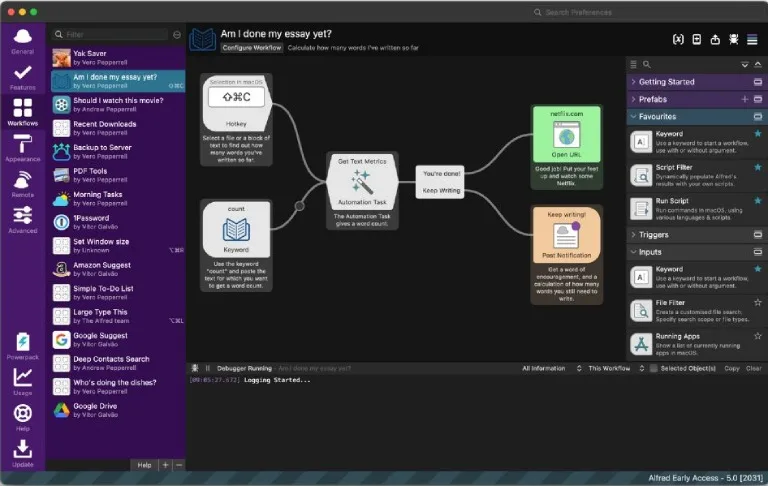
Alfred leads the list because it covers the core of Raycast with a £34 single-user v5 license. Alfred’s shop lists the Alfred 5 Powerpack at £34 for a single user license, or £59 as a Mega Supporter license with free lifetime upgrades. Alfred’s Powerpack page lists Clipboard History and Snippets & Auto-Expansion among its features, and Alfred workflows come with the Powerpack too.
Alfred boosts your efficiency with hotkeys, keywords, text expansion and more, and its Clipboard History lets you locate any text, image or file you copied earlier and paste it again. With Alfred’s Powerpack, you link hotkeys, keywords and actions together to create your own workflows, with no need to write a single line of code.
Workflows start from a different idea than Raycast’s extension store, and the split between Raycast extensions and Alfred workflows comes down to a visual canvas versus code.
The next version is already announced. In a post dated 10 September 2026, Alfred’s developers said Alfred 6 is coming this Autumn, and anyone who purchased in 2026 or is a Mega Supporter / Legendary Supporter will receive a free upgrade. Homebrew lists Alfred 5.8.1 as the current release. You can download Alfred and add the Powerpack license later.

Keyword Launcher with Visual Workflows
Alfred 5
Best for users who want workflows without code
- Scorecard: 8.6 weighted out of 10, with 9s for features, extensibility and compatibility and 8s for maintenance and pricing.
- Evidence: Alfred’s own home page, shop page and Alfred 6 announcement, plus the Homebrew cask, which lists every macOS release back to Big Sur.
- £34 single-user v5 Powerpack license, with a free upgrade to Alfred 6.
- Workflows need no code.
- Clipboard history covers text, images and files.
- Supports macOS back to Big Sur in Homebrew.
- Clipboard History, Snippets and workflows are Powerpack features.
- Priced in pounds, so the dollar cost moves with the exchange rate.
Is Alfred better than Raycast?
Alfred is the better pick if you want a £34 single-user v5 license, and Raycast is the better pick if you want AI inside the launcher. Raycast AI is part of Raycast Pro, which includes 500 credits of AI usage every month. The head-to-head Raycast vs Alfred comparison walks through the rest.
2. Tinycast
Tinycast ranks second, a tenth of a point behind Alfred, because it rebuilds most of Raycast’s free tier as a native app at no cost. Its README describes a tiny, fully native macOS launcher that runs real Raycast extensions, rendered as native SwiftUI, and calls it free and open source. The GitHub repository shows 7,641 stars.
The feature list covers clipboard history for text and images, snippets with optional keyword expansion and 34 Rectangle-style window management actions. AI is off by default, with no chat command and no history file until you turn it on.
Moving over is quick. Tinycast reads a Raycast export directly: you point it at your Raycast export file (.rayconfig) and type the passphrase, though it reads only the export files (.rayconfig) that Raycast v2.0 and later write.
Version 0.11.3 was published on 2026-09-19, and the repository’s latest push is dated 2026-09-27. It needs macOS 26 or newer and installs from the developer’s own Homebrew tap, and because Tinycast is self-signed, its README says to clear the flag once.

Native Launcher That Runs Raycast Extensions
Tinycast
Best for Raycast users on macOS 26 who want a free native app
- Scorecard: 8.5 weighted; a perfect 10 on pricing, 9 on maintenance and features, 8 on extensibility and 4 on compatibility.
- Sources checked were the GitHub repository, its latest release, the README and tinycast.dev; extensibility scores 8 because it runs Raycast’s extensions alongside its built-in commands, and compatibility scores 4 for the macOS 26 floor.
- Free and open source under AGPL-3.0.
- Runs Raycast extensions and imports a Raycast export (.rayconfig).
- 34 window management actions built in.
- AI stays off until you switch it on.
- Requires macOS 26 or newer.
- Self-signed, so the README has you clear a flag once.
- Still a 0.x release.
3. Spotlight
Spotlight ranks third because it does two things people used to install Raycast for, and it costs nothing extra. Apple’s Mac User Guide page on Spotlight says Spotlight opens with Command-Space bar and shows results instantly, with the best match at the top. In macOS 27 it also keeps a searchable clipboard.
To reveal Quick Actions, you select a result and press Tab, and the available actions depend on what is selected. Spotlight can search text and files you previously copied to the clipboard.
Worth noting: Per Apple’s Mac User Guide, Siri AI is available in beta in macOS 27, requires an Apple Intelligence enabled device and is available in English to start. Spotlight still has no extension store to match Raycast or Alfred.
Our Raycast versus Spotlight breakdown covers where the gap remains, and the Spotlight usage data tracks how Mac owners use the built-in search.

Built-In System Search
Spotlight
Best for anyone who wants clipboard history without installing anything
- Scorecard: 8.3 weighted over four criteria, with extensibility unscored: pricing 10, maintenance 9, and 7 apiece for features and compatibility.
- Graded against Apple’s current Mac User Guide; Apple documents no plugin system, so extensibility stayed unscored, and compatibility loses points because Siri AI needs macOS 27.
- Nothing to install or pay for.
- Quick Actions on a selected result with Tab.
- Searchable clipboard history.
- Siri AI in beta inside the search field.
- No third-party extension store.
- Siri AI needs macOS 27.
- Siri AI starts in English only.
4. Asyar
Asyar ranks fourth as the free pick that also runs on Windows and Linux. Asyar is a fast, open-source launcher for macOS, Windows, and Linux, and its GitHub repository counts 847 stars, with the latest push dated 2026-09-28. Its scores come from that repository, the README and asyar.org.
Built-in features include clipboard history, an AI chat that uses your own API key and window management with 17 built-in layout presets. AI agents can call built-in tools, MCP server tools or any tool published by an extension, and third-party extensions are sandboxed with a granular permission system you control.
Moving from Raycast takes a Raycast export (.rayconfig) and the Import from Raycast command, which carries over snippets, quicklinks and app hotkeys. Its v0.1.1-48 build, published 2026-09-21, is marked as a prerelease, and the core application is licensed under GPL-3.0 while the SDK and extension tooling use MIT.

Cross-Platform Launcher with AI Agents and Sandboxed Extensions
Asyar
Best for people who want one launcher on macOS, Windows and Linux
- Scorecard: 8.2 weighted, compatibility left unscored; pricing earns 10, extensibility 9, features 8 and maintenance 7.
- Based on the GitHub repository, its releases, the README and asyar.org; maintenance scores 7 because its 2026-09-21 build is marked as a pre-release, and compatibility stayed unscored because neither captured page states a minimum macOS version.
- Free and open source.
- Runs on macOS, Windows and Linux.
- AI agents that call MCP server tools, plus bring-your-own-key chat.
- Sandboxed extensions with permissions you grant.
- Its 2026-09-21 build is a pre-release.
- No minimum macOS version stated on the captured pages.
- Installs from a third-party Homebrew tap.
5. LaunchBar
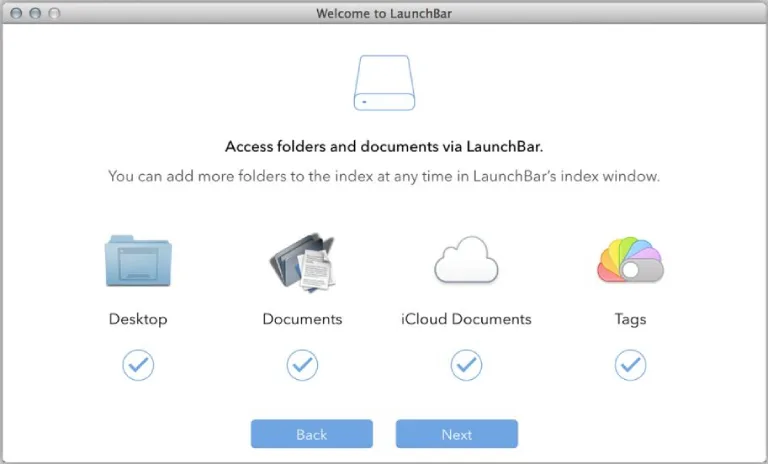
LaunchBar, from Objective Development, earns its place with abbreviation search, deep file handling and a free tier. The developer says LaunchBar 6.24 runs on macOS Tahoe and, after a 30-day trial, can be used for free as long as you like, with an occasional invitation to take a short break.
LaunchBar reaches applications, documents and bookmarks when you type short abbreviations. It also browses the file system and can copy, move or rename files and folders. Custom, script-based actions can be written in AppleScript, JavaScript, Ruby, Python, PHP and more.
LaunchBar 6.24 shipped on April 27, 2026, and Homebrew’s cask requires macOS 12 or later. The developer’s LaunchBar page lists the clipboard history, snippet manager and calculator that come built in.

Abbreviation Launcher and File Manager
LaunchBar
Best for power users who live in abbreviations and the file system
- Scorecard: 8.1 weighted from five scores: 9 for features, 8 each for maintenance, extensibility and compatibility, and 7 for pricing.
- Drawn from Objective Development’s product, download and release-notes pages; pricing scores 7 on the download page’s terms: free after a 30-day trial, with occasional break prompts for unregistered copies.
- Free to keep using after the 30-day trial.
- File browsing with copy, move and rename.
- Script actions in 5 named languages and more.
- Runs on macOS Tahoe.
- Unregistered copies show break prompts.
- Smaller Homebrew footprint than Raycast or Alfred.
6. Quicksilver
Quicksilver is the pick if you want Raycast-style actions from a free, open source project with a real plugin ecosystem. Quicksilver’s own site calls it open source and free forever, actively maintained by a passionate community of developers. Homebrew lists Quicksilver 2.6.0 as the current release, with 685 installs over 365 days.
Hundreds of plugins extend Quicksilver, and triggers assign keyboard shortcuts or mouse gestures to any action. It offers 10+ interfaces and lets you choose styles and colors. Download Quicksilver from the project’s own site, and pair it with our list of best Raycast extensions if you want to compare what each ecosystem covers.

Plugin-Driven Action Launcher
Quicksilver
Best for tinkerers who want plugins without paying
- Scorecard: 7.8 weighted; pricing earns 10, extensibility and compatibility 8, while maintenance and features stop at 7.
- The project home page and the Homebrew cask supplied the evidence; maintenance scores 7 because the site offers no dated changelog alongside the version.
- Free forever and open source.
- Hundreds of plugins.
- Triggers by keyboard shortcut or mouse gesture.
- More than 10 interfaces, with a choice of styles and colors.
- Plugin quality varies across the catalog.
- Only 685 Homebrew installs in 365 days.
7. SuperCmd
SuperCmd ranks seventh on its open source release, held back by a quiet repository. The GitHub project is an Electron + React launcher that ships a full Raycast API compatibility shim so existing Raycast extensions work without modification, and the repository has 3,200 stars under an MIT license.
The README lists a full clipboard manager with quick-paste shortcuts and 24 window placement commands. It also imports encrypted Raycast backups (.rayconfig) with settings, hotkeys, extensions, scripts, quicklinks, snippets and notes.
Its latest GitHub release, 1.0.26, was published on 2026-06-20, and the repository’s last push is dated 2026-07-11.
Its developers separately sell a Swift rebuild at supercmd.sh. The supercmd.sh site describes a version rebuilt in Swift that requires macOS 26 or later. The site sells SuperCmd as a one-time purchase with an early bird offer of 50% off, and one license covers three Macs, priced at $19.99, down from $39.99. Most Raycast extensions work, but extensions that rely on Raycast-managed authentication are not supported yet. Check which of the two you are installing, because the MIT-licensed repository and the paid Swift app are no longer the same codebase. This ranking scores the open source release.

Raycast-Compatible Open Source Launcher
SuperCmd
Best for Raycast users who want their existing extensions in an open source launcher
- Scorecard: 7.7 weighted over four criteria, with compatibility unscored: pricing 10, features 8, extensibility 8 and maintenance 6.
- Evidence came from the GitHub repository, its latest release and the README; maintenance scores 6 because the open source repository has not been pushed since 2026-07-11, and compatibility stayed unscored because the captured README states no minimum macOS version.
- Runs existing Raycast extensions without modification.
- Imports Raycast backups (.rayconfig).
- MIT-licensed source on GitHub.
- GitHub repository quiet since July 2026.
- No minimum macOS version stated on captured pages.
8. Sol
Sol shares window management, an emoji picker and a clipboard manager with Raycast’s free tier. Sol is an open source app launcher, focused on ease of use and speed, with minimal configuration, and it runs natively. Homebrew’s Sol cask logged 2,796 installs over 365 days and requires macOS 14 or later, so older Macs are out.
The feature list includes app search, a window manager, an emoji picker, a clipboard manager, custom AppleScript commands and a script runner. Its latest commit, 2.1.362, is dated Sep 20, 2026, so the project is active.

Minimal Native Command Palette
Sol
Best for people who want Raycast’s free basics in a launcher focused on ease of use and speed
- Scorecard: 7.6 weighted. Pricing (10) and maintenance (9) carry it; features take 7, compatibility 6 and extensibility 5.
- Checked against the GitHub repository and the Homebrew cask; extensibility is limited to AppleScript commands and scripts, and compatibility loses points for the macOS 14 floor.
- Open source, with a commit on Sep 20, 2026.
- Window manager and clipboard manager built in.
- Minimal configuration.
- 2,796 Homebrew installs in 365 days.
- Requires macOS 14 or later.
- No extension store.
- No AI features in its feature list.
9. Monarch
Monarch ranks ninth, a paid launcher that bundles more built-in tools than most of the field. Its developer describes it as an extension of your operating system that lets you perform a variety of tasks without switching apps or workspaces. One hotkey launches apps, runs commands or performs calculations and unit conversions, and pressing Tab changes UI Modes.
The feature list includes unlimited, searchable clipboard history, custom commands, an emoji picker and a calculator with a unit and currency converter. Superlinks let you create commands for any website or app you have, with dynamic values when you need them.
Monarch is a one-time purchase with a perpetual license at $30, down from $39, for 1 macOS device, with bundles available. There are no refunds; instead there is a 30 day free trial with no restrictions on the app.
A February 17, 2026 entry on the site covers major updates to Monarch Notes, Clipboard History and keyboard shortcuts, and the page shows Ver. 0.8.0, while Homebrew’s cask is at version 0.9.53 and logged 477 installs over 365 days. Its FAQ says support for Intel Mac devices is not available currently and that Monarch will support macOS version 12.7 and up.

Launcher with Clipboard History, Notes and Superlinks
Monarch
Best for people who want clipboard history, custom commands and Superlinks in one paid app
- Scorecard: 7.3 weighted: features 9, then 7 apiece for maintenance, pricing and compatibility, and 6 for extensibility.
- Rated from Monarch’s home page, pricing and FAQ plus the Homebrew cask; extensibility scores 6 because custom commands and Superlinks stand in for an extension store, and compatibility loses points while Intel Macs are unsupported.
- One-time $30 license, no subscription.
- Unlimited, searchable clipboard history.
- Superlinks and custom commands.
- 30-day free trial with no restrictions.
- No refunds.
- No Intel Mac support for now.
- Still below version 1.0.
- Base license covers 1 Mac.
10. PopClip
PopClip earns a place because it complements Raycast or Alfred rather than replacing either. PopClip appears when you select text in any app, giving you instant access to useful actions. Homebrew recorded 3,178 PopClip installs over 365 days, third behind Raycast and Alfred among the casks counted here.
The PopClip for macOS Standard License is a one-time purchase with 2 years of free updates on up to 5 Macs, and the free trial starts to nag after 250 actions. PopClip is also available as part of a Setapp subscription, which our roundup of Setapp productivity apps covers.
Worth noting: PopClip’s developer says the latest version is 2026.8.1, but it is not available as an update on the Mac App Store, where the last released version is 2023.9. App Store buyers can migrate to the Standalone edition to receive the latest updates. Download PopClip from the developer’s site to stay current.

Selection-Triggered Action Bar
PopClip
Best for writers who act on selected text all day
- Scorecard: 7.2 weighted, held back by a 4 for features against maintenance 9, extensibility 8, compatibility 8 and pricing 7.
- Rated on the developer’s product and buy pages and the Homebrew cask; features score 4 because it acts on text and does not launch apps or search files.
- Works in any app the moment you select text.
- Extension library for translation, search and more.
- One-time license on up to 5 Macs.
- Also in Setapp.
- Not an app launcher.
- Mac App Store edition is stuck on 2023.9.
- Standard license covers 2 years of updates.
11. Homerow
Homerow makes the list because it does a different job from the launchers here, Raycast included: clicking things without a mouse. Homerow navigates buttons, links and UI elements with keyboard labels, and it requires macOS 13+. Homebrew counted 2,758 Homerow installs over 365 days.
It works with most native macOS apps and a growing set of non-native web-based apps. Homerow is a one-time purchase for use on all your personal Macs, with all future updates included, and it is free to try with a reminder every 50 activations. Pair Homerow with Alfred or Spotlight and the mouse becomes optional.

Keyboard Labels for On-Screen Controls
Homerow
Best for Vim-minded users who want to click without a mouse
- Scorecard: 6.2 weighted on the four scored criteria; compatibility reaches 8, maintenance and pricing 7, features 4, and extensibility has no score.
- Sources: the developer’s pricing page and the Homebrew cask; it documents no plugin system, and features score 4 because it navigates rather than launches.
- Clicks buttons and links from the keyboard.
- Works in most native apps.
- One-time purchase, future updates included.
- Free trial with a reminder every 50 activations.
- Not an app launcher or search tool.
- Needs macOS 13 or later.
- Coverage of web-based apps is still growing.
12. Leader Key
Leader Key closes the ranking because its author has moved on, even though it stays free. Its README argues that typing the name of the thing can be slow and give unpredictable results, and offers predictable, nested shortcuts, like combos in a fighting game. In its examples, leader o m launches Messages, leader m m mutes audio and leader w m maximizes the current window.
The README now opens by saying Leader Key has been surpassed by Tuna, and that Leader Key will stay free and open source while the author’s focus will be on Tuna going forward. The latest release, v1.17.3, was published on 2025-09-23, and the repository’s last push is dated 2026-03-02, with 2,281 stars under the MIT License.
Homebrew’s leader-key cask requires macOS 13 or later and counted 2,063 installs over 365 days. Leader Key supports URL scheme automation for integration with tools like Alfred, Raycast and shell scripts. Tuna is a new macOS launcher that is free with soft limits and has a one-time unlock for the full version, and it requires macOS 15 Sequoia or newer.

Leader-Key Shortcut Launcher
Leader Key
Best for keyboard users who want fixed key sequences instead of a search box
- Scorecard: 5.4 weighted: pricing 10, compatibility 8, extensibility 6, features 4 and maintenance 3.
- Scored from the GitHub repository, its latest release, the README and the Homebrew cask; maintenance scores 3 because the latest release dates from 2025-09-23 and the README says the author’s focus has moved to Tuna, and features score 4 because it runs fixed shortcut sequences rather than a search box.
- Free and open source under MIT.
- Predictable nested shortcuts.
- URL scheme for Alfred, Raycast and shell scripts.
- 2,063 Homebrew installs in 365 days.
- The author's focus has moved to Tuna.
- No search box for apps or files.
- Latest release dates from September 2025.
Verdict by Use Case
Eleven of the twelve picks land between 8.6 and 6.2, so the right choice depends more on how you work than on rank. Leader Key sits apart at 5.4, free and predictable but no longer its author’s focus.
- Best overall: Alfred, because a £34 single-user v5 Powerpack license covers Clipboard History, Snippets and code-free workflows, and includes a free upgrade to Alfred 6.
- Best for Raycast switchers: Tinycast, if your Mac runs macOS 26 and you want your Raycast extensions and settings in a free native app.
- Best built-in: Spotlight, if you mostly want search plus clipboard history.
- Best cross-platform option: Asyar, free on macOS, Windows and Linux.
- Best for keyboard purists: LaunchBar, for abbreviation search and file handling that stays free after the trial.
- Best open source for older Macs: Quicksilver, whose Homebrew cask supports macOS back to Big Sur, with hundreds of plugins.
- Best open source extension runner: SuperCmd, an MIT-licensed launcher that runs existing Raycast extensions.
- Best minimal launcher: Sol, for a lean open source app with a window manager on macOS 14 or later.
- Best for Superlinks and custom commands: Monarch, for a one-time $30 license that bundles clipboard history, custom commands and Superlinks.
- Best add-on to any launcher: PopClip for selected text, Homerow for clicking without a mouse.
- Best for nested shortcuts: Leader Key, if you prefer fixed key sequences to typing names and can live with its author’s move to Tuna.
How We Ranked
Five criteria, weighted to 100%, were scored from each developer’s own published pages and the Homebrew cask record. Maintenance carries the heaviest weight at 30%, because a launcher that stops updating breaks on the next macOS release.
Evidence per criterion. Maintenance came from each tool’s changelog, release notes, repository activity or Homebrew cask record. Feature coverage came from the product page’s own list of search, clipboard, snippet and action features. Extensibility came from documented plugin, workflow or scripting systems.
Pricing came from each developer’s shop or pricing page. Compatibility came from the macOS releases listed in the Homebrew cask or the stated system requirement.
Candidate pool. Twenty launchers and keyboard utilities were evaluated for the Mac ranking: twelve are ranked, four are excluded below, and ueli, Lacona, Cerebro and Script Kit are covered in the next section alongside four Raycast clones that are retired or aimed at Linux.
Inclusion required a reachable page on the developer’s own domain or repository stating the current version, and a tool that runs on a current Mac. Raycast itself was the benchmark, not a candidate. Vicinae was not scored: its Linux focus puts it in the Linux section below, and its macOS build was redesigned only in v0.29.0.
Pick | Maintenance | Features | Extensibility | Pricing | Compatibility | Total (of 10) |
|---|---|---|---|---|---|---|
Alfred | 8 | 9 | 9 | 8 | 9 | 8.6 |
Tinycast | 9 | 9 | 8 | 10 | 4 | 8.5 |
Spotlight | 9 | 7 | Not scored | 10 | 7 | 8.3 |
Asyar | 7 | 8 | 9 | 10 | Not scored | 8.2 |
LaunchBar | 8 | 9 | 8 | 7 | 8 | 8.1 |
Quicksilver | 7 | 7 | 8 | 10 | 8 | 7.8 |
SuperCmd | 6 | 8 | 8 | 10 | Not scored | 7.7 |
Sol | 9 | 7 | 5 | 10 | 6 | 7.6 |
Monarch | 7 | 9 | 6 | 7 | 7 | 7.3 |
PopClip | 9 | 4 | 8 | 7 | 8 | 7.2 |
Homerow | 7 | 4 | Not scored | 7 | 8 | 6.2 |
Leader Key | 3 | 4 | 6 | 10 | 8 | 5.4 |
Source: TechLila weighted scoring, September 2026
Why each scored where it did. Alfred leads because it scores 8 or higher on every criterion. Spotlight ties for the top score on cost and maintenance and has no extension system to score. LaunchBar and Quicksilver trade price against depth, and Sol gives up extensibility for speed.
Tinycast takes second on a perfect price score and a maintenance score of 9, the top maintenance score in the table, shared with Spotlight, Sol and PopClip. It trails Alfred on extensibility, 8 against 9, and on compatibility, where the macOS 26 floor holds it to 4. Asyar’s pre-release status holds its maintenance score down, and SuperCmd’s quiet repository holds its maintenance to 6 and places it seventh.
PopClip and Homerow lose points on feature coverage because each does one job well rather than replacing a launcher. Monarch’s feature score of 9 matches the leaders, but an extensibility score of 6 and no Intel support hold it to ninth. Leader Key finishes last: its maintenance score of 3 is the lowest in the table, because its author’s focus has moved to Tuna.
Exclusions. Four tools were evaluated and left unranked:
- Apptivate: Apptivate 2.2 creates global hotkeys for files and applications, is free, and lists OS X 10.9+, but the newest entry in its changelog, 2.2.1, fixes the menu bar icon on Big Sur. Apptivate still downloads, but it has not tracked a macOS release since.
- Cheatsheet: The hold-Command shortcut viewer Cheatsheet was left out because the only listing we could reach is a download directory, not a developer page.
- HapiGo: HapiGo was left out because we could not reach an English product page for it during research, which put its pricing and feature claims outside what this list could verify.
- Find Any File: Find Any File is a program for macOS that lets you search for files on your disks, and its developer says it isn’t meant to replace Spotlight but complements it. It is a file-search utility rather than a launcher, so it sits outside this ranking.
Rounding. Weighted totals are rounded half up to one decimal place. Where a criterion had no published evidence, it stayed unscored, the item’s scorecard names it, and the total was calculated across the criteria that were scored.
Retired, Stalled and Linux Launchers
Eight projects sit outside the ranking: RustCast, Flare, Vicinae and Backslash (retired or aimed at Linux), Cerebro and Lacona (stalled), Script Kit (built for scripting) and ueli, which Homebrew dropped when its cask failed the Gatekeeper check. Two Raycast clones have stopped development, and each points to an alternative. RustCast’s GitHub description marks it as retired, and its README says Rustcast is no longer being maintained and that its developer now uses Tinycast. The table sets out where each project stands.
Project | Status | Note | GitHub stars |
|---|---|---|---|
RustCast | No longer maintained | Developer uses Tinycast | 1,108 |
Flare | No longer actively maintained | Recommends Vicinae | 1,518 |
Vicinae | Maintained, v0.29.0 | Linux, macOS and Windows | 10,048 |
Backslash | Alpha | Linux-only | 271 |
Cerebro | Latest release v0.11.0 from 2023-02-09 | Homebrew cask disabled 2026-09-01 | 8,564 |
Script Kit | Latest release 2025-12-05 | Scripting app, cask 3.45.1 | 4,192 |
Source: GitHub repositories and READMEs of RustCast, Flare, Vicinae, Backslash, Cerebro and Script Kit, and Homebrew, September 2026
Flare, a Raycast-compatible launcher for Linux, has 1,518 GitHub stars, but its README says the project is no longer actively maintained and recommends Vicinae as an actively maintained alternative.
Vicinae runs many Raycast extensions and script commands out of the box, and its home page lists Linux, macOS and Windows. Version 0.29.0, published on 2026-09-18, redesigned the main UI for the macOS builds, and the repository has 10,048 stars under a GPL-3.0 license. On Linux, Vicinae is the maintained pick; its macOS build has not yet been scored against the criteria in How We Ranked.
Backslash calls itself the Linux-only, open-source alternative to Raycast and says it is currently in alpha, and its repository’s last push is dated 2025-08-05.
Two former picks left the ranking in this update. ueli is a cross-platform keystroke launcher, and v9.29.0 was published on Monday, June 22, 2026, but Homebrew disabled the ueli cask on 2026-09-01, giving fails_gatekeeper_check as the reason. Download ueli from the project’s own site if you still want it.
Lacona’s newest dated release, 2.5.5, is from 12/19/2022, and Lacona Pro costs $9.99 a year or $0.99 a month as an in-app purchase on its Mac App Store listing. Nearly four years without a dated release is a long time for a launcher that depends on macOS permissions, so treat Lacona as a curiosity rather than a daily driver.
Cerebro is an open-source launcher with 8,564 GitHub stars under the MIT License, and its repository’s last push is dated 2026-09-13. Its latest release, v0.11.0, was published on 2023-02-09, and Homebrew disabled the cerebro cask on 2026-09-01 for fails_gatekeeper_check, and the cask recorded 85 installs over 365 days. With no release in more than three years, we count Cerebro as stalled.
Script Kit is an open-source, cross-platform desktop app for creating and running scripts, and its kit repository has 4,192 stars under the MIT License. That repository’s latest release was published on 2025-12-05, and Homebrew’s script-kit cask is at version 3.45.1. It is a developer’s scripting tool rather than a general launcher, so it stays out of the ranking.
Which Raycast alternatives are free?
Tinycast is the top-scoring free option in our ranking at 8.5 out of 10, and its README calls it free, open source, and staying that way. Spotlight is the free option already on your Mac, and in macOS 27 Spotlight can search text and files you previously copied to the clipboard. It comes with macOS, so there is nothing to install or pay for. For plugins and custom script actions, look at Quicksilver and LaunchBar above.
Quicksilver is open source and free forever, and LaunchBar can be used for free after its 30-day trial, with occasional break prompts. Asyar, Sol and SuperCmd’s MIT-licensed GitHub release are open source as well, and Asyar also runs on Windows and Linux. Leader Key will stay free and open source, although its author now focuses on Tuna. Raycast’s own free tier remains the benchmark all eight are measured against.
Is there an open source Raycast alternative?
Yes, and Tinycast is the highest-scoring one here. Tinycast is released under AGPL-3.0. Sol is an open source app launcher with a built-in window manager and clipboard manager, and Quicksilver is open source, free forever, with hundreds of plugins. Asyar adds Windows and Linux, SuperCmd’s GitHub release is open source under the MIT license, and Leader Key’s repository carries the MIT License.
Is there a Raycast alternative with AI?
Spotlight builds an AI assistant into its search field. Siri AI is available in beta in macOS 27 and is available in English to start, and you can ask it a question straight from the Spotlight search field. Asyar’s built-in AI chat lets you bring your own API key and pick your provider and model, and Tinycast’s AI chat works with your own key or an installed AI account and is off out of the box.
Raycast keeps its own AI behind a subscription: Raycast Pro costs $96 a year billed annually and includes 500 credits of AI usage every month. If AI is the reason you use Raycast, our guide to Raycast AI commands shows what that tier does in practice.
Can Spotlight replace Raycast?
Spotlight can replace Raycast’s free core for many people, but not its extensions. Apple’s guide says Spotlight reveals Quick Actions when you press Tab on a result, and it keeps a searchable clipboard history.
Raycast Free includes Clipboard History, Quicklinks, Calculator, Snippets, Emoji Picker and Window Management, plus thousands of extensions. Snippets, window management and the extension store are among the things Spotlight still cannot match.
Conclusion
Homebrew counted 115,270 Raycast installs and 24,054 Alfred installs over 365 days. That gap makes Raycast the default, yet Alfred matches most of it with a £34 single-user v5 license, Tinycast rebuilds its free tier natively for macOS 26 at no cost, and Spotlight in macOS 27 covers the free basics.
Check the maintenance record before you commit. Homebrew disabled the ueli cask on 2026-09-01, and Lacona’s newest dated release is from 12/19/2022. With Alfred 6 due this fall, the ranking at the top is the part most likely to move at the next review.


Leave a comment
Have something to say about this article? Add your comment and start the discussion.