



In the world of digital retail, the gap between a product launch and its boom often narrows down to hours. Not days. For modern Amazon sellers, the ecosystem is governed by perfect calculation. And long-term success in the space requires careful planning and inventory management.
However, the last-minute of product or content releases can be marked by a glitch. It is the moment where a single visual, like a watermark, can affect a thousand-dollar promotional campaign. When these issues come up, it is rarely due to a lack of preparedness but rather to skipping checks at the owner’s end.
As e-commerce platforms like Amazon continue to prioritise high-quality video content in their algorithms, clean, high-definition products have become essential. It is a fundamental business necessity.
Content Watermark Issues as an Amazon Seller
Imagine you have a medium-sized brand about to drop a fresh, fancy kitchen ad, like organic bamboo cutting boards. The content will face competition for keywords and for clear quality.
Amazon sellers spend time getting their listings just right. And working on A+ Content. Also, they can take time in planning ad spots for big sales events. This simply means product video is key. And marketers count on it to turn a page visitor into a customer.
A watermark layer glitch can occur at the hand-off. For instance, a freelancer or a production house offers you high-quality footage. And you want crisp, slow-motion shots of vegetables being sliced on the textured bamboo. Unintentionally, you may not have it your way – errors occur. The editor can include a semi-transparent watermark from a stock library or the supplier’s factory logo visible at the corner of the frame.
For a seller’s creative workflow, the watermark error will require a “revision cycle.” However, if the editor is in a different time zone or unavailable for days, you can opt for a less-than-ideal choice. That is, launch with unprofessional marked footage that violates Amazon platform guidelines. Or postpone the launch and lose the scheduled ad slot and ranking momentum.
Restoring Watermark-free Content with the Vmake AI
The core of quality content recovery lies in the ability to remove unwanted elements without leaving a visual trace. As an Amazon seller, if you encounter a video with logos or text overlays, the Watermark Remover serves as a digital “reset button.”
The technical challenge of watermark removal in video is higher than in images. Due to camera movements, the AI must not only identify the watermark but also “inpaint” the pixels behind it, frame by frame, to ensure the background remains consistent. For a typical bamboo cutting board video, the AI must reconstruct the wood grain and the kitchen tiles behind the moving logo.
The Vmake AI is one of the go-to options for watermark-free content. Powered by AI technology, the workspace offers tools for Amazon users. And the Watermark Remover’s efficiency leads the pack, thanks to its core features. These include:
- Immediate Accessibility
Unlike most software that requires high-end hardware, all Vmake AI tools run in a browser. As an Amazon seller, you can fix your watermark video file by yourself. And bypass the need for a paid editor.
- Batch Processing Capabilities
E-commerce content can be more than a single file. A typical launch includes main gallery videos, “shorts” for social media, and 15-second ad clips. The Vmake AI offers batch upload of multiple files simultaneously. And applies “Smart Remove” technology across the entire set to ensure that the brand voice remains consistent across all channels. On top of that, Vmake AI video enhancer lets you enhance videos in bulk to create professional product videos effortlessly.
- Quality Retention
One of the primary fears of “automated” editing is the loss of resolution. However, high-tier AI utilities are designed to export the finished product while retaining the original bitrate and colour accuracy. The Vmake AI ensures the final asset meets Amazon’s rigorous video quality standards.
How Can You Remove Watermarks with the Vmake AI?
Removing the video watermark with the AI only takes some minutes with these steps outlined below;
- Open the Vmake Webpage
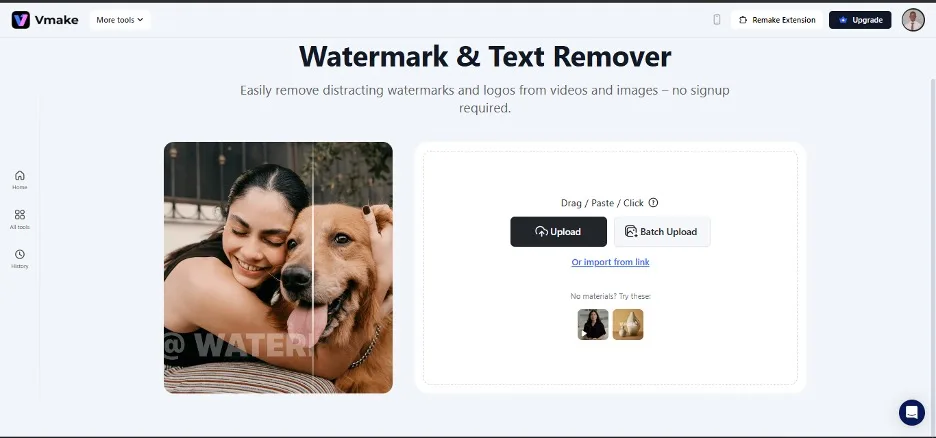
First, visit the vmake webpage to upload your watermarked Amazon video. With an easy-to-navigate interface, the page allows users to drag and paste files and click them.
A quick upload option lets users import a video from their device. An extra catchy feature you can explore is the batch upload on the page.
- Wait for Processing
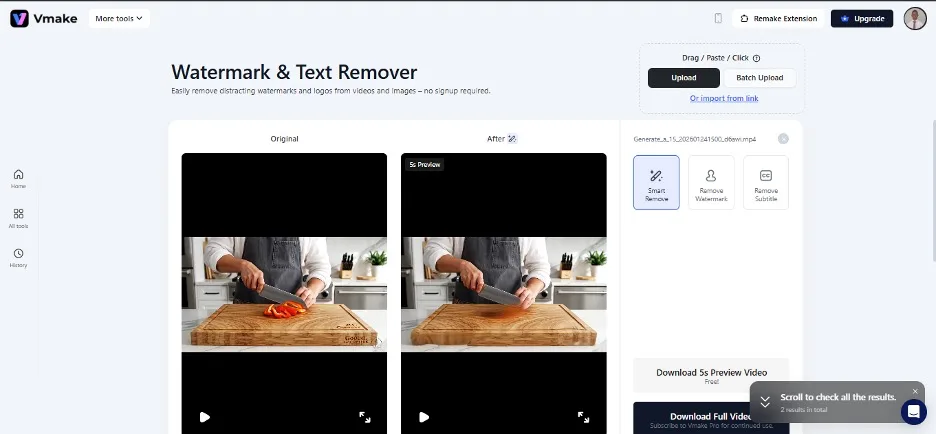
Wait for the video to process the file after uploading. The review is processed automatically with the “smart remove” mode. And you will receive the Original and the after-video results – without the watermarks. The tool also allows manual removal of watermarks and subtitles.
- Export the Video
The “download 5s preview video “option comes as an extra for users to check a 5-second video preview. And you can download the full video after checking. The quality will be retained without a difference in the edited copy.
With Vmake-AI, you can upload additional clips from your Amazon files using the batch upload feature for the same results. It takes less time and produces clean and professional footage.
Conclusion
Using automated post-production tools helps lower selling risks. Every Amazon seller will deal with content issues at some point. This may range from a missing file to a poor background and an unwanted watermark. However, what sets the best sellers apart is having tools ready to fix these problems – even if noticed at the last minute.
Video editing tools like the Vmake suite do not just “edit videos”; they help with revenue. They also help brand owners spend less time in the woods of technical troubleshooting and more time on high-level growth strategies.
In a market where every second counts, having a reliable way to fix a “fixable” problem is not just a convenience. It is a competitive edge that compounds over every product launch and every successful sale.
Your e-commerce is not just about who has the best products. It is about who can navigate the technical hurdles of the digital marketplace with speed and quality tools.

Leave a comment
Have something to say about this article? Add your comment and start the discussion.