



Tracking tags are extra labels at the end of a link, like utm_source=newsletter, that tell a site where a click came from. To remove them, delete only those labels and keep the rest, so the link still opens the same page.
A copied web address can contain a product page, a selected color, a newsletter campaign and a temporary access credential in the same line. Removing everything after the question mark makes it shorter, but can also send the recipient to a different page or stop the link working. A better approach begins by identifying what each part does.
For an ordinary public page, you can use IPDrop to clean tracking parameters from a link and compare the proposed result with the original address before sharing it. Treat the cleaner as an editing aid, not permission to strip an unfamiliar URL. The following method explains what to retain, what to inspect and when the right choice is to leave the address alone.
Make a Copy Before Making a Change
Keep the original address somewhere you control and work on a separate copy. For an innocuous public article, a temporary local text note is sufficient. Do not put a private invitation, password-reset address or customer-specific link into a shared document merely to preserve a baseline.
Decide what the recipient needs to reach. It might be the same article, a particular product variation or a specific search result. That intended destination is the test of the edited link. A shorter string is not an improvement if it silently drops the choice you meant to share.
Separate the Path, Query and Fragment
The domain identifies the host, while the path can identify a page or resource. A question mark introduces the query portion, which often contains named parameters and their values. A hash introduces a fragment, which can identify a position within a document or serve another application-specific purpose.
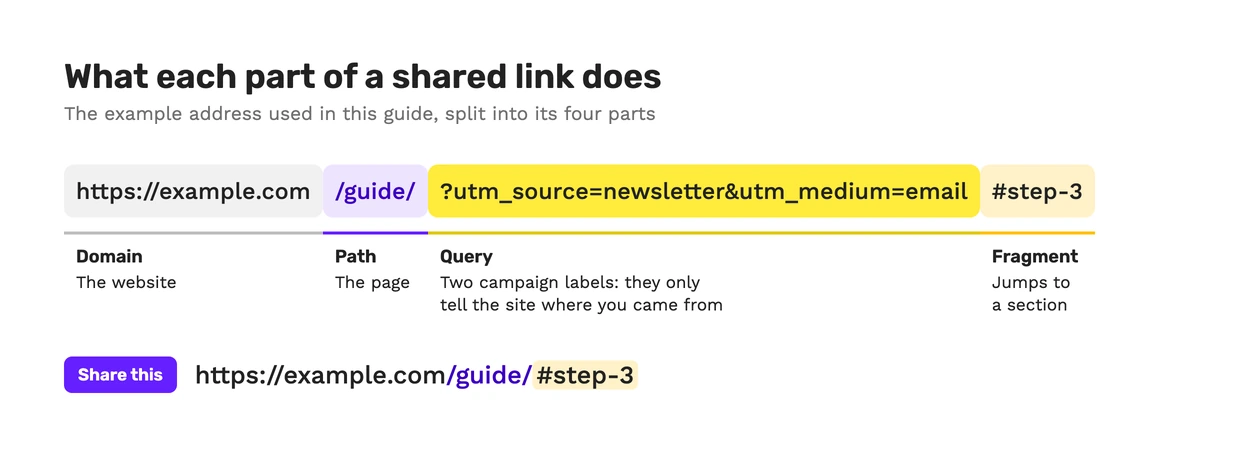
These sections are not interchangeable. Deleting a fragment can remove a useful jump to a section. Deleting a query can remove a search term or a chosen variation. A URL with no query is therefore not automatically the correct public version of a URL with one.
For readers working with JavaScript, MDN’s URL.searchParams documentation describes structured access to query arguments. It also warns that changing search parameters can alter serialization, such as the way spaces are encoded. A changed-looking string needs inspection; appearance alone does not establish whether its destination or behavior changed.
Identify a Campaign Label Before Removing It
Names beginning with utm_ are a familiar example of campaign attribution. Google’s campaign URL guidance explains how source, medium and campaign parameters identify incoming traffic. That is a different purpose from selecting the page’s substantive content.
Consider a made-up public address: https://example.com/guide/?utm_source=newsletter&utm_medium=email#step-3. The path /guide/ is the article and #step-3 jumps to a section. The two UTM labels only tell the site’s analytics where the visit came from. The editing task is to remove the recognized campaign labels while retaining the article path and useful section reference, which gives https://example.com/guide/#step-3. This example is a way to reason about a URL, not a test result from a particular publisher.
Do not expand that example into a rule that every parameter is disposable. A name such as id, item, language or page may control what the server returns. Names are clues, not a universal specification. If you cannot establish what a parameter does, retain it or use the website’s own public sharing control instead.
Common Tracking Parameters You Can Usually Remove
These names are added by analytics and advertising systems to record how a visit started. They do not select the page’s content, so removing them normally leaves the destination unchanged:
Parameter | Added by | What it records |
|---|---|---|
utm_source, utm_medium, utm_campaign, utm_term, utm_content | Anyone who builds a campaign link for Google Analytics | Where the visit came from and which campaign sent it |
gclid | Google Ads auto-tagging | The click on a Google ad |
msclkid | Microsoft Advertising auto-tagging | The click on a Microsoft ad |
fbclid | Facebook and other Meta apps | The click from a Meta app |
mc_cid, mc_eid | Mailchimp | The email campaign, and a unique ID for the recipient |
The last row deserves extra care. Mailchimp’s mc_eid is a unique ID for the person the newsletter was sent to. It does not show the email address in plain text, but the sender can use it to look up that contact. Forwarding a newsletter link with it attached passes your identifier to everyone who opens it.
Compare the Proposed Result Before Opening It
With the copied public address in the cleaner, inspect its proposed output rather than immediately forwarding it. Check that the hostname and meaningful path still match the intended destination. Then inspect which query components have changed and whether a useful fragment remains.
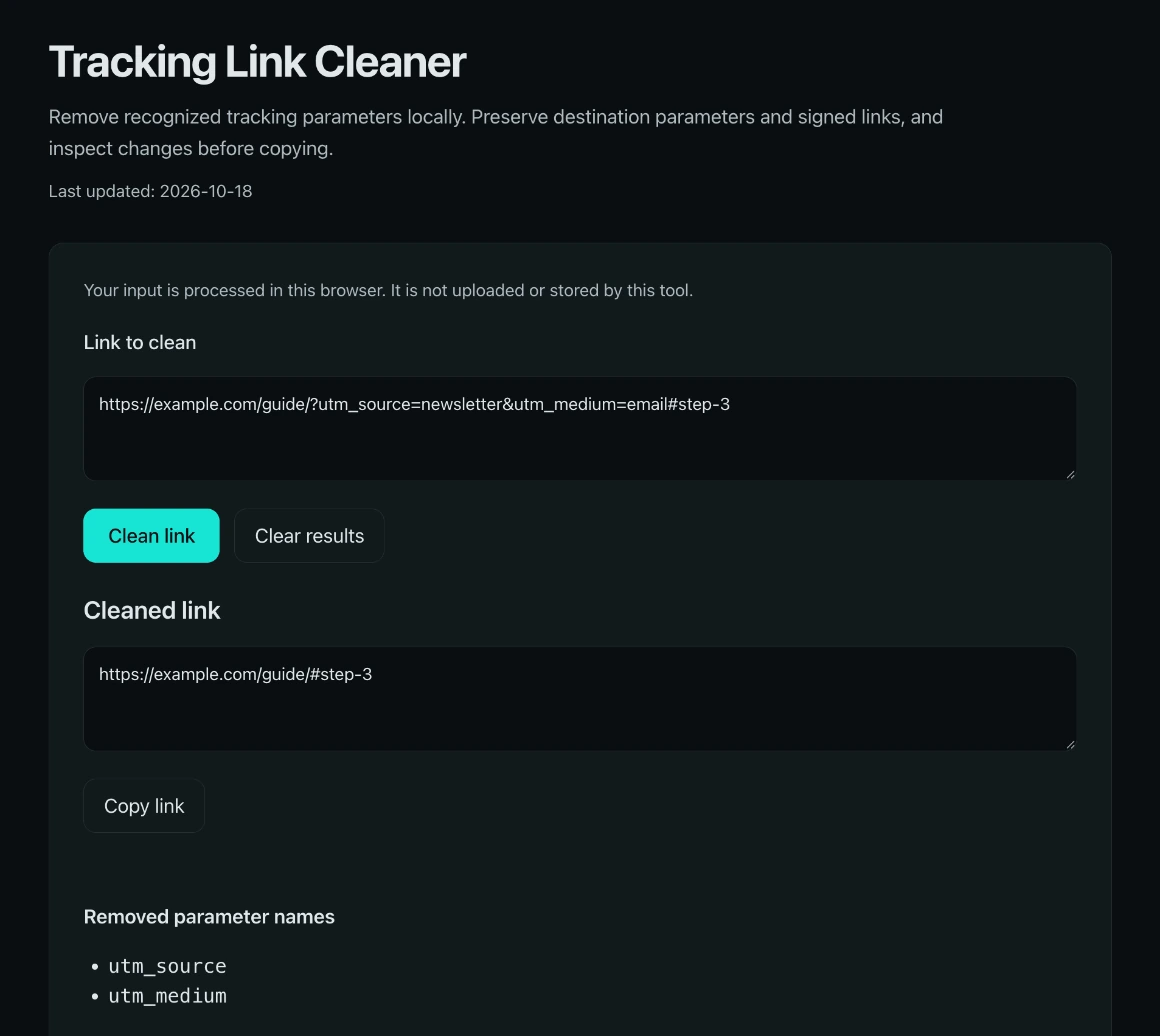
Return to the original if the difference is difficult to explain. The point of using the tool is to make a narrow edit easier to review, not to make an unknown transformation trustworthy. Do not claim that a cleaned link is safe because its tracking labels have disappeared. A misleading domain remains misleading, and a legitimate site can still collect information after a visit.
Keep this comparison away from sensitive access links. If an address appears to grant access to a private file, account action or invitation, do not submit it to an unfamiliar external service. Ask the owner for a public destination or an appropriate new sharing link. Removing an identifying value is not the same as revoking the original permission.
Leave Signed Access Links Intact
Signed URLs are an important exception to casual tidying. Their query values can participate in an access check rather than merely describe an advertising campaign. Editing them may invalidate the signature, and sharing the unedited address may itself pass access to the recipient.
Amazon’s presigned URL documentation describes time-limited access and warns that these URLs act as bearer tokens. That is a concrete reason not to treat a long download address like a public news link. The appropriate question is who should receive that access, not how many characters can be removed.
The same caution should guide handling of unfamiliar invitation and account-action links, without assuming that every service implements AWS-style signing. Use the issuing service’s documented sharing process. If the intended audience changes, request a suitable link rather than trying to repurpose an existing private one.
Verify the Public Destination in the Right Context
Once you have a clearly public, non-sensitive candidate, open it and confirm the actual page. A successful load is only the first check. Verify that it still shows the intended language, product option, article or search context, and that any section reference remains useful.
Your own signed-in session can conceal a problem. Where appropriate, check the public page in a separate signed-out browser context without entering credentials or bypassing an access restriction. If the page is not intended to be public, stop this check and use the owner’s approved sharing method. Do not publish a supposedly cleaned private link as an experiment.
A Quick Checklist Before You Share
- Keep the original address, and work on a copy.
- Name the destination the recipient should reach.
- Remove only parameters you recognize as tracking, such as the ones in the table above.
- Leave signed, invitation and account-action links exactly as issued.
- Open the result, signed out where appropriate, and confirm it still shows the intended page.
Keep a Useful Link, Not a Privacy Promise
Removing recognized campaign tags can produce a clearer address for a public page, but it does not remove cookies, account identifiers elsewhere in the browsing session or every form of measurement. It also does not change the destination’s content or make an unknown download trustworthy. For wider protection, follow these steps to protect your online privacy and try one of these private search engines.
The finished result should have a straightforward explanation. The original public destination was preserved, recognized attribution labels were removed, functional components were retained and the resulting page was checked. When one of those statements cannot be supported, keep the original private, seek clarification or choose a documented public sharing link. That is a more useful outcome than a shorter URL whose behavior nobody has verified.

Leave a comment
Have something to say about this article? Add your comment and start the discussion.