


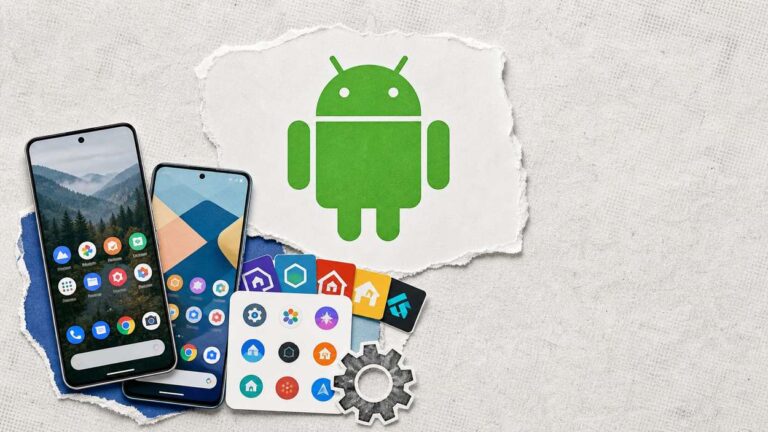

An Android launcher replaces your home screen and app drawer, and it is the one part of the phone you can change completely without rooting it. Install one, set it as the default, and every phone from a Pixel to a Galaxy behaves the way you set it up rather than the way the manufacturer did.
Current as of September 2026. Every launcher below is live on Google Play, checked this week for its last update, its download count, and whether it carries ads or in-app purchases. Four launchers from the previous version of this list are gone from the store, and two more have not been updated in years, so they are out.
The ten best Android launchers below are ordered by how confidently you can recommend them today, which mostly means how recently they were updated. Nova, Niagara and Smart Launcher all shipped updates in the last two weeks.
Android Launchers Compared
The dates and download counts are what the Play Store showed on September 2, 2026. Read the update column first: a launcher that has not shipped in a year will lag behind the current Android release.
Launcher | Last updated | Downloads | Ads | In-app purchases | Best for |
|---|---|---|---|---|---|
Nova Launcher | Aug 24, 2026 | 100M+ | Yes | Yes | Anyone who wants deep control without a new look |
Niagara Launcher | Aug 31, 2026 | 10M+ | No | Yes | One-handed use on a large phone |
Smart Launcher 6 | Aug 26, 2026 | 50M+ | No | Yes | Automatic organization |
Microsoft Launcher | May 8, 2026 | 50M+ | No | No | Microsoft 365 users |
Action Launcher | Aug 6, 2025 | 10M+ | Yes | Yes | A Pixel look with more shortcuts |
Square Home | Aug 16, 2026 | 5M+ | No | Yes | Tile layouts |
Total Launcher | Aug 21, 2026 | 1M+ | No | Yes | Building a home screen from scratch |
Olauncher | Jul 1, 2026 | 1M+ | No | No | A minimal, distraction-free phone |
hyperion launcher | Mar 12, 2026 | 1M+ | No | Yes | Pixel style with theming |
GO Launcher | Aug 27, 2025 | 100M+ | Yes | Yes | Ready-made themes |
What Changed Since the Last Version of This List
Launcher lists rot faster than most, because the apps are small teams and the Play Store removes what stops being maintained. Checked against the store on September 2, 2026:
- Apex Launcher, Next Launcher 3D, Buzz Launcher and 360 Launcher no longer exist on Google Play. Their listings return a 404.
- ADW Launcher 2 is still listed, with 10M+ downloads, but its last update is dated September 15, 2018. Eight years without a release is not something to recommend on a 2026 phone.
- POCO Launcher 2.0, which replaced the old MiHome entry, is still listed with 100M+ downloads but was last updated on March 13, 2023, and it is built around Xiaomi and POCO devices.
- Six launchers that did not exist or were not mature when this list was first written now earn a place: Niagara, Microsoft Launcher, Square Home, Total Launcher, Olauncher and hyperion.
1. Nova Launcher
Stock-style, deeply customizable
Nova Launcher
Best for anyone who wants deep control without a new look
Nova is still the reference point for Android launchers: a stock-style home screen with grid, gesture, icon-pack and app-drawer control that goes far beyond what phones ship with. It is the one to try first if you want your current setup, only more adjustable.
2. Niagara Launcher

Vertical app list
Niagara Launcher
Best for one-handed use on a large phone
Niagara replaces the grid with a vertical, alphabetical app list you swipe through, so it works one-handed on tall phones and hides the clutter of a busy home screen. It is the most different option here and the easiest to learn.
3. Smart Launcher 6

Auto-organizing
Smart Launcher 6
Best for automatic organization without setup
Smart Launcher sorts your apps into categories automatically and keeps the home screen to a few things you actually open, with adaptive icons and color themes that follow your wallpaper. It suits people who want tidiness without configuring it.
4. Microsoft Launcher

Productivity feed
Microsoft Launcher
Best for Microsoft 365 users
Microsoft Launcher folds Outlook, To Do and your Microsoft account into a feed beside the home screen, so calendar and tasks are a swipe away. It is the only launcher on this list with no ads and no in-app purchases at all.
5. Action Launcher
Pixel-style
Action Launcher
Best for a Pixel look with more shortcuts
Action Launcher gives you the Pixel look with extras layered on top: theming pulled from your wallpaper, quick shortcuts on icons, and a search bar that opens more than search. Its last update is a year old, which matters on a list where most entries shipped this month.
6. Square Home
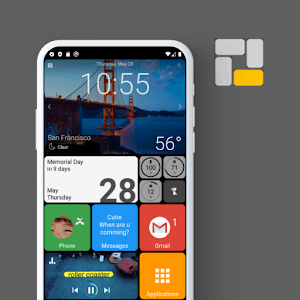
Live tiles
Square Home
Best for tile layouts in the Windows Phone style
Square Home turns the home screen into a grid of live tiles in the style Windows Phone made familiar. If you liked that layout, this is the maintained way to get it on Android.
7. Total Launcher

Freeform builder
Total Launcher
Best for building a home screen from scratch
Total Launcher, from the same developer as Square Home, is the opposite proposition: almost every element on the screen can be moved, resized and restyled. It rewards time spent and punishes impatience.
8. Olauncher
Text-only minimal
Olauncher
Best for a minimal, distraction-free phone
Olauncher strips the home screen down to a short text list of apps on a plain background, with no icons and no widgets. It is aimed at people trying to use their phone less, and it is free with nothing to buy.
9. hyperion launcher

Pixel-style, themeable
hyperion launcher
Best for Pixel style with a coordinated theme
hyperion is a Pixel-style launcher from the Substratum team, with theme controls for colors, shapes and fonts applied across the home screen and drawer. It is a good fit if you want the stock feel with a coordinated custom look.
10. GO Launcher

Theme store
GO Launcher
Best for ready-made themes and wallpapers
GO Launcher is the survivor from the old generation of themed launchers, still on the Play Store with a large library of themes and wallpapers. It carries ads and in-app purchases, and its last update predates most of this list.
How to Set a Launcher as Your Default
Installing a launcher does nothing until you make it the home app. On most phones running Android 10 or later, open Settings → Apps → Default apps → Home app and pick the launcher. Samsung and Xiaomi bury the same screen under slightly different menu names, so search Settings for Home app if the path differs.
The first time you press Home after installing, Android may also ask which launcher to use. Choose the new one and tap Always. Switching back is the same screen in reverse, and nothing about your apps or data changes either way.
Android Launchers FAQ
Do Android launchers slow down your phone?
A launcher is only the home screen and app drawer, so it does not touch how apps run once they are open. Heavily animated launchers can feel slower on a budget phone; the minimal ones, such as Niagara and Olauncher, tend to feel faster than the stock launcher.
Are third-party launchers safe?
The ones on this list are on Google Play and were updated recently, which is the practical test. A launcher sees which apps you open, so stick to maintained apps with a large install base and skip anything that has not been updated in years.
Which Android launcher is free with no ads?
Microsoft Launcher and Olauncher carry neither ads nor in-app purchases. Niagara, Smart Launcher, Square Home, Total Launcher and hyperion have no ads but sell extras inside the app.
Which launcher gives the closest Pixel experience?
Action Launcher and hyperion both build on the Pixel layout and add theming. Nova can be set up to look stock as well, with more control underneath.
Does a launcher change the lock screen?
No. A launcher replaces the home screen and app drawer only. The lock screen, notification shade and quick settings stay as your phone shipped them.
Can I go back to my phone’s original launcher?
Yes, at any time. Open Settings, search for Home app, and pick the original one. Uninstalling the third-party launcher does the same thing automatically.
Which Android Launcher Should You Use?
Start with Nova if you want your current layout with more control, Niagara if you want the phone to feel simpler, and Microsoft Launcher if your calendar and tasks already live in Microsoft 365. Those three cover most people, all three shipped updates this year, and all three are free to try. The decision that outranks the choice of launcher is whether you need one at all: Android 12 and later ship with capable home screens, and if you only want a different icon pack or grid size, check whether your phone’s own launcher supports it first, as many now do.
Whatever you pick, judge it by the update column. A launcher is the app you touch more than any other, and one that stops shipping updates will break a little more with each Android release. If a launcher misbehaves, set the original one back as the default from Settings → Apps → Default apps → Home app; nothing else on the phone is affected. To see which Android release you are running before choosing, our list of Android versions covers every version by name, and if you are setting up a spare machine, Android on a PC works with several of these launchers too. Once the home screen is settled, the dialer is the next app worth replacing.

sandeep kumar
Hi Shaunak….
Thanks for sharing a great list of Android Launcher…..
I am very much happy with my HTC smartphone default launcher but I would like to try your option once.
Jones
Well i think Apex launcher is one of the best launcher among all other launchers . Some launchers are new for me , so thanks for updating me with others also :)
Neil Simmons
Wow.. I didn’t even know that you could change the launcher. I’m not sure if I could be bothered though to relearn the layout of my phone, so I’ll probably just stick with the default launcher – but interesting to know nonetheless.
Is the list in order of preference? Do you think the Nova launcher is the best?
Shaunak Guharay
Personally I like Nova Launcher, as it is by far the smoothest for me.
Kuldeep
Hello,
My default launcher is really awesome but it seems boring so i think i might be picking one of the listed ones.
thanks for the cool resource.
Ayush Agrawal
Nova is no doubt the most popular one. However , I still like Apex!
Ankur Upadhyay
I have been using Smart Launcher for over a month. What I really about it is that it is very light on resources and lightening fast.
Its only drawback is that it lack widgets.
Shaunak Guharay
@Ankur Upadhyay – Smart Launcher is very good too. The lack of widget support is one of their strategies, to make people buy the paid version, which has widget support.
But when widget support is added, RAM and CPU usage goes up automatically, hence the “light on resources” point becomes invalid.
Nhick
Haven’t tried smart launcher yet, checking googleplay now and hope to install it right away.. looks very clean and stylish.
Thanks,
Nhick
Mohit Rajwani
Hello!!!
my default louncher is awsm and i like it very.But your list is too good nice work sir.
Thank you!
Tushar
Creatively, I would go for Smart Launcher. Looks different & that’s what one might like to avoid Android’s default look & feel . . . Also, this gives an opp to avoid Samsung’s Touch-Wiz UI :)
Thanks for sharing.
Sagar Nandwani
I have Launcher Pro, ADW, Regina 3D, FTL Launcher…….some more expensive ones like SPB Shell 3D, TSF Shell all on my RAZR.
Used Tag Home, Helix Launcher 1 and 2, Go Launcher before.
And Moto Home fix and Home Smack to switch between them all with ease. But…I wind up using the stock launcher on my RAZR more. Even more now that its on ICS.
Vishal thakur
My favourite launcher is awd launcher but still better is the stock android launcher. best performance , best speed
vishvast
hi thanks for this wonderful post this reminds me of the first section of android phones launchers
Stephan
Wow, that’s a amazing list.
I’m using go launcher now.I can’t wait to try the others, especially the Nest launcher 3D, looks so interesting.
Thanks for your valuable content.
Stephan
Harshit Singhal
Although all the top launchers mentioned by you are equally good, I feel that Nova and Next launcher 3D are the top two ones.
Nehal Kabra
I love Smart Launcher on my Xperia Arc. It solved many of my onscreen problems.
sameer
Hi Shaunak,
Great list of android launchers..its very useful for me because recently i buy new android based phone.Really dig out very useful android launchers and almost are free.Thank you for sharing!
Kishore Bhagya
I love EVERYTHING HOME. It automatically puts everything on your home in folders. It will ask you what’s on your mind? Say, Pizza, and the background changes to pizza and all of the apps on home screen change to pizza / restaurants or related apps.
monika
helllo
i had use only golauncher and aviate on my android phone i think go launcher is best but it makes my phone so heavy thnx for this nice article rajesh :)
Alia Martyin
Aviate is the best launcher for android till now and I strongly recommend it as it is simple,fast and elegant.
Harsh
Wonderful post! It turned out quite informative to all of us and a lot most likely many more. Many of us have tons of a variety of content about being profitable through an internet business. Visit each of our web page if you’d like: ) thank you
Andy
I enjoy ALMOST EVERYTHING HOME. This automatically positions anything in your home with folders. It’ll question you what’s in your thoughts? Point out, Chicken wings, and also the background modifications for you to lasagna in addition to all of the applications about home monitor alter for you to lasagna and dining places or even related applications. Thanks for sharing this informative post with us. :D
Kamal
Aviate is the greatest launcher pertaining to android mobile phone right up until right now as well as My partner and I strongly recommend it as it is easy, rapidly as well as classy. Great work.
Tripti
Nest launcher 3D looks good. Thanks for sharing this wonderful post. :)
Ash
Hi,
Great list of Android launcher. Nova launcher and Go launcher Ex is my favorite. I think you missed Google Now Launcher, it’s doing good.
Thanks for sharing, keep it up…
Kuldeep
Nest launcher 3D is good. Thanks for sharing wonderful post.
Ash Raful
Hi there,
Thanks for sharing this wonderful article. Love Go launcher Ex – the best launcher ever.
But, now I’m using Buzz Launcher. And, it’s also too good.
You should include Hola launcher, which is light and fast.
Kevin
Aviate is the greatest launcher pertaining to Android OS cellular phone right until right now as well as my partner and I strongly recommend the item the way it put in at home, rapidly as well as fashionable. Wonderful perform. Thanks..
Abid Anwar
I am using Go Launcher in my phone. it is a great Android launcher. Nice article.
Mahesh Dabade
Nice one again. I like Buzz Launcher. I was not knowing 360 and MeHome, will surely try them out. Keep up the good work.
Charan Pammi
I really just addicted to Go Launcher! Will give a try to remaining. Thanks.
Dhruval Patel
Great share, I personally liked MI home launcher :) Got to know some of new after reading your post.
Dumaji
Thanks, Shaunak. I personally use Apex Launcher and I find it very user-friendly. It would be great if you also help us with IOS list as well. I don’t find any cons with apex launcher as it proves to be a very helpful tool for me.
Bablu Yadav
Thanks for the list of best Android launcher list.
Mahesh Dabade
Pleasure Bablu.
Rahman
Google Pixel Launcher is the best launcher for Android, please try it and post here about the experience.
Subhash
Thanks Shaunak for updating the list. I am using Go launcher and it is amazing. Thank you so much for sharing details about Next Launcher 3D.
Zulfiqar Ahmed
I think HOLO launcher is also best for android consuming low RAM and run smoothly.
Sunil Kumar
Thanks for this amazing post. I am also using Go launcher, its cool.
Mughal
Holo launcher is working on my samsung mobile but not on Huawei Mobile any reasons ?
Mahesh Dabade
Can you please give a more detailed explanation.
Joseph Chikeleze
I love Go launcher so much but it’s not working on my infinix phone.
Any fix?? The phone is not rooted.
Mahesh Dabade
We need some more details Joseph regarding the issue.
Harsh Kumar
Hi!
First of all thanks for the list of these best Android launchers. I tried all these launchers and found Nova launcher as the best. While using NOVA Launch, I found that my phone was launching apps much smoothly than before. I think Nova launcher minimizes the RAM uses and helps in better functionality. I also liked its new options including the Google Search Bar and stylish App Drawer.
Thank you!
Have a nice day!
Kuberan B.
Hi,
I have already changed my default stock launcher to nova launcher. It’s great to see you posting about launchers. My suggestion: try to add some more interesting launchers like Windows launcher, programming launcher, etc.
Ravi
Thanks for sharing a valuable article on Android Launcher.
Neuro Rewire
Nice and thank to sharing this list.