



I have been using Setapp since before it became a sensation. I have always liked the idea of a curated list of apps and the possibility of discovering new ones at a central spot. However, it does not mean that I have not thought about stopping the Setapp subscription. On the other hand, I have indeed thought of that possibility and even cancelled my Setapp subscription once.
This is not a sponsored post, but I wanted to share the story of why I cancelled my Setapp subscription and eventually came back. I believe the insights I gathered during the process will help those who are confused about whether to keep their Setapp subscription.
In my case, I was worried about a few things, like pricing costs and unused applications in the collection, and these were pushing me to the decision to cancel the Setapp subscription and look for something else.
Why I Cancelled Setapp
Some specific reasons pushed me to cancel the Setapp subscription.
On the one hand, I was enjoying the convenience that Setapp offers in the domain of discovering apps and exploring the full version of these apps without worrying about advertisements and annoying pop-ups. But a few things started bothering me after a couple of years. At that point, there were:
1. Underused Apps
At the time this was happening, the Setapp catalogue contained over 160 applications. But I was getting the impression that I was using only two or three apps regularly. For instance, I frequently used apps like CleanMyMac X and Paste because they were heavily integrated into the workspace and productivity.

But I felt that other apps were not being used much. It led me to believe that I am not getting much value from the monthly subscription fee.
2. Exploring Alternatives
I also saw a couple of discussions on how I can explore alternative options. I mean, while the Setapp library contained quite a few great apps, it was missing a few options. Alfred and Magnet. So, I wanted to test these options and other alternatives available in the market, including some free options. I also felt like the Setapp subscription was limiting me from checking out these alternatives.
3. Cost Factor
This idea was somehow connected to the increasing number of underused applications. However, I felt that I would be able to save some money by getting rid of the Setapp subscription. At that time, I was using the family plan from Setapp, and cancelling the plan helped me cut down close to $15 every month.

In hindsight, I also had something called subscription fatigue. I had quite a few subscriptions running, and I was a little desperate to cut down at least a few. All these reasons worked together, and I ended up cancelling the Setapp subscription.
Life Without Setapp: What I Tried Instead
I kept myself off the Setapp subscription for almost six months. I saved close to $100 during the period, and I had to find some viable replacements for some of the apps I was using the most. Here are a few options:
1. Ulysses > Obsidian
I was using Ulysses as my go-to writing application. It was a pretty good way to make sure that all my writings are available across devices while also offering a good writing interface. However, with the Setapp collection gone, I shifted to Obsidian, which offered more than a minimalistic writing environment. Obsidian was one of the best discoveries I made during the no-Setapp times, and I still have it installed on my Mac.
2. Paste > CopyClip
Paste was the designated clipboard manager when I had a Setapp subscription. After cancelling Setapp, I went back to CopyClip, the free alternative. Though I liked the minimal interface of CopyClip, living without cross-platform sync was difficult. There were times I wanted the smooth gestures and overall navigation that Paste offered.

3. Mosaic > Rectangle
It was the time before macOS had built-in window-snapping options, and I was relying on Mosaic from the Setapp collection. Since the curated collection wasn’t available, I moved to Rectangle. This nifty app was an impressive way to supercharge how I managed multiple windows on my Mac. I use Rectangle even after I got Setapp back.
4. MindNode > FreeMind
It was a time when I was fond of mind mapping software, and MindNode was a reliable option. However, because the app was gone, I chose to try FreeMind, which was completely free to use. However, FreeMind was not a great option, especially in terms of the UI design. I badly missed the smooth interface of MindNode and cloud-based collaboration options.
It was a good experience to see whether free and freemium options in the market can compete with the options I had with Setapp. Something I noticed was that I was heavily affected by the lack of some features, such as synchronization and rudimentary UI designs. Of course, the limited features in these apps also bothered me.
Why I Came Back to Setapp
After spending six months using these alternatives and skipping some apps altogether, I decided to return to the Setapp subscription. There were a few major reasons I made that shift.
1. Irreplaceable Apps
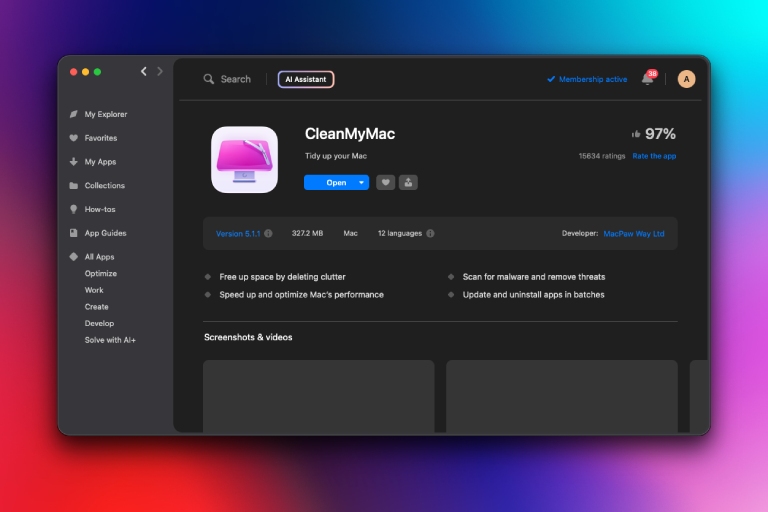
I realized that some apps from the set app catalogue were irreplaceable indeed. In particular, I used apps like CleanMyMac X and Paste. Similarly, I really relied upon apps like Bartender, which made my menu bar clean and more usable. These apps were available outside, but purchasing them individually meant I would have to spend Hundreds of dollars every year. I thus concluded that the Setapp catalogue was adding so much value to my productivity grind.
2. Polished Apps and Updates
Purchasing an individual app from its own source did offer some benefits. For instance, I was able to save some money and spend more time with the app. But it also meant that I had to deal with updates and everything on my own. I also felt that many apps that were available through other sources were not as polished as the set app versions that I had tried. So I was also missing the polished nature of the application collection and seeing these updates.
3. Switching Apps Wasn’t Worth It
The time without setup also made me realize how integrated the applications were into my day-to-day productivity life. And switching between these applications, such as MindNode to FreeMind and Paste to CopyClip, was not really worth it. I ended up slowing down my schedules, and there was a noticeable impact on my productivity in general. This reason alone sped up my transition back to the Setapp subscription.
I also missed the discovery aspect of Setapp by a long shot. For me, Setapp was a great way to get to know new apps in the market. The team at MacPaw continues to do a great job. These days, the Setapp library is home to an incredible collection of iOS and web apps as well. I also love the presence of many subscriptions within, such as ClearVPN, which offers an awesome VPN experience across devices, including Android.
Sure, there were times when MacPaw removed applications from the library, but those were exceptions. I also noticed that the company was quick to add viable replacements to those removed apps. I am also a big fan of the task-based approach MacPaw has been following for Setapp. That is, you will find at least one nice app for one task.
What I Learned (Some Insights)
Here are some insights I gathered after cancelling and resubscribing to Setapp.
You should stick with Setapp if you prefer having a curated collection of apps. The amount you pay for the subscription is totally worth it if you use at least five apps from the collection. You might think that you are saving quite a lot by cutting down the subscription, but you are most likely to regret having a polished set of ad-free apps with regular updates.
However, if you are using only 1 or 2 apps from the collection, you can consider quitting the subscription. It also means you should be ready to explore the world of individually available apps. If you also like the whole deal of owning software licenses, getting rid of the Setapp subscription would be a better idea.
If you have not yet started, you can start with the 7-day free trial. Make sure you monitor your app usage during the free trial, and you will have an answer.

Leave a comment
Have something to say about this article? Add your comment and start the discussion.