



Icon fonts are a popular way to include standard icons in your website content efficiently. Font Awesome is a widely recognized icon font that offers numerous advantages over other options. Another good alternative is using icon fonts from Freepik.
Font Awesome was originally designed by Dave Gandy for use with Twitter Bootstrap. Font Awesome has grown in popularity and can also be easily integrated into WordPress using the Font Awesome plugin.
This article provides a comprehensive introduction to icon fonts, with a focus on Font Awesome, a tool that has revolutionized icon usage in web design.
Why Use Icon Fonts
When you design a website, images take up a lot of web space due to their file sizes. They also have to be called up to your web pages using HTML markup. Not only that, but their scaling is frequently a problem, losing definition as they are increased in size. A regular image only resolves as intended when used in its originally designed dimensions.
When you are seeking standard icon images, such as for vehicles, certain punctuation characters, or graphical charting icons, icon fonts can offer you scalable images that look the same irrespective of the size of the font. This is just as letters and numbers appear the same irrespective of whether you use a size 2 or 5 or a 10 or 24-point font size.
In many cases, people simply do not use images because of this problem, and their article or online report suffers in detail or clarity because of it. By using Font Awesome, they can add basic icons to their sites and scale them to the required size, limited only by the dimensions of their documents – and they can do so without losing definition. You can look at scalable icons in the same way as scalable font characters.
Here is a selection of the video player and social icons available:
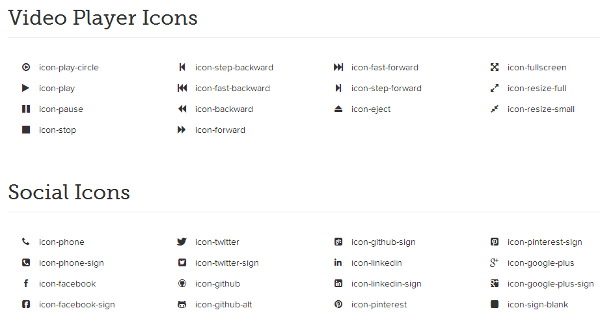
Each of these can be increased in size with no loss in definition. You can change their color easily add shadows and change their transparency. In fact, you can do anything with them that you can with images, and then some, without the disadvantages of file size.
That is basically what icon fonts can do, and the Awesome font in particular. Here is some information on how to use them and take the best advantage of them, and also one or two disadvantages associated with icon fronts:
Using Font Awesome
With Normal Bootstrap CSS:
Font Awesome can be used with the default Bootstrap CSS by following these steps:
- Copy the Font Files: Copy the Font Awesome directory into your project.
- Copy the CSS File: Copy the
font-awesome.min.cssfile into your project. - Edit the Font Path: Open
font-awesome.min.cssand edit the font paths to point to the correct location.
In the <head> section of your HTML, reference the CSS files like this:
<link rel="stylesheet" href="../css/bootstrap.min.css">
<link rel="stylesheet" href="../css/font-awesome.min.css">
Ensure that the font path is relative to your CSS directory.
With Bootstrap Less:
If you’re using Bootstrap with LESS, the steps are slightly different:
- Copy the Directories: Copy the Font Awesome directory into your project and font-awesome-less into your Bootstrap LESS directory.
- Edit bootstrap.less: Open bootstrap.less and replace @import “sprites.less”; with @import “font-awesome.less”;.
- Edit font-awesome.less: Open font-awesome.less in your project and edit the @FontAwesomePath variable to point to your font directory:
@FontAwesomePath: "../font";If you’re using a static compiler, remember to recompile LESS after making these changes.
Without Using Bootstrap:
If you’re not using Bootstrap, follow these steps:
- Copy the Font Files: Copy the Font Awesome font files to your project directory.
- Copy the CSS Files: Copy one of the font-awesome CSS files into your project and edit the font paths to point to the correct directory.
For Internet Explorer 7 compatibility, use font-awesome-ie7.min.css.
How to Use Font Awesome in WordPress
There are two easy ways to use icon fonts in WordPress one you have uploaded the plugin*. You can embed them using HTML, or use shortcode. Here are examples of each:
Using HTML: Add the icon name to the class attribute where you want the icon to appear. For example:
<i class="icon-circle"></i>This will add a black circle. You can change the icon’s size like this:
<div style="font-size: 44px;">
  <i class="icon-umbrella icon-circle"></i>
</div>
For consistent icon sizes, consider adding the font size to your CSS stylesheet.
Using Shortcode: Shortcodes are easier to use but typically work only within post and page content. The format is:
[icon name="icon-circle"]The Downside of Icon Fonts
Icon fonts are excellent tools for adding icons to your website, but they do have some limitations:
- Screen Readers: Some screen readers may interpret icons as alphabetical letters. However, this issue is mitigated with Font Awesome due to its implementation.
- Color Limitation: Icons can generally only be displayed in a single color or a gradient using CSS3.
- Custom Font Creation: Creating a custom icon font can be time-consuming. However, Font Awesome offers an extensive library of icons that continues to grow, providing a solution for most needs.
Font Awesome Generator Summary
The Font Awesome generator remains one of the best free icon font tools available. While it was initially designed for Twitter Bootstrap, it can be easily adapted for use on standard websites. A WordPress plugin is also available, offering seamless integration. If you’re looking for a reliable, scalable icon font, Font Awesome is a great choice—one that you may find surprisingly versatile once you start using it.

Vivek Nath.R
In my blog i’m using Wp Exclusive Icon fonts plugin http://wordpress.org/extend/plugins/wp-elusive-iconfont/
The advantage is it has more customizing options like changing color, size, orientation etc and also it has lots of other icons. Do check it.
Rajesh Namase
Thanks Vivek for sharing this WordPress plugin with our readers.
James Dreesen
Hey Vivek, thanks for sharing the plugin, I’ve looking for something like this. I would also try Font Awesome Icons to see which is the one for me. Nice article Rajesh, please keep it up! All the best to you.
Rajesh Namase
Also try using Font Awesome WordPress plugin :)
Andy
Hi, I was just looking for something like this, since I’m too lazy to create all these classes and add the styles and images into the theme. Thank you!!
Vipin
Thanks both Vivek and Rajesh, both provided the information i was looking for.
rohit chougale
hi rajesh
‘tell me about can we play video in php online if yes then tell me how..
Rajesh Namase
You can try using HTML 5 video tags :) And it’s easy to use HTML 5 with PHP :)
vaibhav
Il defently add this plugin to my wordpress acc..
thanks admin..!
Anand Hittinali
well i’m not a man of many words so this plugin is really helpful to me. thanks for sharing this plugin.
Lily
There is a plugin for this stuff? Wow awesome my first time hearing it. Thank you for sharing this.
Mohsin Ali
Very interesting plugin Rajesh from where did you get these unique ideas.
David Croft
Hello,
thanks for this nice blog, because this “Icon Fonts” topic is very new for me, so i can know many new things and new words within your blog.
The Font generator is really the best free icon fonts which is currently available. so its very useful.
David Johnson
FYI, you used the term “Font Awesome generator” but your article covers Font Awesome itself, not a generator. The word “generator” has a specific meaning in the context of icon fonts. Examples of icon font generators that support Font Awesome include icnfnt and Fontello.
Rajesh Namase
Okay, we’ve updated the article title, thanks.
Carlton
You left out one significant downside of icon fonts: they do not degrade gracefully. All users who have font download disabled (because they either are security-concious, used to be security-concious and forgot, or were configured by someone else who was security-concious and are unaware) just see ugly empty glyph symbols. To be a responsible icon font user, you must accept throwing those users under a bus.
Ayush Agrawal
This article seems a bit old but I would like to say that a good way of using font awesome is using its cdn : //netdna.bootstrapcdn.com/font-awesome/3.2.0/css/font-awesome.min.css.
Helps bloggers looking to cut down load times.
vikas
Nice post, Font Awesome is one of the best developments in the design world.
Mark Fox
Thanks for sharing. I’m more inclined to use it now.
Gaurav Dutt
Man! 2013, how could I haven’t seen this before but still worked flawless for me. Thanks for this.