



Malware today doesn’t show up with a warning label. It hides in memory, exploits zero-day vulnerabilities, encrypts files in minutes, and convincingly imitates banking or email portals. Fileless attacks and ransomware-as-a-service have made threats faster, stealthier, and more automated than ever.
Yet many antivirus programs still behave like it’s 2012. They have heavier installs, background slowdowns, and constant upsell prompts.
Nowadays, the challenge isn’t just stopping malware; it’s finding protection that works quietly in the background without becoming another system burden.
Why Traditional Antivirus Feels Outdated
Many legacy security suites were built for a different era. Over time, they’ve evolved into bundled ecosystems filled with VPN trials, browser extensions, identity monitoring, and upgrade pop-ups.
The result? Higher RAM usage, CPU spikes during scans, and renewal pricing that often increases after the first year. In trying to do everything, some solutions end up feeling bloated and distracting.
This shift has created space for leaner, more focused security tools. One product positioning itself in that space is MalwareFox.
About MalwareFox
MalwareFox presents itself as a lightweight security solution centered strictly on core protection: malware, ransomware, fileless attacks, and phishing without bundling additional services.
After testing the latest version, the overall impression is clear: simplicity and performance take priority.
Installation and First Impressions
Installation is quick and straightforward. The download size is relatively small compared to many mainstream antivirus suites, and setup completes within minutes.
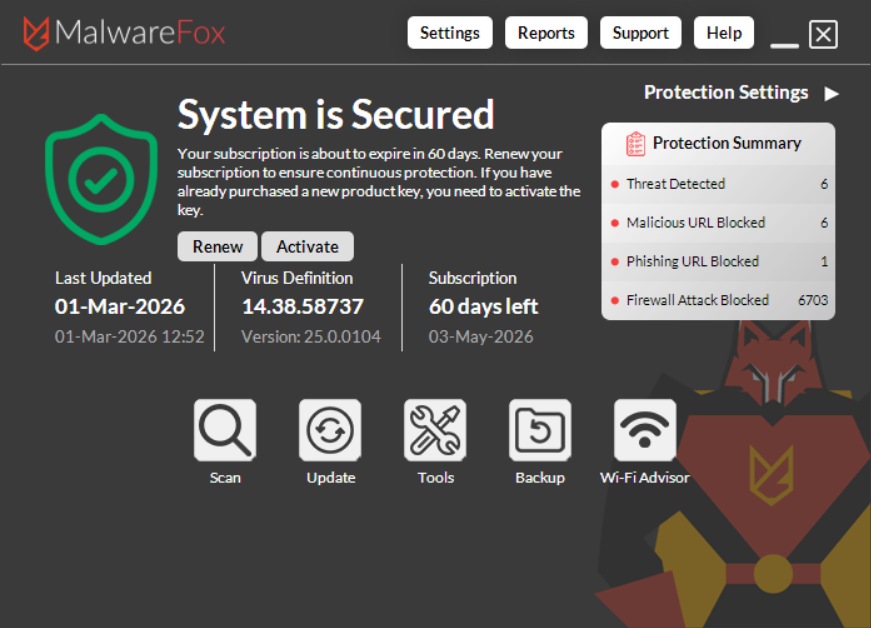
The interface is clean and functional. The dashboard clearly displays protection status and scan information without promotional banners or aggressive upgrade prompts. Visually, the design leans toward a more traditional layout rather than a modern, glossy aesthetic but navigation is simple and intuitive.
System Performance Impact
Performance is where MalwareFox stands out.
During testing:
- Idle CPU usage remained at 0%
- Average CPU usage during scans hovered around 8–9%
- Background activity had minimal noticeable system impact
Even during full scans, the system remained responsive on a mid-range Windows 10/11 machine. For users on older laptops or systems with limited RAM, this low footprint can make a noticeable difference in day-to-day usability.
Malware Detection and Effectiveness
To evaluate detection capability, multiple malware samples including trojans, adware installers, and ransomware simulators were introduced in a controlled test environment.
Known malicious files were detected immediately during real-time execution. More importantly, behavior-based monitoring flagged suspicious encryption patterns before simulated ransomware could fully modify files.
Rather than relying solely on traditional signature databases, MalwareFox uses behavioral analysis to address memory-based and fileless threats. This approach aligns better with how modern attacks operate.
While no security product can guarantee perfect detection, results in controlled testing were consistent and reliable for common threat scenarios.
Ransomware and Real-Time Protection
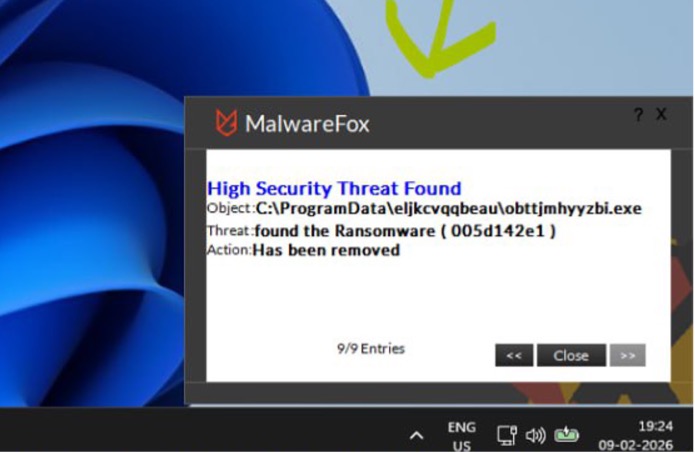
The ransomware module monitors abnormal file activity and blocks unauthorized encryption attempts. In testing scenarios, alerts triggered early enough to prevent widespread file modification.
Real-time protection runs continuously without excessive alerts or marketing notifications, reinforcing the product’s “quiet protection” positioning.
Overall Usability
MalwareFox keeps its feature set focused:
- Real-time malware protection
- Ransomware defense
- Zero-day and fileless threat detection
- Browser and phishing protection
It does not bundle VPN services, password managers, or system optimizers. For users seeking a streamlined protection tool rather than a full security ecosystem, this focused approach may be preferable.
Privacy and Pricing Transparency
MalwareFox takes a straightforward approach to subscriptions. The renewal price matches the initial cost, avoiding the steep second-year increases common in the antivirus industry.
The interface avoids aggressive upsells, and the company states it does not sell user browsing data or activity trends. A 14-day premium trial is available without requiring credit card details, allowing users to test full protection before committing.
In a market often criticized for pricing complexity and constant prompts, this simplified model feels refreshingly transparent.
Pros and Cons
Pros
- Lightweight performance with minimal system impact
- Low CPU usage during both idle and scan states
- Reliable ransomware and behavior-based protection
- Transparent pricing with consistent renewal cost
- No aggressive upsells or bundled extras
Cons
- Interface design feels somewhat dated compared to modern competitors
- No bundled extras like VPN or identity monitoring
- Focused feature set may not appeal to users seeking an all-in-one security suite
Final Verdict
MalwareFox does not attempt to compete with large, feature-packed security mega-suites and that appears intentional. Instead, it concentrates on delivering core malware protection with minimal system impact and predictable pricing.
Performance remains its strongest asset. Protection runs quietly in the background, scans are moderate in resource usage, and the software avoids intrusive prompts.
The interface could benefit from a visual refresh, but functionally it remains clear and easy to use.
For users who prioritize efficiency, transparency, and focused protection over bundled extras and flashy dashboards, MalwareFox offers a practical and lightweight alternative in today’s evolving threat landscape.

Adam Smith
Dear Abhijith,
Thanks for sharing such information. Your article is a very useful. This tool will help in protecting from malware.
Suraj Kumar
Awesome trick to deal with malwares.
Tia Daniels
It seems to be one of the cheapest Anti-Malware programs on the market, I’ll give it a try.
Jasmine Henry
I think that it’s actually cheaper than Malwarebytes, it’s worth a try.
Zoe Heath
Well written article, thanks for the information.
Gavin
My one site is infected with malware and I am going to bug free my website with this tool. Thanks for it.
Brigitte Eisenhauer
I don’t think that this Anti-Malware can remove malware from websites or anything, it’s only meant to remove malware from your computer. I could be wrong but I’m just saying, anyway, do keep us updated please.
Rajesh Namase
Yes, you’re right.
Violet
So how did it go? Did it work?
Hazel
Hi Abhijeet,
Went through your article, since I have been researching for a good Malware protection application I would like to clear some doubts.
1. In your conclusion you said, it outperformed your antivirus application. Can you please share your test data as to which antivirus were compared to this application? which were the malware files that got detected, ofcource apart from false positives. This will be a great information for me and all the readers.
2. Another thing is while installing this application I felt it has uncanny similarrity to Zemana Antimalware application. Is Malwarefox just a rebrand of zemana? As I couldn’t find any mentions for that. Usually it’s always better to stay with parent company than a rebrand when it is offering nothing in addition. A security suite may need superb tech and remote support which Malwarefoxz does not mention.
In search of answers.
Thanks
Rajesh Namase
Hello Hazel,
1. You can try yourself. In our tests, it could find adware and browser hijacker which were not detected by Antivirus.
2. About the relationship with Zemana, it is mentioned clearly on MalwareFox’s About page that they have a tie-up with the company and based on same technology.
Regards,
Rajesh
Nathan
This can be a lifesaver for non tech-savvy people.
Bobbie
Why for non tech-savvy though? What difference does experience and knowledge makes when using a security program?
Polly
The difference is not in using the security program, but having to use it or not. A tech-savvy person can avoid malware by his own without having to rely on an Anti-Malware and some can even remove viruses and malware manually. Non tech-savvy people who can not tell the difference between a legitimate program and a malware will have to rely on an Anti-Malware. Hence why this program is a lifesaver for non tech-savvy people, hope you got it now.
Dave
Mostly for elderly people haha.
Cindy
It looks easy enough to use, I’ll give it a try. Thanks for the wonderful review.
Anne
It certainly does look like an easy way to deal with malware, I’ll check it out.
Esperanza
Thanks for the review. Using an effective Anti-Malware is always so much better than having to remove a virus manually step by step.
Gina
Absolutely, I tried to follow a manual removal guide once and I almost ended up breaking my OS.
Niki
I spent 2 hours trying to remove an adware, then I saw this program… darn it haha.