




The best Kodi skins in 2026 are the ones still shipping in Kodi’s official repository, and that list is shorter than most guides admit: 13 skins for Kodi 21 “Omega” and 14 for the Kodi 22 “Piers” beta. Arctic: Zephyr – Reloaded is the pick for most people, Amber for slow hardware, FTV for anyone who wants Kodi to look like a Fire TV, and Confluence for people who liked Kodi before it changed.
Every skin below was checked in September 2026 against the repository index that Kodi itself downloads, so the version, the last update and the license are the repository’s own figures. Six skins from the 2025 version of this list failed that check because they are no longer in the official repository at all, and they are named further down rather than quietly dropped.
Which Kodi Skin Should You Install?
Kodi 21.3 “Omega” is the current stable release on kodi.tv’s download page, and Kodi 22 “Piers” reached Beta 1 in 2026, so both repositories matter. Every skin in the table is in the Omega repository, and all of them are also in the Piers one. Kodi themes in the “install from zip” sense, from third-party repositories, are not covered here; those come with their own update and safety questions.
Skin | Omega version | Last update (Omega) | Style | License |
|---|---|---|---|---|
Arctic: Zephyr – Reloaded | 3.0.3 | July 2024 | Minimal, light, app-like | CC Non-Commercial 3.0 |
Aeon Nox: SiLVO | 10.0.3 | June 2024 | Classic Aeon, modernized | CC BY-NC-SA 4.0 |
Amber | 3.99.02 | May 2024 | Lightweight, no bloat | GPL-3.0 |
Copacetic | 2.6.1 | August 2024 | Artwork-first, minimal | CC BY-NC-SA 4.0 |
Confluence | 5.0.9 | September 2024 | The classic Kodi look | GPL-2.0 |
Aeon Tajo | 9.2.5 | June 2026 | Aeon Nox 5 revival | GPL-2.0 |
Quartz | 5.21.1 | July 2024 | Fanart showcase, lightweight | CC BY-SA 4.0 / GPL-2.0 |
FTV | 8.0.1 | September 2024 | Fire TV interface | Not stated |
Transparency! | 13.0.0 | June 2024 | Fullscreen fanart | CC BY-SA 3.0 |
Metropolis | 4.2.0 | August 2024 | Retro meets modern, info-dense | CC BY-NC-SA 3.0 |
Source: mirrors.kodi.tv repository index (addons.xml) for the omega and piers branches, and each skin’s package date, read September 2026.
How to Change the Kodi Skin
Estuary has been Kodi’s default skin since version 17, according to the Kodi wiki, and every skin here installs from inside Kodi without a download in a browser. The route is the same on Windows, Android, Fire TV, Linux and a Raspberry Pi.
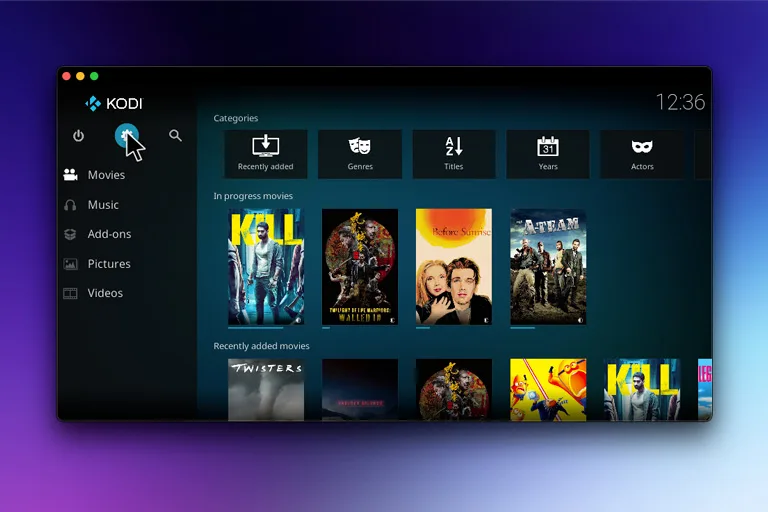
- Open Kodi, select the gear icon for Settings, then Interface.
- Select Skin in the left column, then Skin again under Look and feel.
- Choose Get more. Kodi lists every skin in the official repository for your version.
- Select a skin. Kodi installs it and asks whether to switch to it now.
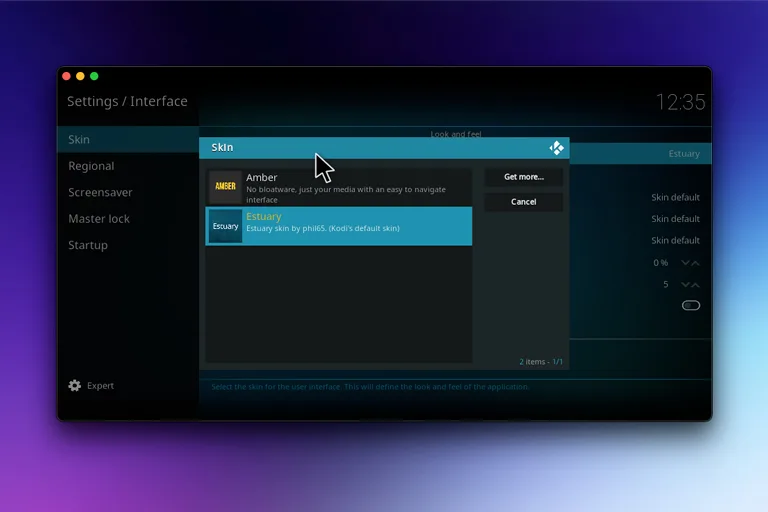
To go back, open the same screen and pick Estuary. If a skin ever leaves Kodi unusable, the wiki’s add-on manager page documents the same install and uninstall flow from the Add-ons section of the home screen, and Kodi always keeps Estuary available as a fallback.
Best Kodi Skins
Ten of the best skins for Kodi, ranked by how many setups they suit. All ten appear under Get more on Kodi 21.3, and the licenses are listed because they decide what you can do with the skin’s artwork.
1. Arctic: Zephyr – Reloaded
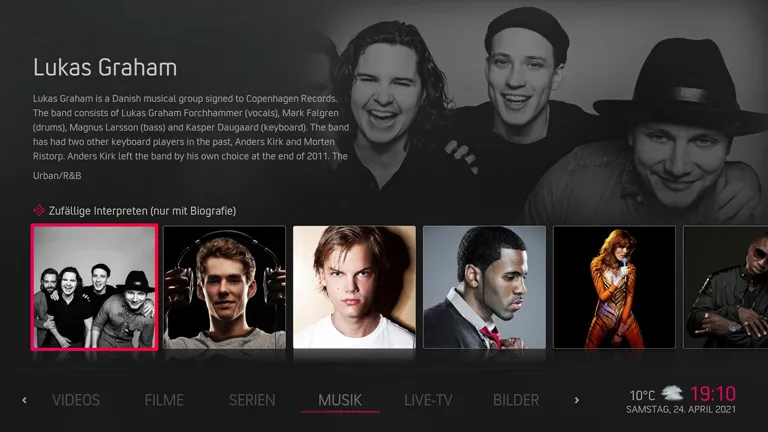
Arctic: Zephyr – Reloaded is the skin most current guides put first, and the repository description explains why: it is based on jurialmunkey’s original Arctic: Zephyr and “focuses on being simple, clean and minimalistic with a light spin.” Maintained by beatmasterrs at version 3.0.3, updated July 2024, it puts a large category bar at the bottom of the home screen with poster-heavy widgets above it, which reads well from a couch and on the small screens of Fire TV sticks. It is remote-first by design; touch and mouse use are not its strength.
2. Aeon Nox: SiLVO
Aeon Nox: SiLVO is the modern continuation of the Aeon line, “completely redesigned to create a modern look, while retaining the classic Aeon feel,” in the words of its listing, with the skin created by BigNoid, modded by SiLVO and widgets by Mr. V. Version 10.0.3 dates from June 2024 in the Omega repository. It is the skin to choose when you have a large, well-tagged library and want every view to show it off, at the cost of more setup time than Arctic or Amber. Licensed CC BY-NC-SA 4.0, so no screenshot here; the listing carries twelve.
3. Amber
Amber’s listing says it in one line: “No bloatware, just your media with an easy to navigate interface.” It is the skin for a Raspberry Pi, an old Android box or a first-generation Fire TV stick, because it draws a horizontal home shelf with the main categories visible and little else running behind it. Version 3.99.02 from May 2024, maintained by bsoriano, Jester, Joethepartylion and Pecinko, and licensed GPL-3.0. A vertical menu is one setting away if the horizontal shelf is not for you.
4. Copacetic
Copacetic is the newest design language in the official repository. Its developer, realcopacetic, describes it as a minimal skin “designed to bring maximum impact to the artwork that you curate,” and calls it a labor of love more than five years in the making. Version 2.6.1 shipped in August 2024. If your library has clean posters and fanart, Copacetic makes Kodi look like a streaming app; if it does not, the emptiness shows. CC BY-NC-SA 4.0, thirteen screenshots on the listing.
5. Confluence
Confluence was Kodi’s default skin before Estuary, and Team Kodi still maintains it with Jezz_X. The listing describes it as “a combination of concepts from many popular skins” built to be easy for first-time users, which is still true: a horizontal home menu, big readable text, and nothing hidden. It is also the only skin here with a newer build in the Piers repository, 5.1.2 from March 2025 against 5.0.9 for Omega. GPL-2.0, and the safest choice for anyone who wants the old XBMC skin feel.
6. Aeon Tajo
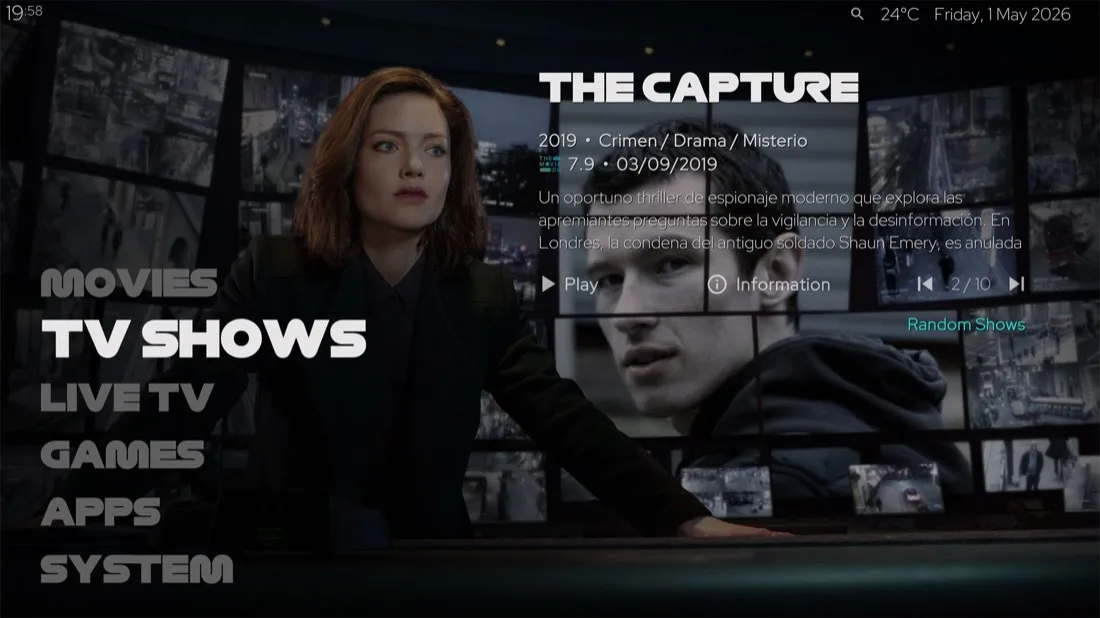
Aeon Tajo is the most recently updated skin on this list: version 9.2.5 was packaged in June 2026 for both Omega and Piers. Its developer, manfeed, calls it “inspired on Aeon Nox 5” with the motto “changes everything so that nothing changes,” and the screenshot shows what that means: a tall vertical text menu on the left, the selected show’s fanart filling the screen, and an information panel with rating, year and synopsis. It is GPL-2.0, which is why the official screenshot can appear here.
7. Quartz
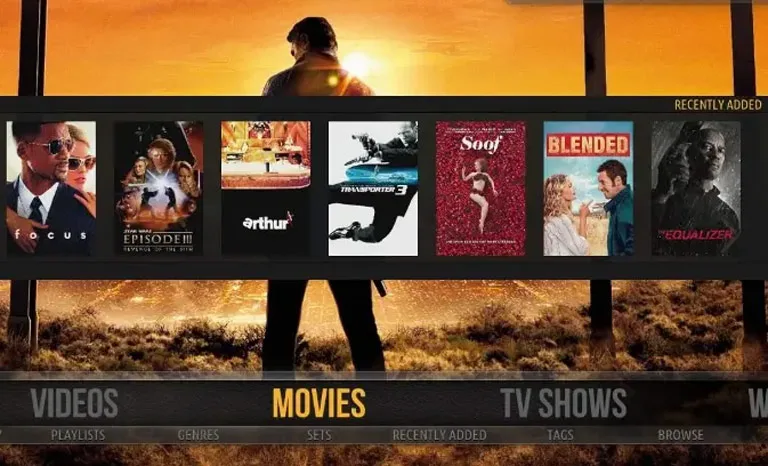
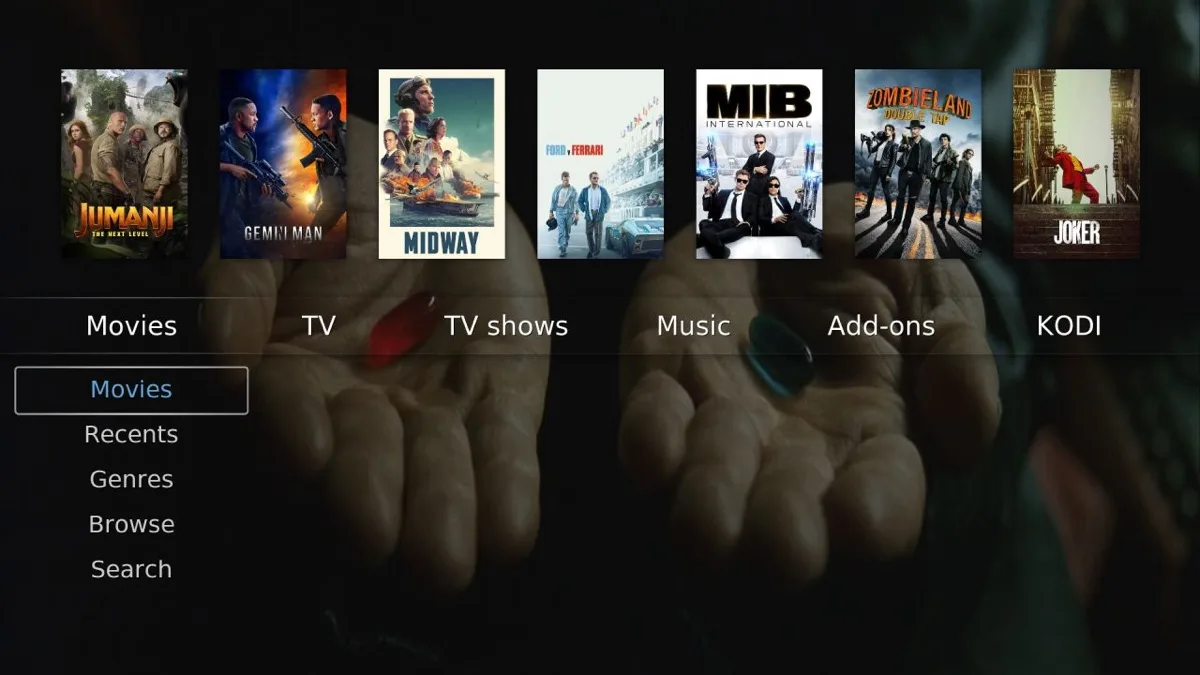
Quartz, by nonjon, is “a no-nonsense UI designed to showcase your fanart,” and its listing calls it lightweight with a highly customizable home screen. The screenshot is the whole idea: a poster shelf across the top, a plain horizontal menu, and a submenu on the left, all over fullscreen fanart. Version 5.21.1 from July 2024, dual-licensed CC BY-SA 4.0 and GPL-2.0. Good on modest hardware, and the easiest skin here to make look like your own.
8. FTV
FTV, by Hitcher, is “based on the original Fire TV UI,” and it is the answer to the “best Kodi skin for Firestick” question: rows of content that behave the way the Fire TV home screen does, so a household that already knows the stick needs no retraining. The listing notes support for Global Search, Up Next, TheMovieDb Helper and Trakt. Version 8.0.1 in the Omega repository from September 2024, and 8.3.1 in Piers from February 2025. The listing states no license, so no screenshot here.
9. Transparency!
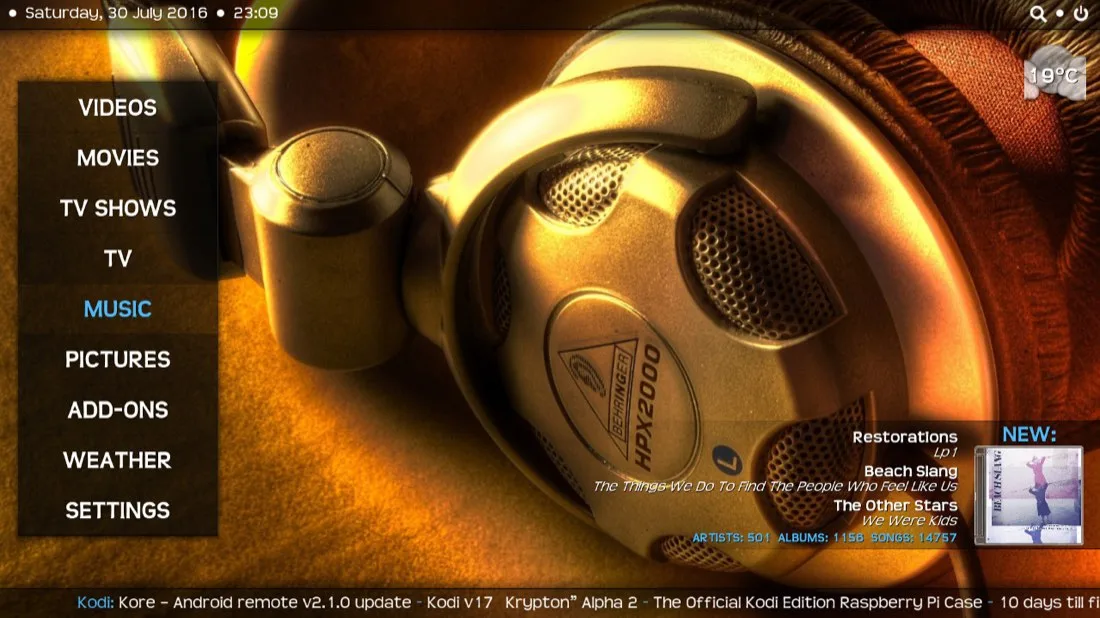
Transparency!, by ronie, answers its own question in the listing: “a fanart skin,” whose main goal is “showing your fanart, fullscreen, in all of the views, all of the time,” with Kodi’s newer features pre-configured so nobody has to edit XML. Version 13.0.0 from June 2024, CC BY-SA 3.0. The official screenshot is old, with a 2016 news ticker along the bottom, but the layout it shows, a boxed vertical menu over edge-to-edge artwork, is what the current build still does.
10. Metropolis
Metropolis is “designed to show as much media info as possible with easy to read text and icons,” per its listing, with multiple themes and customizable menus, and it credits Hitcher’s Alaska Revisited as its base. Version 4.2.0 from August 2024, maintained by jingai, Stoli, Amra and MacGyver. It is the information-dense choice: episode counts, unwatched counts and recently added items on the home screen. CC BY-NC-SA 3.0.
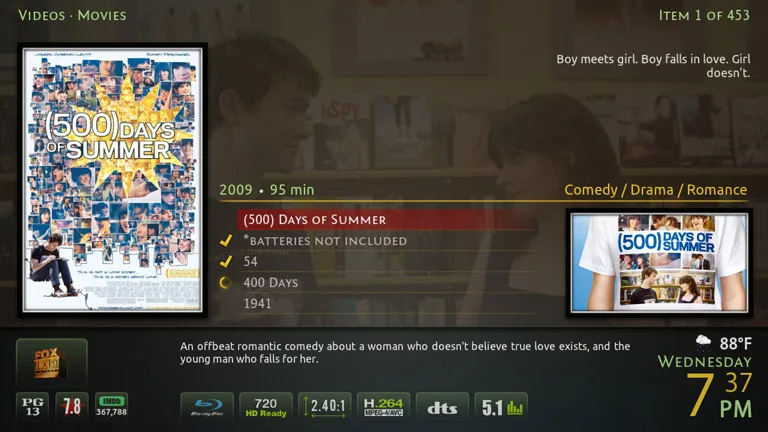
The three official skins not ranked here are Bello 10 (the tenth generation of the Bello skin, 10.0.1, December 2024), Mimic LR (8.2.2) and Xperience1080 (10.0.0, January 2025). All three install the same way and are worth a look if none of the ten fits.
Skins Dropped From This List, and Why
Six skins from the 2025 version of this page are no longer in Kodi’s official repository for Omega or Piers, so their install buttons would have led nowhere. If a Kodi skins 2026 list still names them, it was not checked against the repository.
- Pellucid, Eminence 2, AppTV, Rapier and Unity: absent from both repositories in September 2026.
- Bello 9: replaced by Bello 10, which is in both repositories and listed above.
- Any of them may still exist in a third-party repository. Installing from one means trusting that repository’s maintainer with add-on updates, which is a different decision from picking a skin.
Best Kodi Skin for Firestick and Fire TV
Three of the ten suit a Fire TV stick. FTV copies the stick’s own interface, so it wins for households that already use one. Arctic: Zephyr – Reloaded packs the most information into a small screen with a remote-first layout. Amber is the fallback for an older stick that stutters on heavier skins. Avoid the fanart-heavy skins, Transparency! and Aeon Nox: SiLVO, on the cheapest sticks; they are built for artwork a small device spends its time decoding.
Kodi Skins FAQ
What is the best Kodi skin in 2026?
Arctic: Zephyr – Reloaded for most setups, Amber for weak hardware, FTV for Fire TV users, and Confluence if you want the classic layout. All four are in the official repository for Kodi 21 and the Kodi 22 beta.
Are Kodi skins the same as Kodi themes?
People use both words for the same thing, so the best Kodi themes are usually just skins. In Kodi’s own vocabulary a skin is the add-on that changes the interface, and a theme is a color or texture variant inside some skins, such as the themes Metropolis offers.
Do Kodi 21 skins work on Kodi 22 Piers?
Every skin on this list is in the Piers repository as well, most at the same version. Confluence and FTV have newer Piers builds. Piers is still a beta as of September 2026, so treat any glitch as a Kodi issue first.
How do I go back to the default Kodi skin?
Settings, Interface, Skin, then choose Estuary. Kodi keeps Estuary installed no matter which skin you add, so the way back is always there.
What was the best XBMC skin, and does it still exist?
Confluence, the default from the XBMC days, is still maintained by Team Kodi and still in the repository. Aeon Nox, the other XBMC favorite, lives on as Aeon Nox: SiLVO and, in spirit, as Aeon Tajo.
Why do the license names matter for a skin?
They decide what you may do with the skin’s artwork and code. Non-commercial licenses, which seven of the official skins use, allow personal use and modification but not reuse in anything commercial, which is why this page shows screenshots only for the GPL and CC BY-SA skins.
Is It Worth Changing the Kodi Skin at All?
Estuary is a good skin, and a library without artwork looks worse in every fancier one. Change it when your library is tagged and you want the interface to show that off, or when the device is the problem: a Fire TV stick with FTV or an old Pi with Amber feels faster than the same hardware on Estuary. The decision that outranks looks is the repository, because a skin installed from Get more updates with Kodi and can be swapped back in two clicks.
Pick by device first, then by taste: Arctic: Zephyr – Reloaded or Copacetic for a modern look, Aeon Nox: SiLVO or Aeon Tajo for the full Aeon experience, Confluence for the classic one. If you also run Kodi on a Windows PC, our VLC skins list covers the same itch for the player most people keep alongside it.

Leave a comment
Have something to say about this article? Add your comment and start the discussion.