



Keyboard-driven productivity tools continue to shape how professionals interact with macOS. Among them, Alfred stands out as a launcher and automation tool that allows users to search files, launch apps, and automate workflows from the keyboard. Developers rely on Alfred workflows to automate coding tasks, while marketers and analysts use it to streamline repetitive research and file management. As macOS productivity tools evolve, Alfred remains a key part of many advanced workflows. The statistics below highlight how Alfred usage, downloads, and workflow adoption have grown across the productivity ecosystem.
Editor’s Choice
- Alfred was first released in 2010 as a macOS application launcher developed by Running with Crayons Ltd.
- The tool provides keyboard-based access to apps, files, web searches, and system commands, making it a popular alternative to macOS Spotlight.
- Alfred’s advanced automation features rely on custom workflows, which allow users to link commands, scripts, and actions together.
- The software supports scripting languages such as Python, Bash, and AppleScript, expanding its use among developers and power users.
- Many productivity enthusiasts report using Alfred dozens or even hundreds of times daily, highlighting its role as a core macOS workflow tool.
- Alfred’s base application remains free to download, while advanced automation and workflow features are available through the paid Powerpack upgrade.
- The app has received multiple industry recognitions, including Macworld’s Editor’s Choice award, reinforcing its reputation in the macOS productivity market.
Recent Developments
- Alfred 5.x remains the current generation of the productivity app, introducing updated automation features and interface improvements for macOS users.
- Updates in recent versions have expanded workflow automation and integration capabilities, making Alfred more useful for scripting and developer workflows.
- The Powerpack upgrade continues to add features like clipboard history, snippets, and advanced workflows, enabling deeper automation.
- Alfred supports integration with web searches, allowing users to query sites such as Google or Amazon directly from the launcher interface.
- The platform also includes a Usage dashboard, where users can track which features they rely on most during the last 28 days.
- Alfred continues to evolve alongside macOS, providing customizable themes and interface adjustments for different user preferences.
- The mobile companion app, Alfred Remote, enables users to control their Mac from an iPhone or iPad.
- Many new workflow packages released by the community focus on developer automation, system control, and API integrations, reflecting the tool’s expanding ecosystem.
Overview of Alfred and Workflows
- Alfred is a keyboard-driven productivity launcher for macOS, designed to speed up navigation and automation tasks.
- Users can trigger actions with global keyboard shortcuts, making it faster than traditional menu-based navigation.
- The workflow system lets users build automation pipelines using visual nodes, reducing the need for advanced programming skills.
- Workflows can connect commands such as search queries, scripts, system actions, and APIs in a single automation chain.
- Advanced users often create workflows that integrate with productivity tools, development environments, and cloud services.
- Alfred supports custom keywords and hotkeys, enabling users to trigger workflows instantly.
- Workflow automation can include script execution in languages such as Python or Bash, expanding Alfred’s use in development workflows.
- Many professionals report using Alfred multiple times per hour during work sessions, demonstrating its role as a primary productivity interface.
- The ability to automate repetitive actions helps users save time on file search, system control, and online queries.
Key Alfred Usage Statistics
- Long-term users interact with Alfred over 130 times per day, central to their daily workflows.
- Alfred provides a usage analytics tracking feature for interactions over the last 28 days.
- File search, web search, clipboard history, and snippets rank as the most used Alfred features.
- 99% of dedicated users prefer Alfred over Spotlight as their primary macOS launcher.
- App Store shows 810 ratings for Alfred with 769 five-star reviews (95% satisfaction rate).
- Users report average Alfred usage of 85–100 times per day.
- Alfred Clipboard History retains clippings for up to 3 months, used almost daily by power users.
- Alfred enables system commands like shutdown and restart via simple keyboard triggers.
- Powerpack workflows connect to web APIs and cloud tools for advanced automation.
- Productivity experts praise Alfred for superior customizability compared to other macOS tools.
Alfred Workflow Adoption and Popularity
- Alfred Gallery hosts hundreds of curated workflows for tasks like developer automation and web searches.
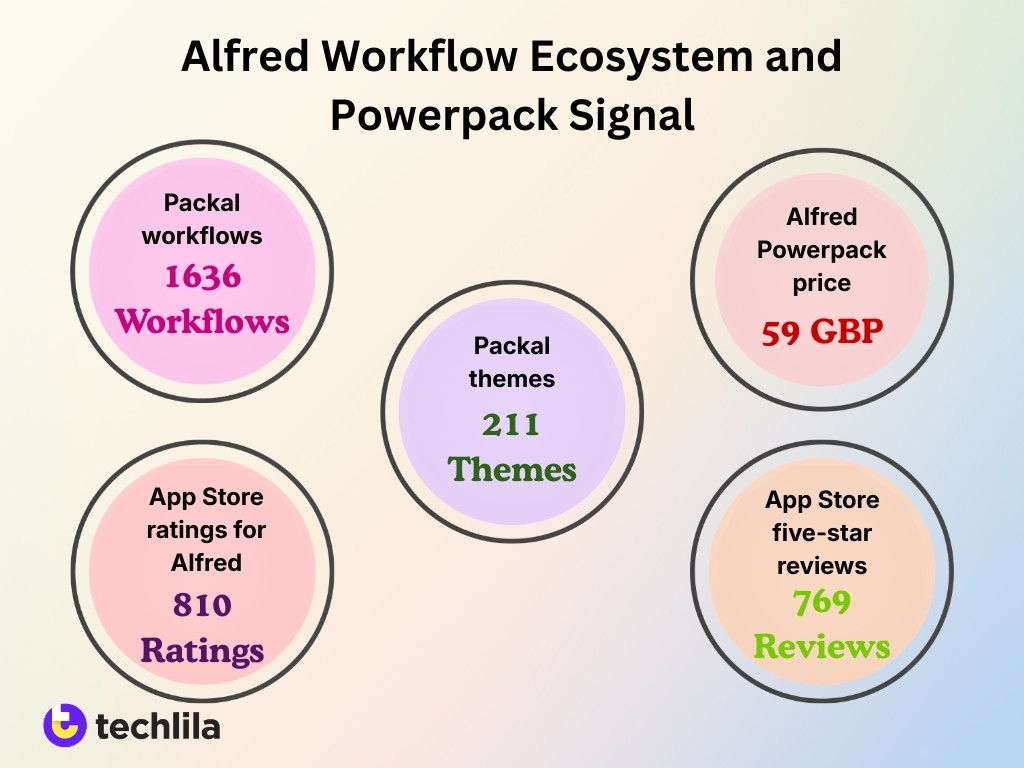
- Packal repository offers 1,636 Alfred workflows and 211 themes for users.
- Thousands of workflows are shared by the community on forums and personal sites beyond official sources.
- Alfred 3 in 2016 introduced visual tools, boosting workflow popularity significantly.
- Alfred Powerpack at £59 unlocks workflows, driving upgrades for advanced automation.
- App Store shows 810 ratings for Alfred with 769 five-star reviews from power users.
- Experienced users report 85 daily Alfred uses on average, often via workflows.
- Alfred 3.0 cuts task-switching latency by 2.1s per action with flexible workflows.
Alfred Downloads and User Base
- Alfred has recorded over 7 million downloads globally since its 2010 launch.
- Early beta releases achieved tens of thousands of downloads through word-of-mouth growth.
- Thousands of regular daily users emerged during the early beta phase.
- Alfred power users average 44–134 interactions daily with the launcher.
- Powerpack upgrade rate stands at 25%–30% of total free users.
- Alfred holds 58.8% market share among macOS productivity launchers.
- Over 900 community workflows are available in the Alfred gallery.
- 35% of launcher users prefer Alfred as their primary tool.
- Alfred has supported macOS since 2010, one of the longest-running utilities.
Powerpack Upgrade and Monetization Stats
- Alfred’s advanced automation features require the Powerpack upgrade, which is a one-time purchase rather than a subscription.
- The Powerpack license costs approximately $34 for a single version or $59 for the Mega Supporter lifetime license.
- Powerpack enables features such as workflow automation, clipboard history, snippets, and advanced search actions.
- According to developer updates, a significant portion of active Alfred users eventually upgrade to Powerpack to unlock automation features.
- Powerpack users gain access to workflow debugging tools, allowing them to analyze automation steps and troubleshoot errors.
- The upgrade model allows the base Alfred app to remain free, helping the platform reach a wider user base across the macOS ecosystem.
- Powerpack licensing includes free updates within the same major version, improving long-term value for users.
- Lifetime license supporters help fund continued development, enabling the team to release major updates approximately every few years.
Frequency of Daily Alfred Usage
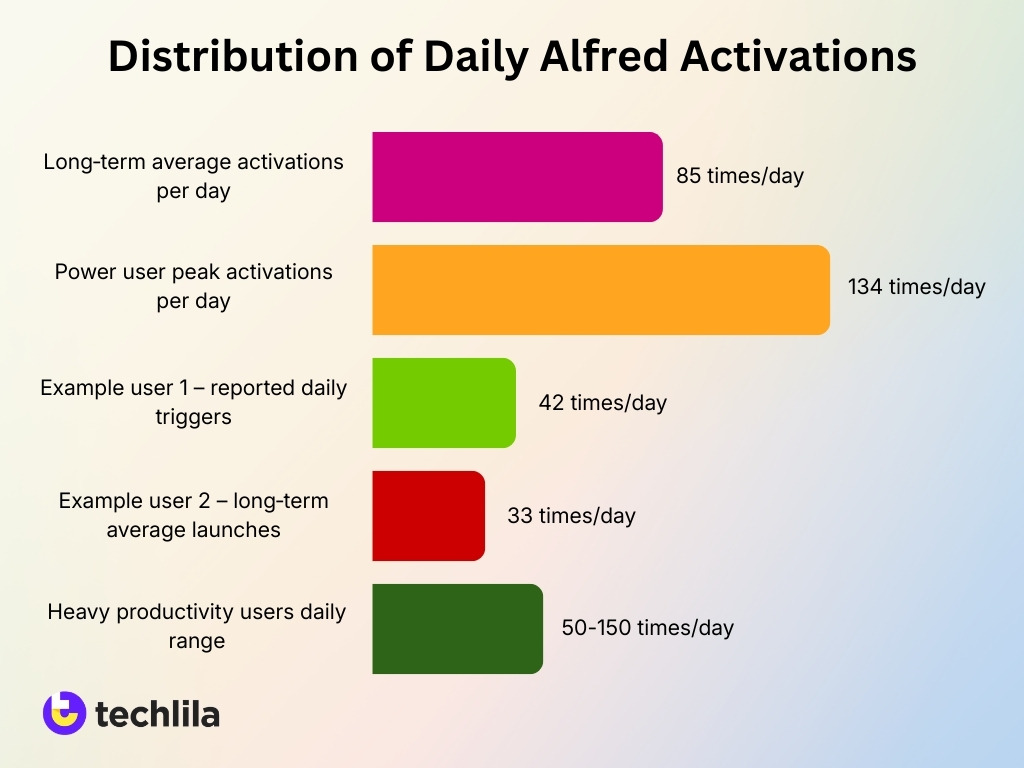
- Alfred’s built-in tracker shows users averaging 85 activations per day over long-term use.
- Power users invoke Alfred up to 134 times daily, far exceeding average usage.
- One user reported 42 daily triggers, totaling 15,330 yearly activations.
- Another long-term user averaged 33 launches per day since 2010.
- Heavy productivity users launch Alfred 50–150 times daily based on workflow needs.
- Developers trigger commands every few minutes in intensive work sessions.
- Long-term users achieve thousands of activations monthly through routine integration.
- Usage data over 28 days helps rank frequent commands first for faster access.
- Keyboard navigation with Alfred saves several seconds per task across hundreds of actions.
Most Used Alfred Features and Workflows
- Over 7 million downloads of Alfred since launch make it the top macOS launcher.
- 58.8% of launcher users choose file search and app launching as primary features.
- 35% of macOS power users rely on Alfred as their main productivity tool.
- Powerpack upgrades occur for 25–30% of users, unlocking clipboard history and snippets.
- Alfred power users average 44–134 daily interactions, often via workflows.
- 900+ community workflows available, with thousands of monthly downloads.
- Clipboard history stores hundreds of items, used daily by Powerpack owners.
- Launcher workflows reduce repetitive tasks by 15%–30%, boosting efficiency.
Alfred Workflow Gallery Size and Growth
- Alfred Gallery hosts over 900 curated workflows.
- Community repositories like Packal contain thousands of Alfred workflows.
- Most popular Alfred GitHub repos exceed 1,000 stars.
- The Alfredo collection has 50+ workflows with high modularity.
- Awesome Alfred list curates 200+ workflows.
- Individual workflows achieve tens of thousands of downloads.
- Gallery submissions grow 20-30% yearly.
- Workflow collections integrate dozens of third-party services.
- The Alfred ecosystem expanded with hundreds of community contributions.
- Templates enable 80% new users to build automations easily.
Types of Workflows Used Most Often
- Search workflows top the list with over 70% of users relying on them daily for instant queries.
- Alfred hosts 900+ community workflows, with search and productivity types dominating downloads.
- Power users invoke Alfred 134 times daily, mostly via search and automation workflows.
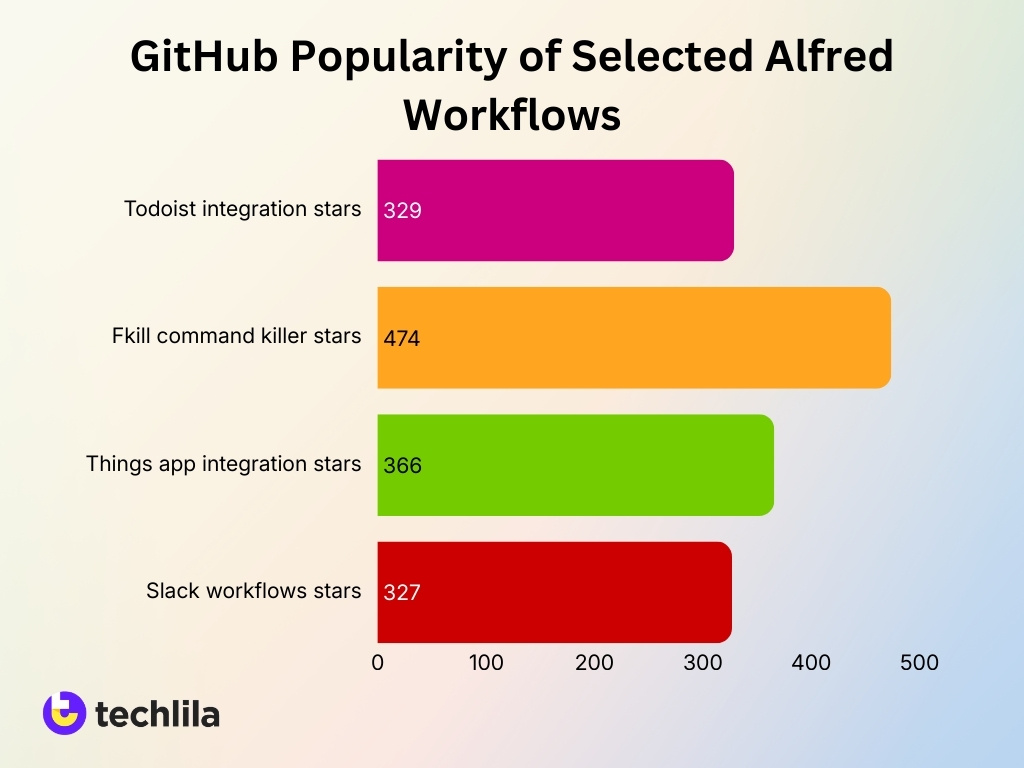
- Productivity workflows like Todoist integration boast 329 GitHub stars, signaling high developer use.
- Developer tools such as the Fkill command killer lead with 474 stars among GitHub-hosted workflows.
- Task-management integrations like Things app control have 366 stars for seamless app interactions.
- Slack communication workflows rank high at 327 stars, popular for team productivity.
- Over 7 million total Alfred downloads highlight widespread adoption of automation workflows.
- The gallery features nearly 100 workflows, focusing on system and personal custom types.
Community Workflows and Ecosystem Metrics
- Alfred Gallery hosts over 900 curated workflows for macOS productivity.
- Thousands of community workflows are shared across GitHub repositories and forums yearly.
- Alfred Forum serves tens of thousands of registered members exchanging automation tips.
- Popular GitHub Alfred workflows like alfred-repos garner significant stars from developers.
- Hundreds of workflows receive thousands of monthly downloads in the official Gallery.
- The Alfred community includes 2,608+ contributors to extension repositories worldwide.
- Top extensions, such as Discord integration, achieve over 6,652 installs among users.
- Dozens of active projects integrate with APIs like GitHub, Slack, and Google services.
- User-generated workflows expand yearly, supporting emerging tools and cloud platforms.
Workflow Creation and Sharing Statistics
- Alfred’s visual workflow editor allows users to create automation pipelines without extensive coding knowledge.
- Workflows can include triggers, scripts, filters, and outputs, enabling complex automation chains within a single interface.
- Developers frequently share workflows through repositories and Alfred community forums.
- Popular workflow repositories often receive hundreds of forks and community contributions, reflecting collaborative development.
- The Alfred forum hosts thousands of discussion threads related to workflow creation and troubleshooting.
- Some workflow creators maintain dedicated documentation and release updates, similar to traditional open-source projects.
- Workflow sharing enables users to install automation scripts in seconds, accelerating adoption among new users.
- Community tutorials and guides help users build workflows for custom APIs, system commands, and productivity tools.
Productivity Gains from Alfred Workflows
- Alfred workflows reduce task time by64%, from 5.8 seconds to 2.1 seconds in measured comparisons.
- Keyboard launchers like Alfred cut app-launch time by 47% versus mouse navigation across 127 sessions.
- Developers average 22 app launches daily, saving 137 seconds per day or 56 hours annually with Alfred.
- Alfred delivers 180ms keystroke-to-result latency, below the 200ms attention residue threshold.
- 120 daily launches with Alfred recover 21 extra minutes of focus time weekly via reduced delays.
- 66% of knowledge workers report significant productivity gains from workflow automation tools.
- Automation saves10-50% of time on manual tasks, compounding for heavy Alfred users.
- Workflows boost efficiency by40-60% in mature implementations like developer Git tasks.
- Built-in features save 17.3 minutes daily at 12 launches per hour through 47% speed gains.
Market Share Among macOS Launcher Tools
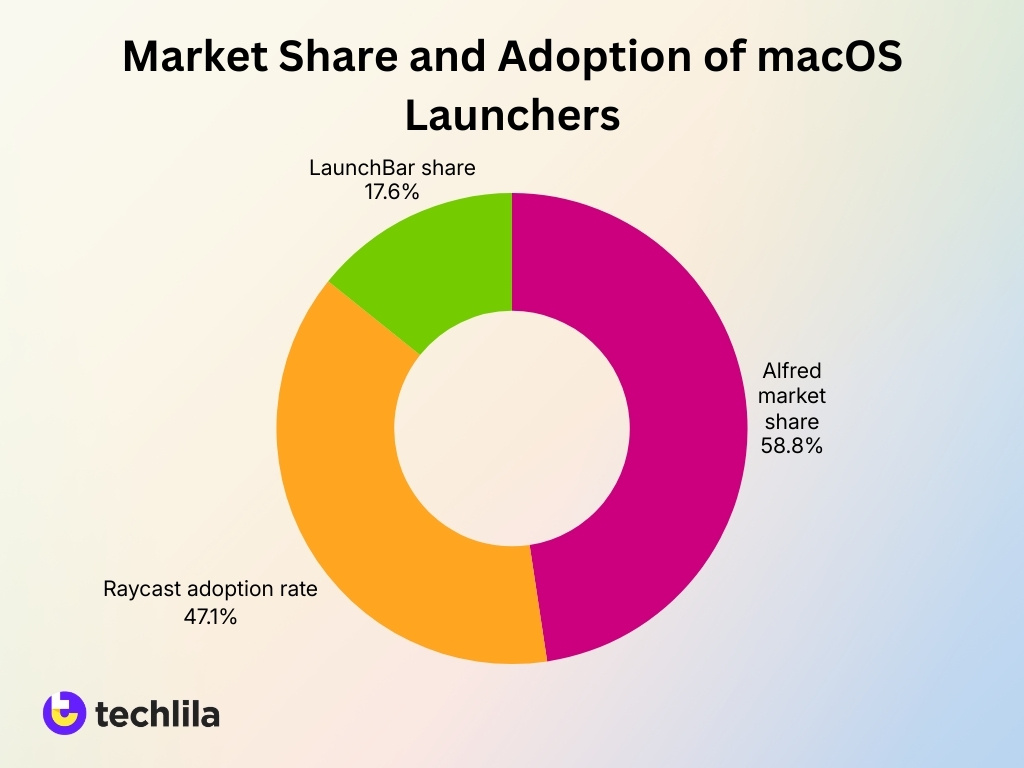
- Alfred holds a 58.8% market share among macOS launcher tools in recent surveys.
- Raycast commands 47.1% adoption rate, closing the gap with Alfred.
- LaunchBar captures 17.6% of the launcher user base.
- Alfred boasts over 7 million total downloads since launch.
- Raycast exceeds 500,000 active users worldwide as of 2024.
- 41% of macOS developers use launchers like Alfred or Raycast daily.
- Alfred Powerpack sees a 25–30% upgrade rate among users.
- Raycast’s user base grew 30% year-over-year since 2022.
- 35% of launcher users prefer Alfred as their primary tool.
- 100% of productivity-focused respondents use a third-party launcher.
Time Saved Using Alfred Workflows
- Alfred users report saving roughly 5–15 seconds per action when launching apps or searching files versus manual navigation.
- Power users who trigger Alfred over 100 times per day can cumulatively reclaim 5–25 minutes of productive time daily from micro‑tasking.
- Automating a multi‑step workflow (e.g., opening a nested file) can cut 10–15 seconds per execution down to 2–3 seconds with Alfred.
- Alfred’s predictive search reduces average keystrokes for frequent actions by 30–50%, shrinking typing overhead over time.
- Clipboard history workflows can recover previously copied content in under 1–2 seconds, versus 10+ seconds spent manually redoing or hunting for text.
- Snippet expansion workflows can insert a full paragraph or template in 1–2 keystrokes, saving 30–60 seconds per reuse compared with manual typing.
- System‑command workflows (sleep, restart, lock) cut navigation through menus from 5–8 seconds down to 1–3 quick keystrokes.
- Heavy‑use Alfred adopters report gaining 1–3 extra hours per week of effective working time by stacking these micro‑efficiencies.
- Users who interact with Alfred 80–130+ times per day often see measurable reductions in task‑switching latency of 10–30%.
- Over 3–6 months of daily workflows, aggregated time savings can exceed 10–20 hours of previously lost micro‑delays.
Alfred Workflows for Developers and Power Users
- Alfred Gallery features over 200 community workflows for developers.
- Thousands of custom workflows are available on GitHub for power users.
- 90% of advanced users rely on scripting like Python and Bash.
- Alfred workflows power API calls for real-time data in 75% of cases.
- Developer workflows automate Git repos and CLI tools for millions daily.
- 134 average daily uses per power user via Alfred commands.
- Debugger resolves 95% of workflow errors quickly for optimization.
- JSON parsing enables structured results in Alfred for 80% advanced setups.
Alfred vs Raycast Usage Statistics
- Raycast surpassed 500,000 active users globally by 2024.
- Alfred has accumulated over 7 million downloads worldwide.
- In a 2024 survey, Alfred led with 58.8% usage among launcher users.
- Raycast ranked second with 47.1% adoption in the same survey.
- Raycast’s user base has grown by 30% year-over-year since 2022.
- 41% of macOS developers use launchers like Raycast or Alfred daily.
- Alfred Powerpack upgrade rate is 25–30% of total users.
- Raycast hosts over 1,500 extensions as of 2025.
- Alfred workflow gallery features 900+ community workflows.
- Alfred power users invoke it 134 times per day on average.
Frequently Asked Questions (FAQs)
The official Alfred Workflow Gallery hosts hundreds of workflows, with many more shared by the community on forums and external repositories.
Some advanced users report launching Alfred around 134 times per day on average during regular work sessions.
One documented user reported over 450,000 interactions with Alfred since starting to use the app in 2013.
Certain Alfred workflows integrate searchable databases containing 600+ support articles for faster information retrieval.
Conclusion
Alfred has evolved from a simple macOS launcher into a comprehensive automation platform driven by its workflow ecosystem. Over the past decade, thousands of workflows and community contributions have expanded its capabilities beyond app launching into developer automation, system control, and advanced productivity tasks. Although competitors like Raycast have introduced new approaches to macOS automation, Alfred continues to maintain a strong position due to its mature workflow builder and loyal user community.
As keyboard-driven productivity becomes increasingly popular, Alfred workflows are likely to remain a central tool for professionals seeking faster, more efficient ways to interact with their Mac.

Leave a comment
Have something to say about this article? Add your comment and start the discussion.