

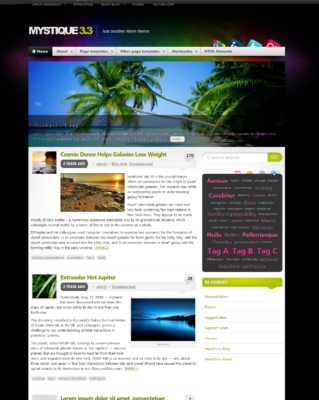
In our earlier article we have covered 50 Most Wanted Mystique Theme Modifications, Hacks. Considering the huge demand by our beloved readers for modifications in Mystique 3.0 and the huge response for previous article, here we are publishing Most Wanted Mystique 3.0+ Modifications, Hacks. Customize Mystique theme as per your choice.
Note: If you’re not familiar with coding stuff then there is no necessary to edit single line of code, checkout Modified Mystique Theme – MystiqueRevised.
Code Snippets to Modify Mystique Theme:
Note: To modify Mystique WordPress Theme you have to add following code, Under Appearance -> Mystique -> CSS or in Advanced tab. We recommend that always install Mystique child theme so you will not loose any modifications when you will update the theme.
1. Adjust position of Site Title Logo:
#site-title {
padding: 25px 0 2px 0;
}
Where 25px is the space above site title and the 2px is the space below site title or site logo.
2. Change Site title color:
#logo a {
color: #E0E0E0;
}
Change value of E0E0E0 if you want another color.
If you want to make site title as per our choice then add following code:
#logo a {
color: #E0E0E0;
display: block;
font-variant: small-caps;
text-decoration: none;
text-transform: none;
}
#logo {
font: bold 395% Verdana,Arial,Helvetica,"Arial Black","Helvetica Black",Gadget,sans-serif;
letter-spacing: -2px;
}
3. Change the hover color of blog title:
#logo a:hover {
color: #CECECE;
}
Change value of CECECE if you want another color.
4. Increase site title text size:
To increase size of site title text use following code. Adjust value of 350 accordingly.
#logo {
font: bold 350% "Arial Black","Helvetica Black",Gadget,sans-serif;
letter-spacing: -2px;
}
5. Modify Appearance Previous and Next Links:
/* Change Appearance of Previous and Next Links */
.post-links a{
background-color: transparent;
border: 0 none;
color: #0071BB;
font-size: 14px;
font-weight: bold;
padding: 2px 4px;
text-decoration: none;
text-shadow: 1px 1px 1px #FFFFFF;
}
.post-links a:hover{
color: #ED1E24;
}
.post-links div{
color: #0071BB;
display: block;
line-height: normal;
max-width: 49%;
}
.post-links .alignright{
text-align: right;
}
6. Adjust space between Navigation bar and content:
.shadow-right {
padding-bottom: 18px;
}
Adjust the value of 18 according to your need.
7. Join navigation bar with main content:
.shadow-right {
padding-bottom: 0;
}
.social-media {
bottom: 10px;
right: 10px;
}
8. Turn widget titles to lower case:
.block .title h3 {
text-transform: none;
}
9. Change the default font size of text inside post's:
.hentry .post-content {
font-size: 16px;
line-height: 20px;
margin: 0 0 15px;
}
10. Border for each post:
Some people like to add border to each post, here is the code to do that,
.post{
border:2px solid;
margin:0 0 40px;
padding:15px;
text-align:justify;
}

11. Change the black background:
In Mystique theme, default background is black you can change it to other. Here we gave blue as an example. Instead of blue you can use color value as #CECECE or any other value that you want.
body{background-color:blue;}
12. Alternate header image:
To use following header image add given code below image.
/* Alternate header image */
#page{
background:transparent url(../images/extras/header-alternate.jpg) no-repeat center top;
}
If you are using child theme then give full path of the image. For example, as I am using child theme I have added following code,
/* Alternate header image */
#page {
background:transparent url(http://cdn2.techlila.com/wp-content/themes/mystique/images/extras/header-alternate.jpg) no-repeat center top;
}
13. Center the logo picture in the header:
#logo {
width : 100%;
text-align : center !important ;
}
14. Move up the social media icons:
.media {
bottom: 30px;
position: absolute;
right: 2px;
z-index: 5;
}
Adjust 30px value to whatever you want.
15. Display number of post views:
As Milenko (Theme Developer) told in his forum, Post views are already implemented, but disabled by default because on large sites recording post views (ie. updating the database each time a visitors views a page) can have an impact on performance.
If you want to enable post view count, open the functions.php file from your child theme folder (should be mystique-extend) and add:
define('ATOM_LOG_VIEWS', true);
Then use it wherever you want in the templates, for example in teaser.php (copy the original to your child theme folder) look for following code:
<?php if(atom()->options('post_category') && atom()->post->getTerms('category')): ?>
<?php printf(_a('in %s'), atom()->post->getTerms('category', ', ')); ?>
<?php endif; ?>
then add following code below above code:
| Views <?php echo atom()->post->getViews(); ?>
Inside widgets, like the “Posts” widget you can output post views by using the {VIEWS} keyword in templates.
16. Replace pages with categories like in old theme:
atom()->addContextArgs('primary_menu',categoryMenu);
Now you’ll get categories in the menu.
17. Change the spacing of the blog title text:
#logo{
letter-spacing: 0; /* change this value, default is -6px */
}
18. How to remove the navigation bar from 3.0
#header .shadow-left{
display: none;
}
The better way, using a child theme: copy header.php to your child theme and remove the code for the navigation
19. Adjust ol,ul:
The list items between ol,ul are cut on the left border. Here is the code to adjust these items
.hentry ol,ul{
padding-left:15px;
}
20. Add a banner just near the logo:
#header {
background: url(http://cdn2.techlila.com/wp-content/themes/mystique/images/YOUR-LOGO-NAME.png);
background-repeat: no-repeat;
background-position:70% 30%;
}
Where 70% is ‘X’ co-ordinate, 30% is ‘Y’ co-ordinate. So just change: background-position:98% 50%;
to adjust banner position
21. Star icon for order-by-views:
Only the order-by-views doesn’t have the star icon. The comment order has it though. So here is the code to add star icon for order-by-views,
.block-tabs .tabs .navi li.nav-posts-views a{background-position: 0 -37px;}
22. Change the [...] from excerpts with ‘Read further’:
Use Child theme and add following code in user – defined code.
<?php
add_filter('excerpt_more', 'my_read_more_text');
function my_read_more_text($text){
return sprintf(' <a class="more-link" href="%1$s">%2$s</a>', get_permalink(), 'Read further...');
}
23. Make the sidebars grey (#eee) and the main content white (#fff):
.c2right #mask-1,
.c2left #mask-3,
.c3 #mask-2,
.c3left #mask-3,
.c3right #mask-1
{background: #fff;}
.c2left #mask-1,
.c2right #mask-3,
.c3 #mask-1, .c3 #mask-3,
.c3left #mask-2,
.c3right #mask-3
{background: #eee;}
24. Fixed custom background image:
#page
{
background-repeat:no-repeat;
background-attachment: fixed;
}
25. How to make comments dofollow:
In WordPress Dashboard -> Appearance -> Editor
Open comment.php file (Recommendation: Use Child theme, copy comment.php file from parent theme folder to child theme folder) and replace
atom()->getAuthorAsLink()
with
atom()->getAuthorAsLink('dofollow')
26. Change appearance of “Show More” button:
By default “Show More” button is not easily visible, use following code to make it easily visible.
.no-fx .block a.more, .block .fadeThis a.more {
-moz-border-radius: 5px 5px 5px 5px;
background: none repeat scroll 0 0 #0997e1;
}
If you want color other than blue then change value #0997e1 to whatever you want.
27. Change appearance of image which shows number of comments on homepage:
First, download and add icons.png image file to your Mystique Image folder (themes/mystique/images/).
.hentry .comments {
position: absolute;
right: 1px;
top: 5px;
z-index: 5;
background: url("YOUR SITE URL HERE/wp-content/themes/mystique/images/icons.png") no-repeat scroll 0 -505px transparent;
width: 48px;
height: 38px;
text-transform: uppercase;
text-align: center;
text-decoration: none;
text-shadow: #999 0px -1px -1px;
line-height: 34px;
font-size: 150%;
ont-weight: bold;
}
.hentry a.comments:hover {
background-position: 0px -543px;
color: #fff;
text-shadow: #000 0px -1px -1px;
}
Don’t forget to change “YOUR SITE URL HERE” text to your actual site URL.
28. Add transparent borders to tables:
table,table td,table th,table tr.even td,table tr:hover td{border:0;background-color:transparent;}
29. Reduce the size of every post heading:
h1.title {
font-size: 250%;
}
Original value is 300%, adjust value according to your need.
30. For single posts in order to display images without covering the sidebar:
img {
max-width: 468px;
max-height: 560px;
}
Adjust max-width to your preference for anyone wanted.
31. Move tagline underneath the title:
#logo{
float:none;
}
#site-title .headline{
float:none;
border:0;
margin:20px 0;
padding:0;
}
32. How to add Google +1 Button in Mystique 3.0+ Navigation Bar:
Under WordPress Dashboard -> Appearance -> Editor
In the Templates Column look for “footer.php” file.
In footer.php file search for tag and add following code before body tag:
<script type="text/javascript">
(function() {
var po = document.createElement('script'); po.type = 'text/javascript'; po.async = true;
po.src = 'https://apis.google.com/js/plusone.js';
var s = document.getElementsByTagName('script')[0]; s.parentNode.insertBefore(po, s);
})();
</script>
Then under WordPress Dashboard -> Appearance -> Mystique settings
In the Advanced tab -> “User-defined code“.
<?php
// for custom menus
add_filter('wp_nav_menu_items', 'add_google_plus_button_to_menus');
// for the default page menu
add_filter('wp_list_pages', 'add_google_plus_button_to_menus');
function add_google_plus_button_to_menus($items){
// append it to the nav menu
return $items.'<li style="float: right; margin-left: 111px; padding-top: 6px;">
<div class="g-plusone"><g:plusone annotation="inline"></g:plusone></div>
</li>';
}
Now you'll see Google+ button on your Mystique navbar. You can repeat same procedure to add Facebook Like button.
33. How to add Search in Mystique 3.0+ Navigation Bar:
under WordPress Dashboard -> Appearance -> Mystique settings
In the Advanced tab -> “User-defined code“.
<?php
// for custom menus
add_filter('wp_nav_menu_items', 'add_search_to_menus');
// for the default page menu
add_filter('wp_list_pages', 'add_search_to_menus');
function add_search_to_menus($items){
// capture the search template
ob_start();
atom()->template('searchform');
$search = ob_get_clean();
// append it to the nav menu
return $items.'<li class="nav-search">'.$search.'</li>';
}
And add following code in Mystique settings -> CSS tab
/* increases top/bottom padding on nav items, so it fits the theme-default search form */
.nav-main a{
padding:12px 15px 14px;
}
/* position and width of the form: top-right */
.nav-main li.nav-search{
position:absolute;
background: none;
border: 0;
width: 250px; /* <- width of the search form, can be changed */
height: 34px;
right:10px;
top:5px;
}
/* no padding on this nav menu item */
.nav-main li.nav-search a{
padding: 0;
}
.nav-main li.nav-search li:hover a{
background-color: transparent;
}
.media {
bottom: 35px;
position: absolute;
right: 2px;
z-index: 5;
}
34. How to Change Home Page Style:
If you want to change home page appearance and want to show only post thumbnail and title of post then create a new file and give name teaser.php to the file in your child theme folder, add following code inside teaser.php:
<article id="post-<?php the_ID(); ?>" <?php post_class('thumb-only'); ?>>
<a class="post-thumb" href="<?php atom()->post->URL(); ?>">
<?php atom()->post->thumbnail(); ?>
</a>
<section>
<header><a href="<?php atom()->post->URL(); ?>"><?php atom()->post->title(); ?></a></header>
<p><strong><?php atom()->post->terms('category'); ?></strong></p>
<footer><?php atom()->post->date(); ?></footer>
</section>
</article>
Then in Mystique settings -> CSS tab add following code:
article a img{
border: 1px solid #fff;
box-shadow: 0 0 5px 1px #888;
}
article section{
text-align:right;
}
article section header{
font-size: 130%;
}
35. How to Add Breadcrumbs:
We recommend you to add Breadcrumbs to your Mystique Theme. It is a very good addition to the design because of usability and it also provides SEO benefits because it links to the path hence increasing bot activity in page indexing. Breadcrumbs provide a way to easily navigate through site, from post, to category, to the next post, or from child page, to parent page etc.
First you need to download the Rdfa Breadcrumb plugin upload and activate it as usual. If you’re using WordPress SEO by Yoast then method is given below to add breadcrumbs using WordPress SEO.
Note: Activate Mystique Child Theme (Mystique-Extend), then under WordPress Dashboard -> Appearance -> Mystique settings -> Advanced, look for User-defined code and add following code:
echo '<div style="font-size: 13px; line-height: 18px; margin: 1px 0; padding: 2px 0;">';
atom()->add('before_primary', function(){
if(function_exists('rdfa_breadcrumb')){ rdfa_breadcrumb(); }
});
echo '</div>';
If you’ve enabled breadcrumbs option (WordPress Dashboard -> SEO -> Internal Links) in WordPress SEO by Yoast then instead of adding above code add following code in Advanced-> “User-defined code”.
echo '<div style="font-size: 13px; line-height: 18px; margin: 1px 0; padding: 2px 0;">';
atom()->add('before_primary', function(){
if ( function_exists('yoast_breadcrumb') ) {
yoast_breadcrumb('<p id="breadcrumbs">','</p>');
}
});
echo '</div>';
After adding above code you will see Breadcrumb on your post as follows:
After adding breadcrumbs, in search engine result pages (SERP) your site results will look like this.
Note: It'll take around 12 hours to 2 days to show breadcrumbs for all pages depending upon how search engine bots crawl your site. You can check your site breadcrumbs in Rich Snippet Tool.
One more thing, previous and next post link are useful when links are after the post instead of above post title, so look for code
<?php if(atom()->options('single_links')): ?>
<div class="post-links clear-block">
<div class="alignleft"><?php previous_post_link('« %link') ?></div>
<div class="alignright"><?php next_post_link('%link »') ?></div>
</div>
<?php endif; ?>
Cut the code and paste after following line:
<?php atom()->action('after_primary'); ?>
If you want to modify appearance of previous and next post link then checkout fifth code snippet.
36. How to Make the Caption Text Larger:
If you want to change font size of caption text then add following code in Mystique settings -> CSS tab
.wp-caption-text {
font-size: 13px;
}
In future, we will do many modifications in Mystique theme so we'll keep this topic updated. If you have some suggestions or problems about code snippets provided here then share it with us in form comment below, we'll try to solve your problems.
Reference: Digitalnature Forum, thanks to Milenko.
If you like these Mystique Theme Modifications please retweet and share it with your friends on Facebook, and on Google+.


WordPress Tips for Making an Awesome Blog
Most Popular and Useful SEO Plugins for WordPress SEO
Hi, I’m new to wordpress and I am very interested to know how to make the menu you have on your page. Specifically, you have the right of the blog, gray with four icons. thanks
In WordPress Dashboard -> Appearance -> Menus. Create Menus. Or search on Google “WordPress Menu”. Thanks.
I am not new to blogging and really value your blog. There is much prime subject that peaks my interest. I am going to bookmark your blog and keep checking you out. Wish you good luck.
Rajesh, your modification tips is great. Surely it helps every mystique users…. Highly recomended post for mystique users…
Hi, where can i change the name of MORE > button in excerpt mode ?
How can i add number of views of a post, what plugin do you use ?
Article updated, check out your answers.
Thanks you so much for this !
Correction –
no. 22 > it should be added on user – defined code and not user.css .
Oh! Thanks Ayush, fixed.
Very nice modifications, I am using the 24th one for my blog..Please see that the 23rd and the 24th modification are the same.Other than this is a great post for Mystique users
Thanks, fixed
Very nice post… great job… thank you so much!
hi rajesh,
could you tell me what is required to be allowed to put the “copyright” notice and the copyright symbol on the site ? (not the creative commons licence or the DMCA thing)
what do i have to do to be officially allowed to put “copyright – all rights reserved” notice on my site ?
thank you.
Search on Google. Sorry, I have not enough information about that topic.
alright. thank you.
maybe you can put up a post on that someday.
gr8 post by the way. keep up the good work.
Hi Rajesh,
How can I change the way that links are shown? I would like it the opposite to how they look now. I’d like them to appear underlined on hover, and blue (not underlined) as plain link. Thanks in advance!
Add following in CSS module:
a{ text-decoration:none; outline:none; color: #007ED9; } a:hover{ color: #E67300; text-decoration: underline; }Adjust color values if you want to change link color.
Brilliant, thanks so much!
Hi there,
I would like to know how to setup the slide. In previous versions I think that we only must to “star” the post we like to appear in the slide, but know I have no clue how to make it appear and configure.
Any answer would be very apprecitated
New version fails to provide this feature. Ask theme developer in his forum.
Dissapointing…it were one of the main reasons to put this template in my web.
Developer forum were down the other day and searching the Net for any answer I fell here.
Thank you for your help, Rajesh!
Hey Rajesh .. Ive been following your site for mystique customization since the early version.. You’ve done an awsome job really !!!
I wanted to know if i can modify the header like techgyo.
Its attached with the menu and those plus1 and fb buttons on the right of the header .. is there a way possible for someone like me with less or no CSS / HTML info at all ?
It is possible to modify everything with CSS, actually he is using my ideas. I have already modified Mystique 2.4.2 and gave professional look (Attached menu with header) and his site has no professional look. It will be better if you give your own styles to your site.
great adds, saves some time digging through code to make changes. While you’re on the case – what do you have for a black menu bar and a search field in the menu bar?
I will try to give code for black navigation. Now a days, I’m busy in my final year project – Search Engine Optimization (SEO) Robotics.
Sounds awesome! have fun with that, I’ll see what I can scratch together in the interim…
How do you add a jpg banner or a flash banner above the navigation bar?
I have not added any banner? Please elaborate what do exactly want?
like on this site:
http://www.stefanthedj.com/blog/
I think he is using paid service – Design your own header for Mystique Theme $7.
where do I find out information about this?
Look at the advertise in the Sidebar.
Hai my friends. I jusat want to know. How can I get the comment style for the example 1 comment, not like mine just number in box
Please elaborate what do you exactly want, sorry I didn’t get you.
Well i am impressed with these chort codes and though useful. Keep it up the good work Rajesh.
I need some help here, ” How can we alter or reduce the size of every post heading ” – as the size of headings in post are preety big.
Add following code in Appearance -> Mystique -> CSS Tab.
h1.title { font-size: 250%; }Original value is 300%, adjust value according to your need.
When everyone comment in your blog, your comment will appear like this : 20 comment. But in my blog, when everyone comment, it will appear like this : 20 only (in box). I want the coding of that.
It will not suit your theme, because the number of comments and the word “Comments” both together can not fit in that box. But still if you want it at any cost then it can be done but will require some changes.
So how I want to edit?
I’ll give you code asap, now a days I’m busy in my Final year project, not enough time to look in code, but I’ll try to give it asap.
hello,
thanks for your great topics. i wonder how i can edit the position of the page title. i want to center it.
best regards
Add following code in CSS tab
h1.title { text-align: center; }Thank you for the help Rajesh
it worked, am stick at another thing, how do we put adsense code with the header? like with the site name being on left and adsense appear on the right?
Read the post carefully, tip no 20.
Hello, thanks for your guide…
How to hide site description?
Add following code in CSS tab.
#site-title .headline { display: none; }Hey man, what theme are you using? I’d love it!
Checkout About Tips and Tricks page.
Hi Rajesh,
1. Good work buddy, How to reduce space between the logo image and the navigation bar?
2. How to customize the top menu bar with colors and fonts, etc?
3. Can a webmail page of the site be linked from the home page?
It would be a great help.
Thanks in advance.
Hi,
Read article carefully.
1. Read 1st tip.
2. For top menu colours you have to change image – bg-nav-d.png.
For fonts add code
.nav-top { font-family: verdana; }Change verdana to whatever you want.
Or use WP Google Fonts plugin.
3. Use Menus. Read – Adding or Changing Menus
Dear Rajesh,
Thank you very much for responding to my queries so quick. Obviously your answers will help me, I’m working on it.
The space between the nav bar and the title logo is still there even at 0px. May be the social icons reserved the space about half an inch.
where can I change the top nav bar image?
I uploaded mystique 3.1 from digitalnature, after I installed there are 2 mystique themes now; one mystique3.1 and the other is mystique extended1.0. I didn’t notice it and worked on the extended one. Which do you suggest to be the best? and is there a possibility to copy all other settings to 3.1 after changing the theme from extended to 3.1?
Silly question again; is it possible to copy all of the contents of the same theme and to paste it into different site where same theme is installed?
I had 3-4 sites hacked and still fear it. however, taken some tips from the internet but do you have any solid idea that we could keep our site secure?
I hope you wouldn’t mind to answer my questions.
Thank you very much.
Hi Prabin,
My solution might be a bit late given that your post is almost 3 months old, but I have found a fix for the space between the logo image an the nav bar.
I have been struggling with getting rid of the space between an image logo and the primary navigation bar as well. I found out that there is a clear block fix in the core.css file (line 2280) which is used the header in order to position the navigation bar correctly, however it introduces a hidden “.” the size of the normal body font-size 13px.
By adding the following to the CSS you can fix this (extending on modification #1 from Rajesh, thx):
#site-title {
padding: 5px 0 0 0; /* set bottom padding of site-title to zero */
}
#logo {
margin: 10px 0 0 0; /* set bottom margin of logo to zero */
/* correct for “clear block fix” by positioning the logo -13px down from its intended position */
position:relative;
bottom:-13px;
}
Be aware that you will have to change the number in “bottom:-13px;” to match the body font size if you decide to alter it.
Thanks Rajesh for this great post. It helped me a lot exploring the possibilities of the mystique theme!
xtended one. Which do you suggest to be the best? and is there a possibility to copy all other settings to 3.1 after changing the theme from extended to 3.1?
Silly question again; is it possible to copy all of the contents of the same theme and to paste it into different site where same theme is installed?
I had 3-4 sites hacked and still fear it. however, taken some tips from the internet but do you have any solid idea that we could keep our site secure?
I hope you wouldn’t mind to answer my questions.
Thank you very much.
According to theme developer always use child theme of Mystique. You will not loose any modifications if you are using child (extended) theme.
You can apply same settings on other site as in theme there is option export code or something like that, now I’m not using Mystique so I forget name of that option. But option is there in first tab.
To prevent your site data from hacking easy and best option is always take backup of your site. Never use pirated themes or plugins. There are many free tools on Internet so use them and check any issues are there
1. The importing of codes is not working may be because I am using a subdomain.
2. Internet Explorer shows errors on the page if the social icons are there the site over the nav bar. When I removed the icons, it showed no errors.
3. How do I change the top nav bar colors and where?
4. Which guest book do you suggest? I installed Gwolle Guestbook but is not working properly.
5. If there is no child theme, how would you make one?
Thanks a lot.
1. Maybe you are using invalid short-codes, read this article: http://digitalnature.eu/docs/shortcodes/
2. Maybe your site having JavaScript error. Or plugin conflict.
3. Change the image via FTP or using server’s file manager program.
4. Maybe plugin conflict or plugin having error, or not supported by new WordPress.
5. Read this article: http://digitalnature.eu/docs/child-themes/
Hi there, I love the info on this page by the way and I appreciate all the tips that you have given.
Im interested in the banner ad in point 20. It says to add a png file. How would one make this a clickable image with an affiliate link for example.
Thank you in advance.
Cheers,
Scott
Open header.php and look for the code
After above line add following line
Don’t forget to add affiliate link and Image URL.
I’ve tried to find it many many times. Thank you very much for answering
I’m also interested in the banner in point 20. I am using a plugin called AdRotate, and I want to place one group beside the logo. Is there a way to implement it? Maybe in the header file?
Hi.. How do I set the css (or php?) To Superimpose a part of the header and the navigation bar? and yet how do I overlay the logo and navigation bar?
Hi,
I love your site.It’s very helpful to me!
I have a site with Mystique 3.1 and i want to set the post’s word length on main page to 150 WITH IMAGES(not filtered) how can i do that?
Thank you very much and good luck with your site !
Hello again,
Most of the people here us Internet Explorer for browsing. There is a swf file on the frontpage that blocks the part of the dropdown menu from the Nav Menu bar. It is ok in firefox. Do you have any solution for this.
IE still shows errors on the page but firefox doesn’t show it. My question is if there is an error, firefox should also show it, isn’t it?
thanks.
Many developer never cares about IE, they hate IE. For IE we have to write different style-sheets for different IE versions. I have already ask theme developer, he told me IE6 not supported and theme works fine on newer IE version.
Hello! I would like to bring another question (easier I think) how do I remove the underlines to the links? css? what code?
Thanks in advance
If you want to remove underline then add following code in css tab
a{ text-decoration:none; }But when we were using Mystique theme we have used following code:
a{ text-decoration:none; outline:none; color: #007ED9; } a:hover{ color: #E67300; text-decoration: underline; }#22 — Can you be more specific…where do I find this child theme? Also, can the text be replaced with a graphic?
Thanks
Bryce
You can create your own child theme or in our earlier article we have provided child them, you can replace text with Graphics.
Is there an easy way, like a short code, that will pull the latest blog post and allow it to be posted to a static page (like the home page)
I didn’t get you, elaborate.
Hello! Here I am again, first of all thanks for previous answers. I currently use Mystique 3.1, I set as necessary the registration to write comments. When I visit the page as a user not logged and when I click on “reply” does not appear any message like “You must register to leave comments”, but a kind of small red rectangle. I state that I have not changed anything, how do I enter text?
Thanks in advance
I want to take the first few lines of the most recent post of the blog (including the thumbnail) and include it on the site home static page.
..and while I’ve got your attention, since I am not using the “Page Top” menu, is there a way to elimate that space between the title and the top of the page?
Read tip no. 1.
Change the Login Screen!!
how to define? do you have a readymade code? for function-user.php
Sorry, no idea about codes.
Thanks
Read: How to Change the Login Screen in Mystique 3.0
I created a folder named custom-login and uploaded the two files in it. Isn’t it the correct way? or do I need just to upload those two files in the mystique folder?
Prabin
Read this post: How to Change the Login Screen in Mystique 3.0
27. Change appearance of image which shows number of comments on homepage:
= Where can I find a single icon.png file for this? And my posts are shown not by date but like 2 years ago, 1 year ago..
Please help.
Thanks
Image url: http://www.techlila.com/wp-content/uploads/icons.png
To show post by date change the setting in Content Option Tab. In Post Previews -> Date/ Time -> Choose option Absolute (Use Time/Date Settings).
I used the following from your website but still doesn’t work. Was it for earlier versions of Mystique?
‘;
}
add_action(‘login_head’, ‘custom_login’);
function change_wp_login_url() {
echo bloginfo(‘url’);
}
add_filter(‘login_headerurl’, ‘change_wp_login_url’);
function change_wp_login_title() {
echo get_option(‘blogname’);
}
add_filter(‘login_headertitle’, ‘change_wp_login_title’);
?>
It’s working fine on Mystique 3.0 and above. I have checked it on local server.
I try to manage my subscriptions from this post, because I don’t want to get an email everytime someone writes something, but I only get this error message:
Catchable fatal error: Object of class WP_Error could not be converted to string in /home/namase/public_html/wp-includes/pluggable.php on line 947
I think this is due to problem in plugin. I’ll try to solve this issue. Thanks for notifying us.
I want to find out how to change the page colors…the page where my posts appear…thank you!
Hi Rajesh,
I wanted to put a gradient at the top. I’ve already got an image as a logo.
So i did this:
#page-ttop{ background:transparent url(FULLURL/wp-content/uploads/bgtop.png) repeat-x center top; }Then put #page-ttop next to #page-ext in the header.php. But this means I’ve edited the parent header.php file.
Is there any better way to do this just in the style.css file?
Man, can you answer me a question? If you take a look at the logo of my site (click in my name to see it) you’ll see a significant distance between the logo and the navigation bar. I tried the first tip, but I’m using 0px for the space below the site logo and it changes nothing.
You can help me to put the logo touching the navigation bar?
Thanks!
This is the only way I found to remove space, ask theme developer for more details.
Hi Davidson,
I have been struggling with the same thing and found a solution. Please read my reply to Prabin Dangol’s comment on September 29th. You can close the gab now!
Enjoy!
Wow these tips are great, and have been helping me create a very professional looking website.
I was wondering if you could tell me how to change the color of post titles.
I saw that you listed how to change the site title color, so I figured this would be possible to. Thanks for the tips Rajesh!
For Post Titles on Single Post Page add following code:
h1.title { color: #6978d7; }Change 6978d7 value if you want any other color.
For Post Titles on Home Page add following code:
.hentry h2.title a { color: #6978d7; }Change 6978d7 value if you want any other color.
Client wants to replace the logo with a 728×90 clickable banner ad at the very top of every page. I don’t see that as an option in the ADS section, so how (where) would I put that code?
In header.php
Is ti possible to eliminate social icons and collapse the space between the header and the menu bar?
In older Mystique i was using:
#header a.rss {display:none;}
#header a.twitter {display:none;}
But in 3.x doesn’t workwork…
In Modules Uncheck Social Media Icons, read tip number first for reduce space between header and menu bar.
I am using the latest version of mystique theme in which the css is embedded inefficiently. This is increasing the page load time. Cache and css plugin can’t even help as there is some unnecessary stuff included in the css file. How to improve that thing.
Mystique is not a cause behind slow page loading. When I was using Mystique my site page load time was less than 5 sec. There are many tips to avoid unnecessary PHP calls, replace PHP code with HTML whenever possible.
I see load time of some of my pages as high as 16s. I wanted to change couple of calls but page blanks out. Here is what I want to do if you could advice
1) Load jquery.js from google not from the site.
2) load minified version for jquery.js
3) Why is http://s.ytimg.com/yt/jsbin/www-embed_core_module-vflBAcEEg.js loaded? It is 84kb
Any other ways to reduce load time? Thanks
Use “W3 Total Cache”, “Use Google Libraries”, “WP Smush.it” plugins.
Hi everyone,
where can I change the Text Color of the Post-Info (Author, views) from grey to black.
thx
Add following code in CSS tab
.hentry .post-info { color: #000000; }hi all is there a trick to display the photo gallery on all page instead of manually adding it every time i creat a new page ?
thanks a bunch
Tested the above suggestions to replace the title logo from h1 with image logo via css customization, but for some reason both the title and image logo show up.
The goal is to have the effect of: h1-logo image | h2-site description
Adding a background: url(link to image) to #branding #logo, also tested multiple options including adding #site-title with the logo image info, #site-title display: none; removing the references to #branding #logo, etc. no luck so far.
CSS section
h1,h2,h3,h4,h5,h6 { clear:both; font-weight:normal; }
#branding { padding:4em 0 2em; }
#branding #logo {
border-right:1px solid #999;
background: url(‘link to the image’);
float:left;
font-size:52px;
font-style:normal;
font-weight:bold;
line-height:60px;
padding-right:.3em;
margin:0;
}
#branding #logo a {
color:#fff;
font-variant:small-caps;
letter-spacing:-.04em;
text-decoration:none;
text-shadow:#000 1px 1px 1px;
}
#branding #logo a:hover { color:#ed1e24; }
HTML body
<a rel="home" /* displays blog title (title logo) of the site */
the site description….
Suggestion??
Hey,
Thanks for your awesome work! Is there a way to remove the header that shows on every page? For example, when you are in the home page, it shows on the top of the page “Home” Is there a way to remove that?
Thanks
Do you mean, from navigation bar you want to remove “Home”? Use Menus.
I think he’s asking about page title on top of the article/page content…
if it’s that you can do-it by altering pages/articles template (remove or comment line : home
or setting condition display:none to the css h1.title tag
or maybe i’m sure there is a pluggin who do the tricks if you are not familiar with css or php
Any news on how to unsubscribe from this article? Getting really irritating with all the emails…
In mail checkout option for unsubscribe, thanks.
Hello Rajesh,
How to change Navigation bar pages title to uppercase ?
And, I want to know how can I change my background to be fixed just with my background image (not my background image + gray in the content and in the footer)
Just like in this site http://www.ramosprojetos.com.br
Thank you.
I want to make the content (#primary-content and sidebars) transparent. Can you tell my how to do this?
Is possible to do customize de menu bar to Black navigation style just in mystique 3.4.2?
Thank you
It’s image, change image color.
I find the answer,
.nav-main {
font-family: Segoe UI;
text-transform: uppercase;
}
AND
#footer #copyright {
background: none repeat scroll 0 0 #FFFFFF;
font-size: 110%;
line-height: 150%;
padding: 1em 0;
text-align: center;
text-shadow: 0 5px 5px #FFFFFF;
Great!
Hi Roger, you can modify/alter each CSS rule Under : Appearance -> Mystique -> CSS.
with webmaster tools such as bugzilla (firefox) or the one provided in chrome browser you can easily find the rule to modify (and you can also test it live before performing the changes).
This is really simple if you are familiar with CSS…
Yeah, I agree with you. Also you can use Firebug – Firefox Addon. And inspect element, change properties and more.
Hi
I have just found your blog site and the advice you provide on modifying the Mystique theme would have saved me hours of work whilst developing a site for one of my clients – but it will I am sure be really useful on the next site on which I use the theme, so nice one!
I wonder though if you could give me some advice on the menu bar display – on my client’s site (URL as per above) all the browsers in which I have tested it look fine, but my client has reported that one of two of the friends/customers that she had asked to give feedback on the site have said that the menu bar is displaying half way down to logo/top banner. Could you offer any advice why this might be happening – I have tried to submit a question on the digitalnature forum but haven’t had any responses.
many thanks for any advice
Hi Rajesh,
How to Decrease the gap between widgets?
Thanks
This one is useless unless you can tell us how to give link to it.
20. Add a banner just near the logo
Can you explain how to link this banner?
Thanks
Already answer is there in comments.
Open header.php and look for the code
After above line add following line
Don’t forget to add affiliate link and Image URL.
Hi, there is no code like this , I try to put it above but the banner was above the site title, and it stay ever on the left.
Thank you for your answer. How about if we want to use that space for adsense? is it possible?
Yeah, it is possible. Paste your ads code there. Adjust position accordingly.
Very nice modifications, thanks for sharing. Great work.
Can you explain how to reduce the width of the sidebar please and remove the whole of the comments form section on pages and posts.
Thanks
Joan
Under WordPress Dashboard -> Appearance -> Mystique settings -> Design Tab. Look for Column Sizes. Ajust the sidebar width there. Then click on Save Changes.
To remove the whole of the comments form section on pages and posts simply disallow comments on each page and post.
How would I add a background to each post page? (not the #page or background in black) but the white text sections?
In Mystique settings -> CSS tab add following code.
hentry { background: none repeat scroll 0 0 #EEEEEE; }It will change color on post pages, but you have to adjust other CSS then your page will look more better.
Hey! Is there any way to replace the default avatars for the comment section? Mystique seems to use its own command to call the avatars and I can’t find where it is since the new update.
I’m using the WP-FB Auto Connect plugin and want a user’s Profile picture to be their avatar.
I had it working on the older version, but the update broke it and I can’t find where the code is to change it.
Thanks!
In WordPress Dashboard -> Settings -> Discussion Settings. In the end of page there is option for Avatars. Choose Default Avatar that you want to display on your site.
Excellent.
One question : how can I change the size og the header ? Want to have the menu higher.
THANKS
I want to run my clients website without any option to make comments so how would I disable the display of the comments form at the bottom of pages and posts. I have disabled the ability to make comments within the WordPress options but the theme still shows the form but with ‘comments closed’ displayed, but my clients doesn’t want any of the comments elements to be visible.
Thanks for the other tips I have found them very useful.
Actually this was bug in earlier version of Mystique, this bug is fixed in new version of Mystique. If comments are closed and there are no any comments on page then theme will not show “Comments are closed”.
Hi what I usually do is to manually remove all “comment” div into each template file (only if you are sure that you never will use in the future) or set : display:none to the comment div via css… this will hide your comment section in all template pages.
By the way I’m sure you can find some plugin who do the job if you are not familiar with html/css coding.
How to I add Blog catagories in Navigation bar. Like you have in Tip 13′s screenshot –>> [Home][About][ContactUs][Write For Us]… etc?
Use Menus, read: Adding or Changing Menus.
I have Mystique 2.4.2
I wanted to know if you know how to added the date to single
post pages like under the title of the post.
Hope you can help.
I’m up for going to MystiqueR3 3.1 if you know how to add the date that the post was made under the title of the post on single post pages.
I post news so sometime people think the post is newer then it is. But It was post over an year.
So i want them to be able to see the date it was posted.
Hope you can help.
Copy single.php from mystique theme folder (Parent theme folder) to child theme folder. Then look for this code:
After above code add following code:
<?php printf(_a('Posted on %1$s at %2s.'), atom()->post->getDate(get_option('date_format')), atom()->post->getDate(get_option('time_format')) ); ?>I did that and I get
Fatal error: Call to undefined function atom() in /themes/MystiqueR3-extend/single.php on line 38
line 38 is
atom()->post->getDate(get_option(‘date_format’)),
Hi Rajesh! I am fairly new to blogging and I just discovered this wonderful theme. I’m so glad I stumbled upon you site! I have a million and one questions, but the one that brought me to this site is, is there a way to change the tab images or add titles to the different tabs?
Thanks so much!
Which tab images you are referring? Tabbed Widget?
Hi, how to invert socialize in theme?
would like to hover over the icons, they stay down, instead of staying up. Is there a hack to make this settings?
thank you
Hi, how can I move up the nav bar and reduce the size of the header ? Thanks in advance.
Hi. I want to modify the background color of the menu from top of my page. I try but any css code does has effect. http://i43.tinypic.com/71pvmq.png
It is image, no CSS code.
Please, how can i change the color of the menu bar to black.
This question is requested three times! Please, response.
Hey read above comments, I already gave reply.
how to convert pages into categories on the Mystique 3.1 Navigation??
tkz
Use Menus. Read: Adding or Changing Menus.
Rajesh, this post and the comments have been extremely helpful for me! Thank you so much. I tried to read carefully, so I apologize if you did answer my question and I missed it.
I noticed you explain how to decrease the size of text and titles on all posts. I was wondering if there was a way to change only the size on “sticky” posts, which appear to be *EVEN BIGGER.* I would really appreciate any help you can give, and thank you for your time.
In Mystique settings -> CSS tab. Add following code:
.hentry.sticky h2.title { font-size: 200%; }Change the value “200%” according to your need. Original value is 300%.
Hello Rajesh,
Do you know how to add Google plus button to mystique 3 nav bar?
Thank you
I have updated the article, checkout #32 tip.
hye,i tried number 27 butits not working..why?
Follow the procedure carefully, in code don’t forget to change “YOUR SITE URL HERE” text to your actual site URL.
Thanks for all your effort
point 24 was useful to me but I would like also to keep background picture to left (not centered)
Could you help?
Thanks
For more background controls use “Background Control” plugin.
do u know if there is any reason that the backgroud image i upload is only fitting in the center of the screen as opposed to the entire screen?
Use background control plugin.
Is there any way, That i can make it so on the home page the post only shows a big thumbnail image and 5-6 lines from the post, and there a “read more” button? I really love this theme. And Thanks for these cool modifications!
We have provided similar code in #34.
Dear Rajesh,
The dropdown menus hides behind the swf object in IE. Do you have any solution for this.
Thanks.
Can you please look at it?
Which Internet Explorer you are using, I mean to say that which version?
Thanks For a great Post.
I have a question, when I enabled tabbed widget. When my site loads it shows and shrinks back. Due to this reason I disabled it. Please reply ASAP. Thanks in advance.
Download and install latest version of Mystique theme – Mystique 3.2.3.
How can i add plus one button in menu, like yours in this site
I want to change the background color of widgets from green to other color.
Thanks In Advance.
We have provided the code to add Google +1 button in Mystique Navigation bar.
You can change the background color of widgets in Mystique settings -> Design tab. Look for styles and colors, choose color which you would like.
hi, you had a tutorial of showing how to change colors, fonts and meny styles, and all that in an older Mystique version, but with newer Mystique, these codes won’t work… could you help us out here?
Yeah, the code snippets provided in 40+ Mystique theme modifications will not work, I’m trying to give all code snippets for newer version of Mystique theme.
updated new version of mystique and under appearance, css i do not see any fields that will let me input anything???
There is input field, checkout carefully.
no really there is not. also, i installed your modified version and all the appearance options are all over the place, couldnt even get to the button to upload logo as it was behind another option.
but myst, app, css tab i see the verbage at the top and no where to enter code on that tab. I can go to the extend and i see the css sheet but im new to all this and want to make sure im doing it correctly.
Nick, Download and install the latest version of Mystique theme – Mystique 3.2.3.
installed 3.2.3. when i go to settings, CSS tab, all i see is Check css/core.css to see existing theme classes and properties, which you can redefine here.
All URLs must have absolute paths. You can use the {THEME_URL} keyword to point to the parent theme URL. Read the documentation to see all available keywords.
there is no where to input code. unless im not understanding where to put it, but i see no space anywhere that will except text. Perhaps im just a moron and dont know what im doing. that could be it.
Send screen-shot of that page.
http://herotechsolutions.com/wp-content/uploads/2011/12/css.jpg
there is the screen shot requested.
im also having some other small issues, on design, i change a color style and in preview above color changes, but when i view my page is on the default green color.
Nick remove current theme and install fresh theme again. because on my test site there is no such problem.
yeah. i have done that several times. installed mystique light, then 3.2.3, then your modified version, then back to 3.2.3. Both your version and 3.2.3 same issues. Please let me know if you can think of anything else.
Did you see the issue im mentioning from the screen shot?
I have seen the issue but when I tried Mystique theme on my test site there is no such issue.
ok tried again and end up with same issues. if you would like to contact me and login to my site so you can see what it is doing just let me know. I do not know what else to try. Probably hard for you to troubleshoot if you cannot see with your own eyes. perhaps its a permissions thing? i do know that one time i installed an extend theme got created, that is not happening anymore. Also there are 2 random mystique css files in uploads when i ftp. Just 2 things i have noticed.
yeah of course you didnt see the issue. it is obviously an issue pertaining to my install instance, or my computer but the issue has been resolved. i appreciate your responses and thank you for your help. keep up the good work with your site here.
I want to center the navigation menu on the page top menus.. NAVIGATION: TOP
what will be the code
thanks
how can we add google plus one button in menu nav bar in main theme
Mansi, read the post carefully and I already answered to your question in above comments. We have updated the article, read tip no. #32.
sorry to bother you, you have posted it to add in child theme
i am using the main theme…is it possible to add it in the main theme
Theme Developer and here at TechLila we always recommend to use child theme, you’ll not lose any modification after theme update if you are using child theme. So we’ve posted, how to add Google +1 button in child theme. If you want to add it in main theme then add code in function.php (Note: If you’re familiar with PHP then and then only edit function.php)
Hello. I recently updated to mystique 3.2.3 from 2.x. Since then my Facebook Comments plugin (“Facebook Comments for WordPress”) displays the comment box twice. I tried too “SEO Facebook Comments” with same result. You can easily see that in a post like http://www.esquerrarubi.cat/bon-nadal-2011-2012/
Do you know how I may correct this?
Hey, Rajesh after i updated to Mystique 3.2.3 Views count stopped counted stopped pageviews means after i updated mystique 3.2.3
in previous mystique one post has 10254 views and now after updated to 3.2.3 three days the same post has 10254 views
even i visited the post 20 times to check
Hi, thanks for the great info I’ve used it a lot on my site.
Another reader asked this question to but didn’t get a follow up.
since the updates my main navigation drop down menus fall behind youtube videos (with the new wordpress you just type in the url of the video and nothing else), I tried adjusting the z index of the navigation in the css, that didn’t work. then tried to embed the youtube videos with the “&wm=transparent modifier” but this also doesn’t work. It only leaves a black “frame” where the video should be but no video.
Any suggestions?
Thanks for your help
I am making a website right now and the title has three words. With the settings that come with Mystique, the first and third words are light grey and the middle word is dark grey (when grey is selected under the design settings as the theme color). When you hover over the title, the first and last words become white and the middle word turns green. I want to change this such that the middle word becomes yellow (fff900) instead of green, but the first and last words remain white. I tried the code you gave above, but it turns all words yellow when fff900 is inserted and you hover over the title words. What should I type in to only turn the middle word yellow when I hover over it, but leave the first and last words white? It would be great if you could help me out! I’d really, really appreciate it.
Hi. Thanks for those tips, they are very helpful.
I would like to do things related with the post information bar (the one above the post title).
1 – How to change the font color of the text? Someone already asks about that here, and i use the code, but it only changes the “By” (before the author) and “In” (before the category). I would like to change the author and category color too.
2- I want to put this info bar also in the single posts page.
Thanks!
Hey,
can you tell me you i can show the “+” and “-” for rating in the comments the whole time and not only at mouseovering it?
Hi Rajesh — I want to hide comments throughout the site via css. I have disabled comments via Discussion settings, but I still see the bar/tabs that read “Related Posts”, “Pings”, Comments — I would like to remove this entire section. Thanks!
Reference: http://www.losangelesconcertcalendar.com/wp-content/uploads/2012/01/hide-comments.jpg
Hi there! Is it possible to make the front page a “grid style” like some of those magazine blogs? I couldn’t seem to find any such option in Mystique. Unless a plugin is needed?
BTW, I found this graphic to better visualize what I was hoping to achieve with this theme:
Read tip no #34.
Rajesh some of your code snippets show encoded characters instead the characters itself which makes it hard to just copy and past your code as everything needs to be edited – eg. see tip 34.
Ohh, it’s common WordPress error, I’ll update such code snippets asap.
Updated the article, thanks for notifying.
Hey i’m using mystique 2.4.2 and I wanted to take how to put an adsense ad next to my logo on my website. Like to the right of the logo. I think I saw it on this website but can’t find it again.
I know that you have to put the adsense code in the Ad code #1: place. And then you have to have a code for Advanced or User CSS place.
I found out how to put the google ad in the mystique 2.4.2.
But I did want to know how to do it 3.0. I know in point 20 it says about that but its linking to picture. How would I put the adsense code there?
And one other thing In mystique 2.4.2 when I had a youtube video in a post it would never go over into the sidebar. But when I try using your MystiqueR3 the youtube video goes over in the sidebar. I think in 2.0 it would re size or some thing.
I really like MystiqueR3 and would love to use it if I could get them to thing fixed.
After playing around I was able to get the ad where I wanted it.
But 2 others
If you go http://travisfaulk.com/terror-the-new-blood-music-video
You see that the youtube video go over into the sidebar. In the older mystique if would always not let the video go over. I think it might of re size it or something. Just wanted to know a way to fixed. I can make the videos smaller in the future but I have old posts with videos in it.
And how do you get rid of the print button that comes up when you go to a post?
Hi Rajesh,
I am making a child theme from Mystique 3.2.6 Extended, and what I would like to do is use Mystique to have 4 pages within the main menu bar which show ONLY posts under 1 chosen category. Example: Page 1 shows only posts within the category “Horror Film”, Page 2 shows posts under the category “Art House”, etc…
Any ideas how I can do this? I am pretty new to WordPress, but I really like this theme.
Oh, by the way (sorry Rajesh!) when I use the code on TIP 23 above to change the sidebar colour, I lose the graphic behind the Widget Title? It is just text. (you can see on my test site) Any idea?
Your blog is by far the best I have seen on Mystique, many thanks.
I’m having an annoying issue with my website.
I want to be able to display a 3 column layout on the homepage which has the latest posts, but I also want the post page to have no columns and I did this by adding layout c1 to the custom fields but because the post is displayed in summary on the homepage then it breaks the 3 column layout of the homepage.
Is there another way to have latest posts on homepage with 3 columns and single post page with 1 column only?
Thanks, this article is amazing.
I just updated to Mystique 3.2.8 and my site logo got resized to a smaller size than before. I was using the code you suggested above to change the site logo size, but it is no longer working. How do I resize the site logo image in 3.2.8???
Hi Rajesh Namase,
How do i join the Logo and the Navigation bar together?
Your instructions only tell us how to join the Navigation bar and the content…
Thanks
Hi to all, I’m using this theme on a blog.
I want to change the color of each post-title from green to blue, how to make this?
I’ve a problem with images, when I click on an image, nothing happens I see the title of the image in the navigation bar but no fullscreen image.
The site is http://www.concretamentesassuolo.it
Thank you all.
Hi,
WIth the new version of the theme i keep gettine a error in the theme setting screen “Design”
‘It appears that your home page has javascript errors on it. Deactivate all plugins, then activate them back one by one to find out which one is causing errors.”
Any clue on how to resolve this?
Thanks!
I am wondering if there is a way to change the Show More at the bottom of a page to something showing page numbers that you can skip to. Something similar to or even using WP-PageNavi.
Thanks !
Hi there, great posts & info! Really was a help. How can you change the roll over colour of the MAIN navigation bar links? I have found the UP state and changed it, but the hover state seems to be controlled by the choice of colours you select within the Mystique settings for the widget bars? How can I overide this?
Many thanks
I mean to change the hover state of the TEXT in the main nav, just making that clear!
Hey there,
I’m trying to figure out how to utilize the child theme, but I’m having some difficulty. Where is this achieved? I just need a few minor tweaks(mainly the menu bar using categories instead of pages). Any help is appreciated!!
Tommy
If you are using child theme then you’ll not loose any modification after updating theme. So our recommendation is use child theme if you want to edit theme.
I’m getting this error when I attempt to install the theme:
The package could not be installed. PCLZIP_ERR_BAD_FORMAT (-10) : Unable to find End of Central Dir Record signature
I’m attempting to install it on WP like the author’s website states. I’m modifying multiple things, and I want the original to stay intact. Did I name the file wrong? It’s named “Mystique Extend”, but when I look on my dashboard it says I’m using Mystique, and not Mystique Extend.
Backup current theme then delete parent and child version of Mystique theme, then download and install latest version of Mystique theme. It’ll automatically create child theme.
Okay, I’ve implemented all code and none of it works, unfortunately. The only features that work are the search in nav function(and it’s not positioned right, it’s positioned next to the nearest page), and the border around post feature. The black nav, category on nav, and spacing of blog title do not work.
What am I doing wrong?
This is my sheet, and I’m only getting search bar in nav and bordered posts.
/*
Theme Name: Mystique – Extend
Theme URI: http://digitalnature.eu/themes/mystique/
Description: Child theme of Mystique. Please leave this one activated for proper customizations to Mystique.
Version: 1.0
Author: Tommy B & digitalnature
Author URI: http://digitalnature.eu/
Template: mystique
*/
atom()->addContextArgs(‘primary_menu’,categoryMenu);
/*border for each post */
.post{
border:2px solid;
margin:0 0 40px;
padding:15px;
text-align:justify;
}
/* search in nav bar */
/* increases top/bottom padding on nav items, so it fits the theme-default search form */
.nav-main a{
padding:12px 15px 14px;
}
/* position and width of the form: top-right */
.nav-main li.nav-search{
position:absolute;
background: none;
border: 0;
width: 250px; /* <- width of the search form, can be changed */
height: 34px;
right:10px;
top:5px;
}
/* no padding on this nav menu item */
.nav-main li.nav-search a{
padding: 0;
}
.nav-main li.nav-search li:hover a{
background-color: transparent;
}
.media {
bottom: 35px;
position: absolute;
right: 2px;
z-index: 5;
}
How can I change the width of the nav- menu (header) in full width.
The gray menu is full width- I have done it now with an background image.
But I want change it in the code.
Thanks for advance.
Hi Rajesh, thanks for the great tips, how do I make the images of the widgets smaller, its quite big for my linking, thanks again ?
Also, how could I add a slight light blue background colour to the widgets, thanks again.
Checkout images in theme folder, modify them according to your need.
In latest version author removed “User-defined code” option
Now how to add G+ button in navigation bar? Also I need to add category links and search in navigation bar.
Activate child theme then you can then and then only “User-defined code” option is available.
Hey, nice post can you tell me how to change the “more tag” text to something else?
How can I allow the pictures in my posts to show up with the excerpt on my home page? I dont want to show the whole post, just an excerpt but WITH the photos… Thanks!
In Mystique settings -> Content options -> Post teasers. In Content option choose Excerpt or User Limit option and for photo checkout Thumbnails on the same page.
Thanks for the great post, found loads of useful things here,
I was wondering does anyone know if its possible to hide the widget titles from the right sidebar in Mystique 3.0?
Any help would be much appreciated
Simple, if you don’t want to show title then don’t add titles to widget.
Awesome tutorial,
Thanks a lot
You are the man , great post !!!
Hi, I saw the tip 14 related with the social icon, really nice. I would like to know if can i use any parameter to make them hover like the original mystique template. Like when the user pass the mouse over the facebook for instance the icon “jump”, but my template is not doing that. Is there any css property to configure that?
Thanks,
Thank you very useful article.
The social icons are not appearing on my site please help I already checked the 755 permission its all right.
What I want to know is how to hide the site title and headline and still see the “header.jpg” behind it? I plan to create a new header.jpg logo themed to my site topic… Cardinals baseball. Thus far my attempts to hide the title and and headline text have moved the nav bar to the top of the screen.
So far I have used the codes:
display: none;
and
text-indent: -1920px;
If I create a header image that is the same site as the included header (1300×390) that uses imagery edge-to-edge, and I want the full header to display, with no clickable title text on top of it, how can I pull this tweak off?
Thanks!
Hey, great article! I was just wondering if you kow a way to move the header down so it’s neatly above the links to web pages pages like on my old blog . Here’s a link to my new blog so you can hopefully see what I mean: http://jamieholroydguitar.com/
Thanks!
Great find! Thanks a lot for all the tips!
Everything worked perfect with me.. Except for one thing: the color of the fonts in the nav bar!
I changed the color of the nav bar to make it darker, but I couldn’t change the font color to make it lighter. I tried this:
“.nav-top {
color: #ffffff;
}”
But it didn’t do anything. What am I doing wrong?
On my website I got tired of the social media icons taking the visitor away from my site so I posted in the mystique forum and this is what I found out…
You go into your theme editor and find the social-media.php template you then simply edit it, and on the link add the target=”_blank” attribute.
Here is what the code looks like before…
<a href="URI; ?>” class=”icon” title=”label; ?>”>label; ?>
And you simply add target=”_blank”
<a RIGHT HERE href="URI; ?>” class=”icon” title=”label; ?>”>label; ?>
Hope this is helpful to someone who wants their social media icons to open in new tab!
Thanks for providing this code snippet, I think it’s useful for many Mystique theme users.
Hello Rajesh,
I really love this post I used it to make almost all changes on my website very informative. Now I am stuck with one question I want to change the font size of text in every post I used the post number 9.
.hentry .post-content {
font-size: 16px;
line-height: 20px;
margin: 0 0 15px;
}
But it does not change the font size. If you see it is small on my site and I want to enlarge it by atleast 15% Please help…
Thank you
Try this code:
.hentry .post-content p { font-size: 18px; }Change font size according to your need.
Thank you sir. It rally good for me and my blog.
Hello,
I reduced the gallery, 920×270 px, but how to put a bottom,
to arrive at a style as there?
http://www.menestrelbluray.com/
Thank you
“How to put a bottom to arrive as a style as there?” I didn’t get you, sorry. Can you please elaborate?
Okay I left default, what I wanted was to reduce the size of the slider, and put a colored box around the slider, a frame, but failed.
Noaneo recently posted – Wednesday 13, concert unique à la Boule Noire le 15/11
Very very nice Modifications. Thank you Mr. Rajesh
Waiting for more new great tricks!
We’re continuously adding new code snippets here, stay tuned for more updates.
Very nice tips collection. Very appreciate it. Thanks Rajesh.
I notice that Mystique has an option to make it so that posts “Use first attachment as thumbnail, if none is set”. However, I have some posts with no thumbnails or attachments and so Mystique just shows the thumbnail as a big, ugly gray box. Is there a way to just have it show a default thumbnail if one is not available? Or if that isn’t possible, can I just have it not display a thumbnail if one is not available?
Why not to put an image in “post-thumbnail ” without inserting it into the article?
Create your own image by default.
Unfortunately, I have many previous posts that do not have post thumbnails. So if I were to rely on that, I’d have to go back and manually add one to many of the posts from the entire blog history.
When I had Mystique theme on WordPress.com, thumbnails were hidden if there wasn’t one. Ideally, I’d like a default picture instead of the gray thumbnail, but if I could revert to that functionality, I would be alright too.
Hello,
doing things in order, please, already put the code for “the_post_thumbnail”, teaser.php
<a href=""> 'aligncenter'),array('alt' => '')); ?>then add a code for functions.php ensure that the first image is the_post_thumbnail
function autoset_featured() { global $post; $already_has_thumb = has_post_thumbnail($post->ID); if (!$already_has_thumb) { $attached_image = get_children( "post_parent=$post->ID&post_type=attachment&post_mime_type=image&numberposts=1" ); if ($attached_image) { foreach ($attached_image as $attachment_id => $attachment) { set_post_thumbnail($post->ID, $attachment_id); } } } } //end function add_action('the_post', 'autoset_featured'); add_action('save_post', 'autoset_featured'); add_action('draft_to_publish', 'autoset_featured'); add_action('new_to_publish', 'autoset_featured'); add_action('pending_to_publish', 'autoset_featured'); add_action('future_to_publish', 'autoset_featured');Source: http://wpforce.com/automatically-set-the-featured-image-in-wordpress/
Thank you.
Thanks noaneo for replying very quickly
Hello Rajesh.
Thanks for such an awesome post. Can you tell me how can I remove sidebar from pages?
Thanks,
Ajay
When you add new page or edit exiting page you'll find an option to choose Template under Page Attribute (Look at right sidebar below Publish option), choose "1 column page (no sidebars)" option from dropdown.
Hi there, I’d like to change the position of the comment box from the speech bubble at the top right of post to the traditional area after the post…I’ve got a disqus plugin but not sure where to put the code….
How to open Facebook, Google+, Twitter icons URL in new window?
Jonathan already provided the answer: http://www.techlila.com/mystique-theme-modifications-hacks/#comment-7618
Hi Rajesh
I noticed that Milenco’s site digitalnature.eu is down. Do you have any idea why?
Yeah, it’s down but I don’t know the reason
Hi,
Digitalnature has a Facebook page??
Thank you.
I think No, there is no Facebook page but he has twitter account – http://twitter.com/digitalnature.
Thank you, nobody asked digitalnature why the site is down?
Because many people don’t know how to contact him.
and in twitter???
People had not asked him on Twitter too because he is not active on Twitter mostly, check out date of his last tweet. Just contacted him, his reply:
“Server load issues with the host… It will be up again this weekend hopefully”
Thank you, I had posed him on twitter but not had of answer, I had seen that it was not active well, it is necessary to try sometimes.
Is anybody else getting an annoying gap between main menu and sub-menu items? The developer site is down and I don’t expect it to be back up anytime soon, and I’ve been trying to figure this gap issue out for months.
Check out my website, mouse-over one of the menu items on the top navigation, you’ll see there is a space of about 21px there, and I can’t find the custom CSS to repair it!
Try this, add following code in User CSS.
.sub-menu { margin-bottom: none !important; margin-top: none !important; }Rajesh, the original coding you gave me didn’t work, but I modified the “none” to read “0px” and it worked beautifully. Thank you so much!
It should work, don’t know what’s the problem. I’m glad your problem is solved
Sorry, can you help me with changing [...] from excerpts with “Read further”? Don’t understand in what file I should insert the code.
IN /wp-content/themes/mystique/lib/core.php
Checkout line number 686 and 699.
Hello Rajesh,
can I:
1. Change comments template and use for example “WordPress Thread Comment” instead it?
2. Put the Featured Content / Gallery in top of posts, in primary-content area?
Thanks…
If you’re familiar with coding then everything is possible
Understand WordPress and theme structure and modify themes according to your need
Hi Rajesh,
thanks for all your help. I want to know if it is possible to reduce the text of the drop-down menu. The drop-down menu is too big.
Thanks
Add following code in Mystique Settings -> CSS tab:
.nav-main li li a { font-size: 105%; }Adjust value 105% according to your need.
I can’t find
In the Advanced tab -> “User-defined code“.
Please help me Mr. Rajesh Namase.
Download and activate it, then and then only you’ll see that option.
Sorry sir , it’s plugin or what? and where I should put it?
Please I’m new in wordpress
It’s Mystique child theme, activate it same as other normal themes.
Is this child can make problems with search engine
Thanks for help and reply Mr Rajesh
Not at all, WordPress has introduced child theme concept because if you modify core theme then after updates you’ll lose all the modification, solution on this problem is create child theme and do modifications in child themes (Which file you want to modify copy that file in provided child theme maintaining same structure and do modifications in it).
Thanks , you are the best
In point 32 , first step I’ll use footer.php, second step “User-defined code”
User-defined code not appear in main theme and footer not appear in child theme.
so what should I do sir cause when I put this codes nothing happen
Hello Mahmoud, try to understand child theme concept, if you want to modify footer.php file then copy that file into child theme folder (maintain same file structure as core theme) and then modify that file. So your changes will preserve even after you update core theme.
What should I do in point 33? Inert second code in CSS tab for main theme or child?
Second question: I put ads code in single.php and ads appears in posts only.
What should I do if I need them appear in main page inside posts. I mean in short post before you click read more?
Of Course in child theme, you’re still not getting child theme concept. Checkout this thread to know more about child theme uses, read all the replies.
For ads try Ad manager plugin provided by Milenko, it works very well with his themes
I don’t know whether he provided option to place ads before Read More button or not!
Is there any way to make the caption text larger? I’m finding that it’s too small for me to see, but I can’t figure out how to make it larger.
Checkout code snippets #36.
I am desperate for some advice. I am starting a new blog at http://www.sbcltd.co.uk using mystique 3.3.2. I am experiencing the following fatal error on all pages when leaving comments ( e.g. http://www.sbcltd.co.uk/about-sbc/#comment-20 ), does anyone have a solution or fix to this issue?
I appreciate any help in advance.
Fatal error: Uncaught exception ‘Exception’ with message ‘Method getAuthorAsLink is not defined’ in /home/sbcltd/public_html/wp-content/themes/mystique/atom-core.php:375 Stack trace: #0 /home/sbcltd/public_html/wp-content/themes/mystique/templates/comment.php(31): Atom->__call(‘getAuthorAsLink’, Array) #1 /home/sbcltd/public_html/wp-content/themes/mystique/templates/comment.php(31): Atom->getAuthorAsLink(‘dofollow’) #2 /home/sbcltd/public_html/wp-content/themes/mystique/atom-core.php(2896): require(‘/home/sbcltd/pu…’) #3 /home/sbcltd/public_html/wp-content/themes/mystique/atom-core.php(2833): Atom::load(‘/home/sbcltd/pu…’) #4 /home/sbcltd/public_html/wp-content/themes/mystique/atom-core.php(6090): Atom->template(‘comment’) #5 /home/sbcltd/public_html/wp-includes/class-wp-walker.php(129): AtomWalkerComments->start_el(”, Object(stdClass), 0, Array) #6 /home/sbcltd/public_html/wp-content/themes/mystique/atom-core.php(6020): Walker->display_element(Array, Array) #7 /home/sbcltd/public_html/wp-content/themes/mystique/atom in /home/sbcltd/public_html/wp-content/themes/mystique/atom-core.php on line 375
Try reinstalling the theme, or maybe conflict with any one of your installed plugin, try deactivating one by one to check which plugin creating this issue.
How to make dropdown so close to menu bar as it is possible ?
Thx
Add following code in Mystique Settings -> CSS tab:
ul .sub-menu { margin-top: 0px !important; }I am trying to get rid of the space between my header and the navigation bar. Check it out here: http://brickextra.com/. I could not find an answer to my question on this page. How would I go about doing this in WP.org Mystique theme?
Thanks in advance!
Add following code in Mystique Settings -> CSS tab:
#site-title { padding: 3px 0 0; }After adding above code you’ll still see some gap, if you want to join header with menubar then add following code also.
#logo a { margin-bottom: -12px; }Thanks! It worked!
The only problem is that the RSS social-media icon is too high. How would I make it “go-behind” the navigation bar (like it used too)?
Also, one other thing. There is a little space on the end of the header (on the right) because the header isn’t as long as the navigation bar. I would like to make a new header that is the same size (width) as the navigation bar, so that there is no space. The problem is though, I don’t know what width the navigation bar currently is. How would I find this out?
Thanks,
Nathan
Just checked your site and as per current setting use 960px width image so there is no space at right side.
Thanks! I will now change the header so that it will fit perfectly above the navigation bar.
Don’t worry. I managed to fix the social-media icon (made it go lower by changing the amount of pixels in this code).
.media {
bottom: 5px;
position: absolute;
right: 2px;
z-index: 5;
}
Nice to hear that your problem is already solved before reading your comments
I would just like to ask a few more questions…..how big (width and height) is a typical Mystique navigation (I need to know so that I can choose the width and height of a button that I’m going to put on there).
Thanks in advance!
Great tutorials! Awesome! I have a question about changing the font color in the menu bar where the home button is. It is currently set to default blue. How can I change the color to orange when you hover over the menu and its submenu too?
Add following code in Mystique Settings -> CSS tab:
.nav-main li.open > a, .nav-main li:hover > a { color: #ff8800; }You can change color code value according to your need.
Respected Sir, this post was really helpful for me as I am using Mystique theme only. I have read many other tutorials and found out very helpful, you write really in a nice way. thanks for sharing these post. I have a question, I want to add breadcrumbs in my theme. but there is no user-defined code under my advanced tab or its missing in my theme? Waiting for your reply sir.
Use child theme of Mystique, then and then only you’ll see that option, kindly check above comment for more information.
How to add custom widget areas ? – Like to header up to Social icons or Befor content on main blog page…
Thanks
Try searching “add WordPress widgets at any place using shortcodes”
Hi Rajesh,
I have a small query. Recently I made a sitemap for my site but the “Page” named ‘SiteMap’ appears in the Top navigation bar.
Is there a way for it to not appear on the Top navigation bar as I have already added it to the footer?
In Appearance -> Menus -> Create new menus. Mystique allows menus at 3 different locations – Choose which menu you want to show at different positions from dropdown.
Thanks Rajesh.
I just checked and I am currently using Mystique 2.4.3
Last year I upgraded to v3 but I had all sorts of errors due to broken CSS.
On my current Mystique theme, I see just one location – Primary Navigation.
It says :
“Your theme supports 1 menu. Select which menu you would like to use.
Primary Navigation”
Can you guide me how to add 3 locations to the theme?
Use updated version of the theme. There are many benefits using latest version.
First of all thanks for these good customization tips. I am too using Mystique on my Blog and I want to remove the default social media icons at the end of the post. Do you know how to remove them ?
Hello Rajesh,
Can you help me,
1. How to add Facebook comment in above the comment mystique??
2. How to show the random article in the 404.php ??
Thanks before …
Adam recently posted – Spesies Baru Tarantula Langka Di Temukan
Hello and thank you for all the wonderful information on Mystique. It has been so helpful and I have joined your feed.
How can I chose which page I want my posts to go to? I have a main page where most posts go and another page for the holidays where I want specific posts to go.
I didn’t get you exactly but you can try settings -> Reading -> Front page displays choose the page according to your need.
Hello and thx a lot for your custom theme !!!!
I have a question, you can see on my site that on the welcome page the “home” (accueil) button is black…
Id like to make it like the others transparent / blue / white…
Any ideas ?
Another question, my wallpaper is not going to the bottom of my site… what should i do ? custom the image, make it longer ? or modifiy the code ?
thx a LOT for your help
Vincent recently posted – DFJDLSKJ
Great information here for Mystique customization. Thank you.
How can I exclude a specific post category from the blog page in Mystique Theme?
Hi,
Thank you for this great tutorial. I used several of your tweaks, however I’m stuck with one issue. I’m using MYSTIQUE version 3.3.2 with light blue customization and I would like to change my site’s logo color to dark blue. I tried your tweaks no. 1 and 2, but they modify color of the first word from the logo, though the second word is in light blue. Please check the following image: http://www.gustaw.net.pl/im/hover-out.png
I would appreciate your help
Kind Regards,
Grzegorz
Grzegorz recently posted – Praktyczna psychologia zarządzania w Tarnowie
Hi,
My previous issue is already resolved thanks to the following code:
#logo span.alt {
color: #;
display: inline;
font-style: normal;
}
Grzegorz recently posted – Praktyczna psychologia zarządzania w Tarnowie
Hello,
Please look at the following image:
http://www.gustaw.net.pl/im/non-active-menu.png
I would like to change the active submenu highlight color from grey to white since grey is illegible. My Mystique version is 3.3.2
Which CSS code should I use?
Kind regards,
Grzegorz
Grzegorz recently posted – Praktyczna psychologia zarządzania w Tarnowie
Hi Rajesh. !
do you have a sample template for blank template/page for Mystique.
What I mean blank is No sidebar, Footer and Header but retain all the other formating. this is for information popup.
I have tried using various but it doesnt work, probably because this is an atom type.
thanks a whole lot.
Let me rephrase my question,
How can I remove footer and header from page-c1.php in mystique/template folder. I want to create empty page with the formatting still intact but bigger space for form display.
In tip #20 for adding a banner at the top of the site, I am not able to find the section of code you have there, the #header or which file it is in.
What I want to do is add my adsense bar at the top as there is no option to add that in a widget (mystique only lets me add to side bar in widget). Can you specifiy which php I edit to accomplish the banner bar at the top of my site using adsense code?
I’ve already provided the code (solution) in earlier comments, thanks.
Thinking to change my theme to this. Another question, my wallpaper is not going to the bottom of my site… what should i do ? custom the image, make it longer ? or modifiy the code ?
thx a LOT for your help
Nickss recently posted – Tikona Open Port 53 UDP 4G Trick UP and Maharashtra
Wallpaper means background image? Repeat the image using CSS code, refer the code that I already provided
Really usefull, i take some css codes for my blog
Thx !
edit : not enought words, really?
Not sure how to add the Facebook like button to the nav bar. I did the Google plus button as you posted, but cannot figure out the Facebook one. Please help! thanks!
Brian Linss recently posted – DJ Steel joins the radioSTFU.com Family with 2 HOT shows!
Hey mate,
I tried to ad a search in my menu bar as specified in your post. I went to mystique settings, advanced tab but saw no place for user define code. Could you help me locate it. I know there was a recent update for Mystique so maybe they changed that?
I’m trying to change the size of the background image – it is getting cut off at the bottom. Any ideas how to resize?
Thanks,
Joe
Joe K recently posted – Future Full and Free
Hi Rajesh,
I want to delete my breadcumbpath on my homepage and will upwards my H1 a little.
On the other pages this is correct, except from my homepage.
I hope you can help me.
Martijn
Which breadcrumb plugin you’re using? And upwards H1 title means?
Hi Raj!
Thanks for the great hints. I’m running a test website using the latest wp and mystique 3.3.2 (atom). I’ve a problem with tabbed widgets and that is they do not show up when grouped in tab. widgets work fine when used alone though. take a look at this : http://sandbox.khatstudio.com
tabs appear, but the widget is not there. When I disable jquery the first widget appears but obviously not functional.
I was wondering if you could have a look and see if you can figure out what’s the problem.
Thanks
The problem is Mystique is not compatible with latest version of WordPress, ask developer to update it, his website: digitalnature.eu
Hi, I am trying to hyperlinkk the header image to a different URL.
Do you have some CSS that will do that?
Thanks in advance.
Rick
CSS will not work to add a hyperlink, where exactly do you want to add a image with hyperlink, right side of header? I already provided a code for that in above comments.
Is it possible to increase the padding between the right side bar and content? Also, how do I get subcategories to show up in my menu when the main category is hovered over — like a flyout?
Thanks!
hooperschallenge.com
cristy recently posted – Recycle Bank : Earn Another 100 Points
Yes using CSS tweaks you can increase the padding, also in appearance add categories or subcategories that you want to show, just drag and drop.
Thanks on the drag/drop!
Do you know where in the ccs I would make the change?
cristy recently posted – Recycle Bank : Earn Another 100 Points
Question about #32
I do not use extent theme but keep the modification in my local disk. ( in fact I can hardly usr extent theme because “feature content” is not in the extent theme menu, maybe I did something wrong, any how, I’m happy with keeping the modification locally.)
So the question is, what about the second part of the mod, what will be the php name for this mod ? I want to ftp it to my server side with the proper name to be executed ..
Maybe to be added to an already existing php, whinch one in this case, an which part ?
I want it to be displayed in the navigation bar.
Hello, I want add Google +1 Button in navigation bar, but in Mystique 3.3.2 there is no possibility to add User-defined code, here is an edited screenshot how it looks: http://i45.tinypic.com/b4anfq.png
I would be very glad if you could help me
you faithful reader from Slovakia
Patrik Žec recently posted – Ako sťahovať videá z YouTube
Hello, I finally came to the solution itself, It must have activated the child theme, then appear function of edit User-defined code. This is really a sophisticated theme :O
So someone will have this problem, please let him know. I just must edit margin-left to 10px and padding-top to 6px (but these changes are likely to be individual). You can see the result on my site.
And in last post I forgot to write, so BIG THANKS FOR THIS AMAZING TUTORIAL, GL with web and wordpress
BTW: Interesting comment system.
Sincerely
Patrik “PATWIST” Žec
Patrik Žec recently posted – Ako sťahovať z YouTube
I’m not sure if this has been asked already, I can’t find the exact answer.
I’m looking to change the color of the ACTIVE button in the navigation/pages bar. The bar is silver now, which works well, the active button (usually ‘home’) is black, which makes the text hard to read.
Hello!
As I already saw you explained how to change the color of the hovered title/header text for the “first” word. When I add another word, the color of the right word will become the color of the theme but when you hover over the title, it changes back to the standard green. I can’t adjust that in the theme itself or via your modification.
Do you have an idea how I can change the color for the hover of the next word? (If you go to my site, it’s the word “Blog” in the title.
Thanks for writing about my plugin (RDFa Breadcrumb). It is now available in 5 International Languages.
Thanks.
I’ve read the entire post including all the comments and responses. But I don’t think this question was asked: I’ve changed the theme background to a darker color (#000)… how to I change the body font color to a lighter color (#fff)?
no response? ok…
Thanks for your time or lack of…
nice mods..but i would like to know how to add html banner near the logo…i would like to add 728by90 adsense code
thanks…
Hi, I want to change the post titles to show first instead of the site description…If you look at my site and click a post the meta reads pmf.me.uk >> then the post title…I want to swap it to show the other way round..I have done this many times with other themes by just editing the header.php but no matter what code I swap around this theme just won’t have it.. Any help appreciated.
Peter recently posted – Free WordPress.Org Web Hosting
Hi,
Wow you did an amazing job, helped me a lot to design my new website.
The only thing I want to is that how can I remove the space between the logo and the navigation bar? I want my logo to be right above the navigation bar.
Thanks again for your impressive article.
How do I change the color of the widgets?
Also, my Instragram pictures are huge, how do I fix it?
mystique, seems a great theme. however…
I would like a search form in my navbar
I have tried every which way but loose, but cannot get it to work (feel like putting an axe through the computer screen
I’m using the latest mystique theme
have you a step by step guide that definitely works
here’s, hoping
Great tips! I can’t seem to find out how to make the top menu in Mystique have drop downs or sub-menus…Please help!
Hi I used step 15 to get post views however the reading is always o views even after I look at the post!
Any ideas?
Matthew Guddat recently posted – The End of Time
never mind I sorted it. Even after I copied and pasted the code into functions.php
define(‘ATOM_LOG_VIEWS’, true);
I actually had to DELETE the word false which was further down in the code.
define(‘ATOM_LOG_VIEWS’, false);
It was over riding my copy and paste statement
Matthew Guddat recently posted – The End of Time