If you’re working with or using WordPress, then you should always think about your site’s security. WordPress isn’t any more or less secure than any other platform, but the number of users, plugins and third-party add-ons makes it a common target for attackers. Don’t worry though, there are some basic steps you can take to keep your site safe (even if you’re not very tech-savvy)!
Most WordPress ‘hacks’ and attacks don’t do anything more sophisticated than try and brute-force their way into your admin area by guessing your password. That’s much easier for them to do if they don’t also have to guess your admin username! Avoiding using common words (like admin) for your usernames can make brute-force attacks much less effective.
If you’re working with an older site that already has an ‘admin’ user, it might be time to delete that account and transfer any content or access to a more secure username!
Use a complex password
Having a better password can make it much harder to guess or to brute-force. An easy tip to remember is CLU: Complex. Long. Unique.
But longer, unique passwords can be hard to remember, right? That’s where tools like 1Password and LastPass come into play, as they each have password generators. You type in the required length, and it generates a password for you. You save the link, save the password, and move on with your day. Depending on how secure you want the password to be, it’s sensible to set a long password (20 characters is good) and decide on things like the inclusion of less usual characters like # or *.
Add two-factor authentication
Even if you’re taking steps to lock down your site, brute-force attacks can still be a problem. Two-factor authentication can add extra security to your login process, and reduce the risk of someone guessing your password.
The principle is that, rather than just entering your login details, you also need to confirm that you’re you by entering a one-time code from another device you own (usually through an app on your phone). That’s much harder for attackers to fake!
Two popular plugins for handling authentification in WordPress are the Google Authenticator and Rublon Plugin (which takes a slightly different approach). Just make sure that you don’t lose your backup codes, or you might find yourself locked out.
Employ ‘least privileged’ principles
The WordPress.org team has put together a great article in the WordPress Codex regarding Roles and Capabilities. We encourage you to read it and become familiar with it because it applies to the following step.
The concept of least privileged is simple. Only give permissions to:
those that need it,
when they need it and
only for the time they need it.
If someone requires temporary administrator access for a configuration change, grant it, but then remove it upon completion of the task. The good news is you don’t have to do much here, other than employ best practices.
Contrary to popular belief, not every user accessing your WordPress instance needs to be categorized under the Administrator role. Assign people to the appropriate roles (like ‘Editor‘ or ‘Contributor‘), and you’ll greatly reduce your security risk.
If you need more fine-grained control, plugins like User Role Editor enable you to tweak access rules and individual user privileges.
Hide system files
Your wp-config.php and .htaccess files can be critical to your WordPress security. They often contain your system credentials and can expose information about your site’s structure and configuration. Ensuring that attackers can’t gain access to them is vital.
Hiding these files is relatively easy to do, but doing it wrong might make your site inaccessible. Make a backup and proceed with caution. Yoast SEO for WordPress makes this process somewhat easier for you. Just go to “Tools > File Editor” to edit your .htaccess file.
For better WordPress security, you will need to add this to your .htaccess file to protect wp-config.php:
<Files wp-config.php>
order allow,deny
deny from all
</Files>
That will prevent the file from being accessed. Similar code can be used for your .htaccess file itself:
<Files .htaccess>
order allow,deny
deny from all
</Files>
Use WordPress security keys
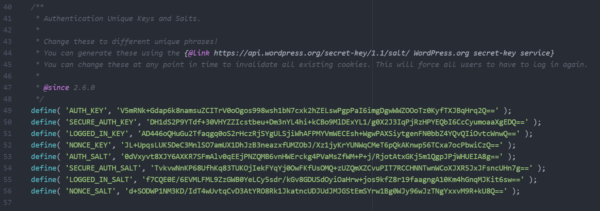
Your wp-config.php file has a dedicated area where you can provide ‘Authentication keys’ and ‘salts’. These are a set of random values, which are unique to your website. They’re used by WordPress to encrypt any information stored in cookies, which makes it harder for attackers to sneak in by pretending to be an authenticated user.
An example of authentication keys and salts in wp-config.php
You can define your own random values, or use the handy generator to get a set which you can just paste in.
Disable file editing
If a hacker gets in, the easiest way for them to change your files would be to go to “Appearance > Editor” in WordPress. To improve your WordPress security, you could disable the editing of these files via that editor. Again, you can do this from within your wp-config.php file by adding this line of code:
define('DISALLOW_FILE_EDIT', true);
You will still be able to edit your templates via your favorite (S)FTP application (or build processes). You just won’t be able to do it via WordPress itself.
Hide your login and limit login attempts
Brute-force attacks usually target your login form. So changing where that lives can make it harder for attackers to get in. The All in One WP Security & Firewall plugin has an option to simply change the default URL (from /wp-admin/) to something more secure.
Next to that, you can also limit the number of attempts to log in from a certain IP address. There are several WordPress plugins to help you protect your login form from IP addresses that fire a multitude of login attempts your way.
Be selective with XML-RPC
XML-RPC is an application program interface (API) that’s been around for a while. It’s used by a number of plugins and themes, so we caution the less technical to be mindful of how they implement this specific hardening tip.
While functional, disabling can come at a cost. This is why we don’t recommend disabling for everything, but being more selective on how and what you allow to access it. In WordPress, if you use Jetpack you’ll want to be extra careful here.
There are a number of plugins that help you be very selective in the way you implement and disable XML-RPC by default.
Get good hosting
Even if you’re meticulous when it comes to the security of your website, if it’s hosted by a company that isn’t just as meticulous, you may as well not have done anything at all.
If an attacker can gain access to your website hosting, they can take complete control of everything. That means it’s really important that you choose (or move to) a host that takes hosting seriously. Cheaper hosting options often don’t come with good security or backups, or might not offer support to help you clean up a hacked site.
Finding the right hosting partner can be complex – but not if you start with our recommended hosting companies. Some of these come with their own dedicated WordPress plugins, too, which provide even stronger security benefits.
Stay up to date
It’s critical that you update your theme(s), software, plugins, and other components as part of an ongoing routine. Otherwise, you’re leaving the door open to attackers. If you’re a user of the Yoast SEO plugin, just follow these easy steps to update your Yoast SEO plugin.
If you’re running an up-to-date version of WordPress, you can also configure your site and plugins to automatically update whenever there’s a new version.
Lastly, don’t forget to look at the other moving parts of your setup. From your hosting system, to your own computer’s operating system, anything which is running software or using passwords needs to be kept up to date.
Make regular backups
If something goes wrong, you’ll need to have backups in place in order to safely roll back to an earlier date. Good hosting companies will provide backup facilities as part of their packages, but if you want to shop around, there are some excellent plugins available.
Consider using a security plugin
If all of this feels like a lot of work, don’t worry – help is available, in the form of firewall plugins and general security plugins. These plugins look for known attackers and common attack patterns and stop them before they have a chance to compromise your site.
Some of the more popular security plugins (like Sucuri Security and Wordfence) are maintained by companies that employ security researchers who monitor, educate on and patch issues. That helps to keep your site protected against all of the latest threats.
You’ll still need to take care of the basics, but these plugins can help you shore up your defences, and to react quickly to emerging threats. It’s worth spending time exploring their settings, reading their documentation, and making sure that you’ve tailored the setup to meet your site’s unique needs.
Stop attacks at the ‘edge’ with a CDN
The best security solutions prevent attackers from ever getting anywhere near your website or admin controls. Many Content Delivery Systems include sophisticated firewall functionality; combining performance optimization with protection. These systems can identify and intercept bad traffic at the network level, and stop it from ever reaching your website.
Cloudflare in particular does a great job of blocking ‘bad traffic’ and even has rules and scans specifically developed to protect WordPress sites. Their ‘Zero Trust‘ approach to security expands on our recommendations to employ ‘least privileged’ principles, to assume that all traffic and requests are ‘bad’ until proven otherwise – and their tools do a great job of preventing common and brute-force attacks.
Don’t forget logs & monitoring
Even with the best protections, sometimes things can go wrong. If they do, it’s important to be able to find out what happened, and what you can do to prevent it from happening again.
Adding an activity logging plugin to your WordPress website can be a great help in diagnosing what might have happened after a hack, as well as helping you to keep an eye on day-to-day activity.
Anything else?
Like optimizing your website for SEO, security is something that you should be looking at all of the time. There are a lot of different areas that you should explore, and this list barely scratches the surface.
If you’d like to learn more, we recommend exploring the ‘hardening WordPress‘ page on wordpress.org, and talking to your hosting company.
Jono was the Head of SEO and part of the leadership team at Yoast. He's a digital strategist, marketing technologist, and full stack developer. He's into technical SEO, emerging technologies, and brand strategy.
June 13 - 15, 2024
Team Yoast is at Attending, Organizing, Sponsoring, Volunteering WordCamp Europe 2024! Click through to see who will be there, what we will do, and more!
See where you can find us next »
23 May 2024
Learn how to start your SEO journey the right way with our free webinar. Get practical tips and answers to all your questions in the live Q&A!
All Yoast SEO webinars »

 See more from the WordPress for beginners series